Join us at FabCon Atlanta from March 16 - 20, 2026, for the ultimate Fabric, Power BI, AI and SQL community-led event. Save $200 with code FABCOMM.
Register now!The Power BI Data Visualization World Championships is back! Get ahead of the game and start preparing now! Learn more
I am able to use the following query to remove rows from the top until we hit a row where the value of Column1 = Name
= Table.Skip(Source,each [Data.Column1] <> "Name")
How can I do the same using a wild card (like "Nam*", for example)?
Solved! Go to Solution.
Hi @PowerBeeEye ,
I create an example and do a test of @jhartranft60 's solution. It works.
| Column1 | Column2 |
| Name | 1 |
| Name1 | 2 |
| Name2 | 3 |
| Name | 4 |
| Na1 | 5 |
| Nam2 | 6 |
| Nam | 7 |
| Name | 8 |
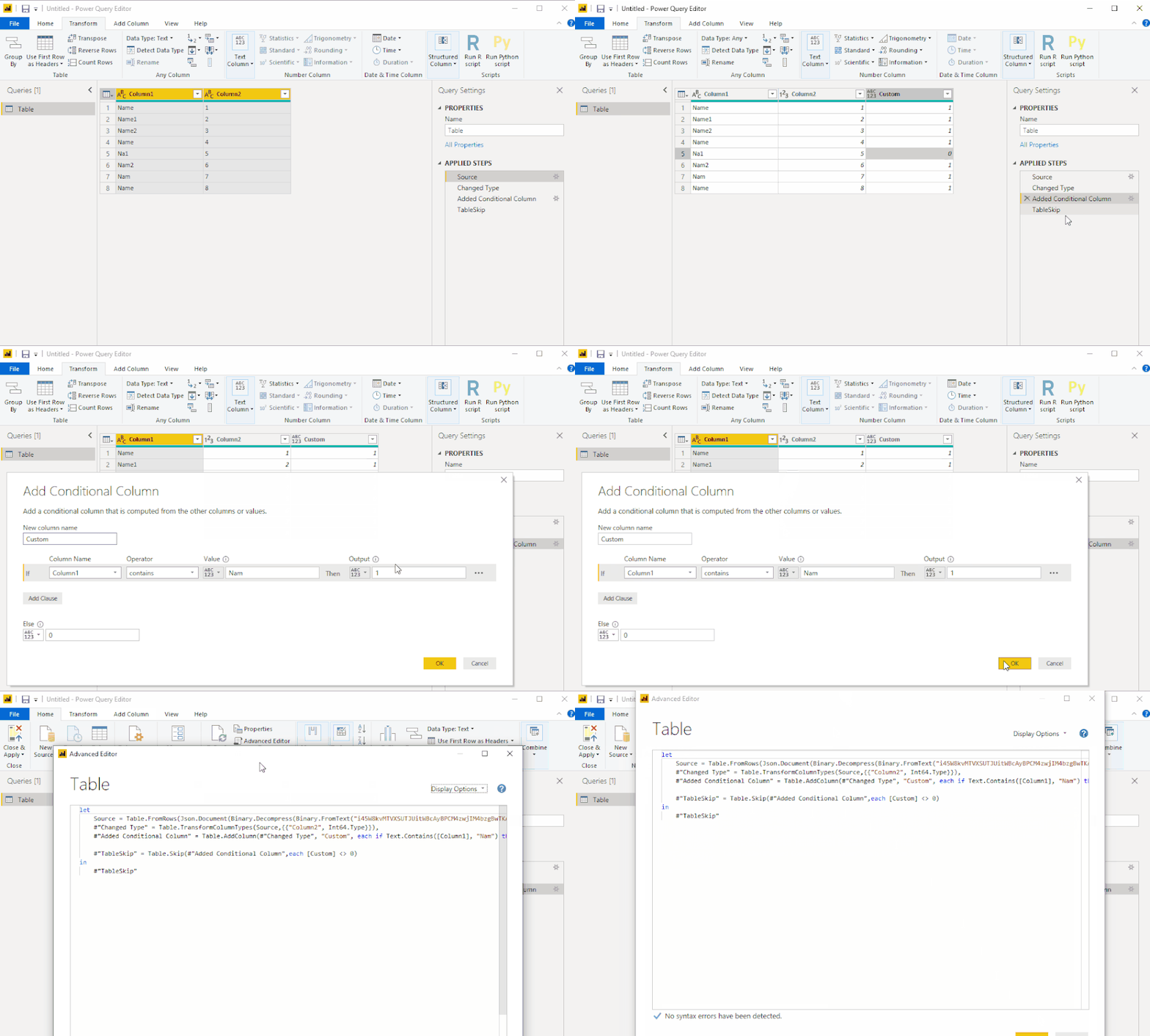
Attach the complete code:
let
Source = Table.FromRows(Json.Document(Binary.Decompress(Binary.FromText("i45W8kvMTVXSUTJUitWBcAyBPCM4zwjIM4bzgBwTKAekzBQmAVJlBuMA2ebIOiyUYmMB", BinaryEncoding.Base64), Compression.Deflate)), let _t = ((type text) meta [Serialized.Text = true]) in type table [Column1 = _t, Column2 = _t]),
#"Changed Type" = Table.TransformColumnTypes(Source,{{"Column2", Int64.Type}}),
#"Added Conditional Column" = Table.AddColumn(#"Changed Type", "Custom", each if Text.Contains([Column1], "Nam") then 1 else 0),
#"TableSkip" = Table.Skip(#"Added Conditional Column",each [Custom] <> 0)
in
#"TableSkip"
Best Regards,
Icey
If this post helps, then please consider Accept it as the solution to help the other members find it more quickly.
Hi @PowerBeeEye ,
I create an example and do a test of @jhartranft60 's solution. It works.
| Column1 | Column2 |
| Name | 1 |
| Name1 | 2 |
| Name2 | 3 |
| Name | 4 |
| Na1 | 5 |
| Nam2 | 6 |
| Nam | 7 |
| Name | 8 |
Attach the complete code:
let
Source = Table.FromRows(Json.Document(Binary.Decompress(Binary.FromText("i45W8kvMTVXSUTJUitWBcAyBPCM4zwjIM4bzgBwTKAekzBQmAVJlBuMA2ebIOiyUYmMB", BinaryEncoding.Base64), Compression.Deflate)), let _t = ((type text) meta [Serialized.Text = true]) in type table [Column1 = _t, Column2 = _t]),
#"Changed Type" = Table.TransformColumnTypes(Source,{{"Column2", Int64.Type}}),
#"Added Conditional Column" = Table.AddColumn(#"Changed Type", "Custom", each if Text.Contains([Column1], "Nam") then 1 else 0),
#"TableSkip" = Table.Skip(#"Added Conditional Column",each [Custom] <> 0)
in
#"TableSkip"
Best Regards,
Icey
If this post helps, then please consider Accept it as the solution to help the other members find it more quickly.
I think I have a solution, though it's likely not the most eloquent of possible solutions.
First, use a text filter on Column 1. You can use Contains "Nam" so that it's equivalent to "Nam*". Once that's filtered, create a new Custom Column, "Temp", and make it =1. Once that's complete, remove the filter from Column 1.
Next, you can simply use your formula on this new column: = Table.Skip(Source,each [Data.Temp] <> 1
Finally, now that those top rows are removed, delete the 'Temp' column. Let me know if it works for you!
The Power BI Data Visualization World Championships is back! Get ahead of the game and start preparing now!
| User | Count |
|---|---|
| 39 | |
| 37 | |
| 33 | |
| 33 | |
| 29 |
| User | Count |
|---|---|
| 132 | |
| 90 | |
| 78 | |
| 66 | |
| 65 |