Join us at FabCon Atlanta from March 16 - 20, 2026, for the ultimate Fabric, Power BI, AI and SQL community-led event. Save $200 with code FABCOMM.
Register now!Get Fabric Certified for FREE during Fabric Data Days. Don't miss your chance! Request now
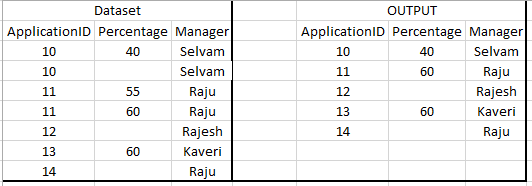
From the given dataset i need filter out the duplcates and from the output i need to develop the visualization.Plese help me out.
Solved! Go to Solution.
Hi @pabburi,
Here is one way. Create a calculated table using the following code
Table =
SUMMARIZE(
'Table1',
'Table1'[ApplicationID] ,
'Table1'[Manager] ,
"Percentage" , MAX('Table1'[Percentage]
)
)Hi @pabburi
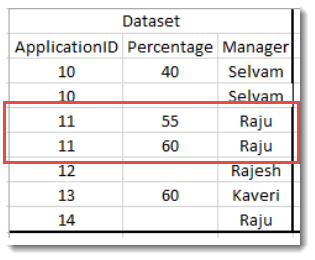
For the two rows highlighted for Raju? Do I take it the reason why the 2nd row is kept and the first row is discarded because 60 is higher than 55?
Hi Phil,
Thank you for the time.
Yes applicationID 11 is consider to percantage 60 because of its higher value.
Hi @pabburi,
Here is one way. Create a calculated table using the following code
Table =
SUMMARIZE(
'Table1',
'Table1'[ApplicationID] ,
'Table1'[Manager] ,
"Percentage" , MAX('Table1'[Percentage]
)
)It worked.
Thank you Phil
Check out the November 2025 Power BI update to learn about new features.
Advance your Data & AI career with 50 days of live learning, contests, hands-on challenges, study groups & certifications and more!