cancel
Showing results for 
Search instead for 
Did you mean: 

The Power BI Data Visualization World Championships is back! Get ahead of the game and start preparing now! Learn more

Reply
N_R_000
Helper I
Helper I

Remove dataset in BI Desktop when using DirectQuery (Dec 2020 release)

I've been building reports using published datasets as my data source since the Dec 2020 release, but I'm now struggling to remove a dataset from a desktop build that I no longer need in the report; any clue on how I can do this? 


To clarify here's the process: 

1) Build a data model, publish to service as 'MyDataset1' and another as 'MyDataset2'. 

2) Create a new report and load in those 2 datasets using the new 'DirectQuery for Power BI datasets and Analysis services'.

3) Decide I don't want Dataset2 in my report but can't find the delete option!


Thanks in advance.  

1 ACCEPTED SOLUTION
Icey
Community Support
Community Support

Hi @N_R_000 ,


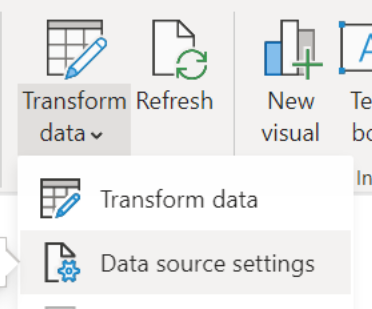
In the latest version, you can delete DirectQuery connections to Power BI datasets and Azure Analysis Services. To do so, go to the Data Source Settings dialog, which you can find in the dropdown for “Transform data”.

deleting_dq_connections_1.png


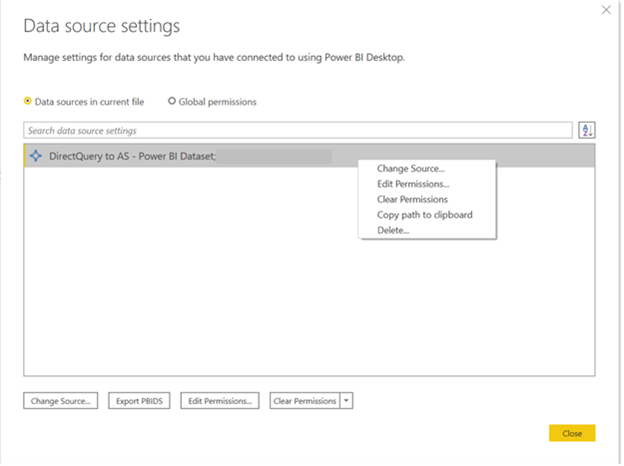
In the Data source settings dialog, right click on the DirectQuery connection you’d like to delete:

deleting_dq_connections_2.png


Please note that this does not reverse the action of adding a local model. This action deletes the DirectQuery connection, and all the tables and fields associated with that connection.


Reference: Power BI February 2021 Feature Summary | Microsoft Power BI Blog | Microsoft Power BI


Best regards

Icey


If this post helps, then consider Accepting it as the solution to help other members find it faster.

View solution in original post

2 REPLIES 2
Icey
Community Support
Community Support

Hi @N_R_000 ,


In the latest version, you can delete DirectQuery connections to Power BI datasets and Azure Analysis Services. To do so, go to the Data Source Settings dialog, which you can find in the dropdown for “Transform data”.

deleting_dq_connections_1.png


In the Data source settings dialog, right click on the DirectQuery connection you’d like to delete:

deleting_dq_connections_2.png


Please note that this does not reverse the action of adding a local model. This action deletes the DirectQuery connection, and all the tables and fields associated with that connection.


Reference: Power BI February 2021 Feature Summary | Microsoft Power BI Blog | Microsoft Power BI


Best regards

Icey


If this post helps, then consider Accepting it as the solution to help other members find it faster.

parry2k
Super User
Super User

@N_R_000 I think at this point you cannot delete dataset2 and I'm sure this is going to improve in future releases.


Check my latest blog post Compare Budgeted Scenarios vs. Actuals I would  Kudos if my solution helped. 👉 If you can spend time posting the question, you can also make efforts to give Kudos to whoever helped to solve your problem. It is a token of appreciation!

Visit us at https://perytus.com, your one-stop-shop for Power BI-related projects/training/consultancy.


Subscribe to the @PowerBIHowTo YT channel for an upcoming video on List and Record functions in Power Query!!

Learn Power BI and Fabric - subscribe to our YT channel - Click here: @PowerBIHowTo

If my solution proved useful, I'd be delighted to receive Kudos. When you put effort into asking a question, it's equally thoughtful to acknowledge and give Kudos to the individual who helped you solve the problem. It's a small gesture that shows appreciation and encouragement! ❤


Did I answer your question? Mark my post as a solution. Proud to be a Super User! Appreciate your Kudos 🙂
Feel free to email me with any of your BI needs.

Helpful resources

Announcements
Power BI DataViz World Championships

Power BI Dataviz World Championships

The Power BI Data Visualization World Championships is back! Get ahead of the game and start preparing now!

November Power BI Update Carousel

Power BI Monthly Update - November 2025

Check out the November 2025 Power BI update to learn about new features.

FabCon Atlanta 2026 carousel

FabCon Atlanta 2026

Join us at FabCon Atlanta, March 16-20, for the ultimate Fabric, Power BI, AI and SQL community-led event. Save $200 with code FABCOMM.