cancel
Showing results for 
Search instead for 
Did you mean: 

The Power BI Data Visualization World Championships is back! Get ahead of the game and start preparing now! Learn more

Reply
Chitemerere
Responsive Resident
Responsive Resident

Relative Growth Rate (Evolution Index) Calculation

I am trying to calculate a relative growth rate or so called evolution index as per the following:
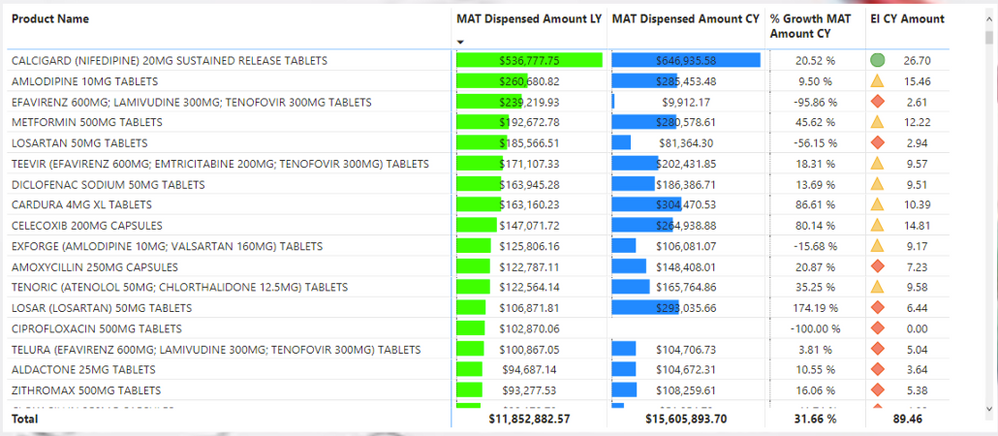
Screenshot 2020-04-08 at 19.52.21.png


I have columns which are calculated measures.  These are 'MAT Dispensed Amount LY' and 'MAT Dispensed Amount CY'.  MAT is moving annual total, CY is current year and LY is last year.  I also have another column which is '% Growth MAT Amount CY' which is growth in the MAT over the last year.  The measures are calculated as follows:


MAT Dispensed Amount CY = CALCULATE([Total Dispensed Amount],
DATESINPERIOD(AuditCalendar[Date], MAX(AuditCalendar[Date]), - 1, YEAR))


MAT Dispensed Amount LY = CALCULATE([MAT Dispensed Amount CY],
SAMEPERIODLASTYEAR(AuditCalendar[Date]))
% Growth MAT Amount CY = [MAT Dispensed Amount CY]/[MAT Dispensed Amount LY] - 1
 
I then try to calculate the 'EI CY Amount' which is the Evolution Index (EI). The Evolution Index is basically the growth rate of a product relative to the growth rate of the market.

For example, the EI for the product Calcigard should be (20.52/31.66)*100 = 64.81.  The EI for the market is always 100 i.e. (31.66/31.66)*100.  A product having an EI above 100 means it is growing above the overal market and conversely.


My calculaton for the EI which i have tried is as follows:

EI CY Amount = (100 + [% Growth MAT Amount CY])/
(100 + [Total MAT Amount CY]/[Total Dispensed Amount LY] -1)*100
 
with the other two measures as follows:
 
Total MAT Amount CY =
CALCULATE([MAT Amount CY], ALLSELECTED(tblDatawarehouseConsolidatedCleanStage))
 
Total MAT Amount LY =
CALCULATE([MAT Amount LY], ALLSELECTED(tblDatawarehouseConsolidatedCleanStage))
The table for the data is tblDatawarehouseConsolidatedCleanStage
The calculation is obviously wrong as per the example given above and the market EI is 89.6 but should the 100.
Can someone assist with the calculation of the right EI.
Best regards,
Chris
1 ACCEPTED SOLUTION
v-lid-msft
Community Support
Community Support

Hi @Chitemerere ,


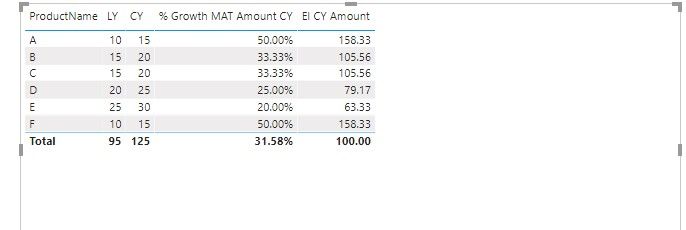
we can create a measure to get the EI CY Amount to meet your requirement.,


EI CY Amount = DIVIDE([% Growth MAT Amount CY],CALCULATE([% Growth MAT Amount CY],ALLSELECTED())) *100


4.jpg


If it doesn’t meet your requirement, could you please show the exact expected result based on the table that we have shared?


BTW, pbix as attached.


Community Support Team _ Dong Li
If this post helps, then please consider Accept it as the solution to help the other members find it more quickly.

View solution in original post

2 REPLIES 2
v-lid-msft
Community Support
Community Support

Hi @Chitemerere ,


we can create a measure to get the EI CY Amount to meet your requirement.,


EI CY Amount = DIVIDE([% Growth MAT Amount CY],CALCULATE([% Growth MAT Amount CY],ALLSELECTED())) *100


4.jpg


If it doesn’t meet your requirement, could you please show the exact expected result based on the table that we have shared?


BTW, pbix as attached.


Community Support Team _ Dong Li
If this post helps, then please consider Accept it as the solution to help the other members find it more quickly.

Thank you very much for the assistance, most appreciated.


Best regards,

Chris

Helpful resources

Announcements
Power BI DataViz World Championships

Power BI Dataviz World Championships

The Power BI Data Visualization World Championships is back! Get ahead of the game and start preparing now!

December 2025 Power BI Update Carousel

Power BI Monthly Update - December 2025

Check out the December 2025 Power BI Holiday Recap!

FabCon Atlanta 2026 carousel

FabCon Atlanta 2026

Join us at FabCon Atlanta, March 16-20, for the ultimate Fabric, Power BI, AI and SQL community-led event. Save $200 with code FABCOMM.