FabCon is coming to Atlanta
Join us at FabCon Atlanta from March 16 - 20, 2026, for the ultimate Fabric, Power BI, AI and SQL community-led event. Save $200 with code FABCOMM.
Register now!- Power BI forums
- Get Help with Power BI
- Desktop
- Service
- Report Server
- Power Query
- Mobile Apps
- Developer
- DAX Commands and Tips
- Custom Visuals Development Discussion
- Health and Life Sciences
- Power BI Spanish forums
- Translated Spanish Desktop
- Training and Consulting
- Instructor Led Training
- Dashboard in a Day for Women, by Women
- Galleries
- Data Stories Gallery
- Themes Gallery
- Contests Gallery
- QuickViz Gallery
- Quick Measures Gallery
- Visual Calculations Gallery
- Notebook Gallery
- Translytical Task Flow Gallery
- TMDL Gallery
- R Script Showcase
- Webinars and Video Gallery
- Ideas
- Custom Visuals Ideas (read-only)
- Issues
- Issues
- Events
- Upcoming Events
The Power BI Data Visualization World Championships is back! Get ahead of the game and start preparing now! Learn more
- Power BI forums
- Forums
- Get Help with Power BI
- Desktop
- Relative Date Filtering - date moving ahead too ea...
- Subscribe to RSS Feed
- Mark Topic as New
- Mark Topic as Read
- Float this Topic for Current User
- Bookmark
- Subscribe
- Printer Friendly Page


- Mark as New
- Bookmark
- Subscribe
- Mute
- Subscribe to RSS Feed
- Permalink
- Report Inappropriate Content
Relative Date Filtering - date moving ahead too early
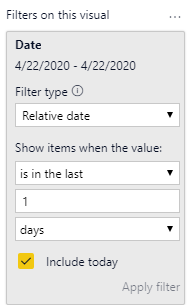
I'm attempting to use Relative Date Filters to display sales in the last 1 day (the current calendar date). It works fine for most of the day but at about 5pm PST the filter moves to the next calendar date, 7 hours too early. It does this whether using Power BI Desktop or the Power BI Service. Is there any way to align the time used in the Relative Date Filter with PST?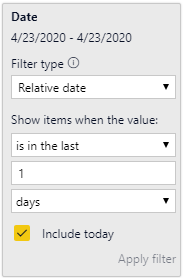

- Mark as New
- Bookmark
- Subscribe
- Mute
- Subscribe to RSS Feed
- Permalink
- Report Inappropriate Content
Not exactly a perfect fix, but a workaround that worked for me was to apply the filter to the dataset in Power Query. Basically just filtering out any data that isn't from today, then removing the filter entirely within the report.
Not my solution, here is the link to post where I initally saw it: https://community.fabric.microsoft.com/t5/Desktop/Relative-moving-Forward-one-day-after-8PM/td-p/180...


- Mark as New
- Bookmark
- Subscribe
- Mute
- Subscribe to RSS Feed
- Permalink
- Report Inappropriate Content
Hi @soundguy2 ,
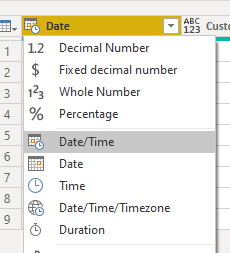
1,Go to query editor>Click on the button of date column on the left top corner and choose "Date/Time",see below:
And then you will see what time is set in your date column,here you see:
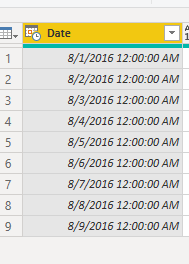
Then find the time difference between the column and your local time,then add a custom column using the M code below to adjust the time:
custom=[Date]+#duration(0,17,51,0)
And you will see:
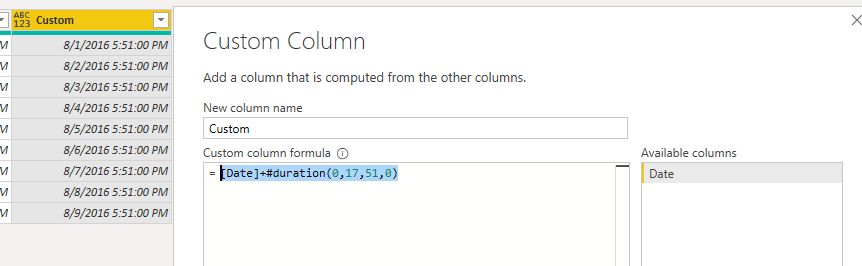
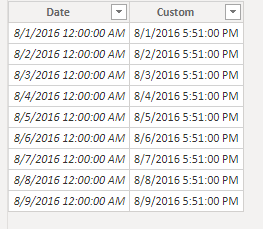
Save and use the new column in your visual and apply filters.
Here is a sample .pbxi file you can refer to.
Best Regards,
Kelly
- Mark as New
- Bookmark
- Subscribe
- Mute
- Subscribe to RSS Feed
- Permalink
- Report Inappropriate Content
Thank you Kelly for trying to solve this issue for me. Unfortunately, the Relative Date Filter still moves forward at 5PM PST, and no amount of manipulating the data seems to fix that.
For now, it looks like the only solution is not to refresh the report after 5PM (not ideal, but better than a 1PM cutoff).
@PowerBI Team - Can the functionality of the Relative Date Filter be improved? It's usefulness is limited if it's not syncronized to the user's timezone.
Regards,
Brian
- Mark as New
- Bookmark
- Subscribe
- Mute
- Subscribe to RSS Feed
- Permalink
- Report Inappropriate Content
Hi @soundguy2 ,
It doesnt make sense,as you have modified the datetime column,there shouldnt be any time difference between ...
Did you use the new date/time column in the date field?
Kelly
- Mark as New
- Bookmark
- Subscribe
- Mute
- Subscribe to RSS Feed
- Permalink
- Report Inappropriate Content
Hi Kelly,
There definitely is a time difference when using a date column that has been modified. Following your directions, I can adjust so that the daily sales is correct after 5PM, however I then see yesterday's sales before 5PM. The relative date filter always changes at 5PM so there is always some difference before and after that time.
The real kicker was this evening (April 30) when all April sales disappeared because that report was using the "is in this month" filter. Unless there's secret way to realign the relative date filter to the user's time, we'll have wait for the Power BI team at Microsoft to address this one. Thanks again.
Regards,
Brian

- Mark as New
- Bookmark
- Subscribe
- Mute
- Subscribe to RSS Feed
- Permalink
- Report Inappropriate Content
I have this issue as well, were you ever able to come up with a solution to this?
- Mark as New
- Bookmark
- Subscribe
- Mute
- Subscribe to RSS Feed
- Permalink
- Report Inappropriate Content
Nope. I've just accepted that we're not going to view today's sales after 5pm pacific time. Sadly, it's been years since the original post on this.
Regards,
Brian

Helpful resources

Power BI Monthly Update - November 2025
Check out the November 2025 Power BI update to learn about new features.

Fabric Data Days
Advance your Data & AI career with 50 days of live learning, contests, hands-on challenges, study groups & certifications and more!

FabCon Atlanta 2026
Join us at FabCon Atlanta, March 16-20, for the ultimate Fabric, Power BI, AI and SQL community-led event. Save $200 with code FABCOMM.


