Join us at FabCon Atlanta from March 16 - 20, 2026, for the ultimate Fabric, Power BI, AI and SQL community-led event. Save $200 with code FABCOMM.
Register now!The Power BI Data Visualization World Championships is back! Get ahead of the game and start preparing now! Learn more
Hi,
I'm trying to build a waterfall chart that will show increases in customer registrations over the last 10 weeks, with the total figure at the end displaying the total registrations of all time.
Ideally i'd like the starting figure of my ten week period to be the count of registrations before this period, but when i add a relative date filter to show only the last 10 calendar weeks the graph starts at 0, and the total only shows the amount of registrations within that time period.
Is there any way to achieve this?
Hi @Anonymous
Is this problem sloved?
If it is sloved, could you kindly accept it as a solution to close this case?
If not, please let me know.
Best Regards
Maggie
Hi Maggie,
I gave it a shot, but it didn't seem to solve the problem. Just for clarification, are the references to sheet1 e.g
flag1 = IF(MAX(Sheet1[firstday])>=[Min]&&MAX(Sheet1[firstday])<=[Max],1,0)
referring to the date table i created or my original data source (where i'm pulling the count of registrations from)
Hi @Anonymous
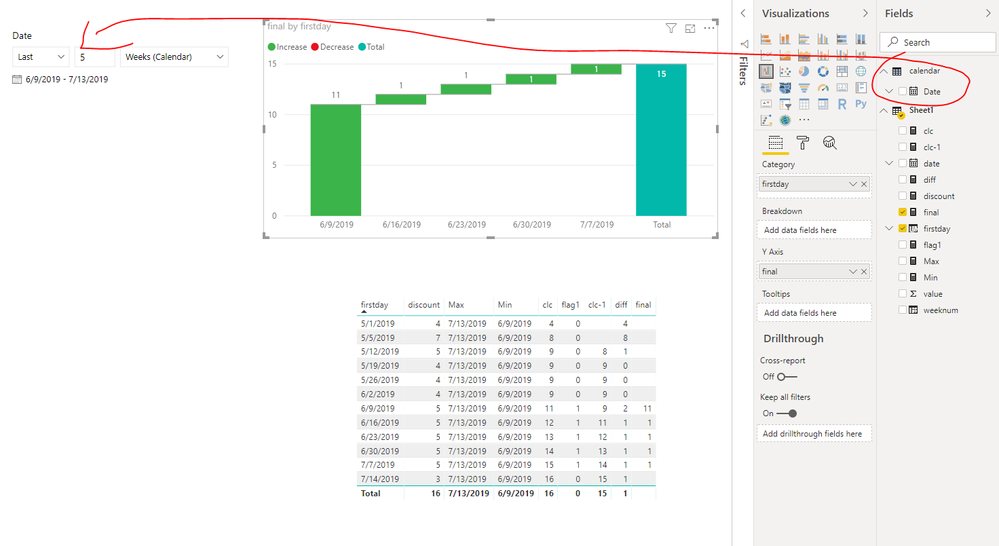
1.Create a new table which is not connected to any other table
calendar = CALENDARAUTO()
Add [date] In the slicer
2. create columns in your table
weeknum = WEEKNUM([date],1) year = YEAR([date]) firstday = CALCULATE(MIN(Sheet1[date]),ALLEXCEPT(Sheet1,Sheet1[year],Sheet1[weeknum]))
Create measures
Min = MIN('calendar'[Date])
Max = MAX('calendar'[Date])
flag1 = IF(MAX(Sheet1[firstday])>=[Min]&&MAX(Sheet1[firstday])<=[Max],1,0)
discount = DISTINCTCOUNT(Sheet1[value])
clc = CALCULATE([discount],FILTER(ALL(Sheet1),Sheet1[date]<=MAX(Sheet1[date])))
clc-1 = CALCULATE([clc],FILTER(ALL(Sheet1),[firstday]=MAX([firstday])-7))
diff = [clc]-[clc-1]
final = IF([flag1]=1&&MAX(Sheet1[firstday])>[Min],[diff],IF([flag1]=1&&MAX(Sheet1[firstday])=[Min],[clc]))
Best Regards
Maggie
Community Support Team _ Maggie Li
If this post helps, then please consider Accept it as the solution to help the other members find it more quickly.
The Power BI Data Visualization World Championships is back! Get ahead of the game and start preparing now!
| User | Count |
|---|---|
| 40 | |
| 36 | |
| 34 | |
| 31 | |
| 27 |
| User | Count |
|---|---|
| 136 | |
| 103 | |
| 67 | |
| 65 | |
| 56 |