cancel
Showing results for 
Search instead for 
Did you mean: 

The Power BI Data Visualization World Championships is back! Get ahead of the game and start preparing now! Learn more

Reply
Anonymous
Not applicable

Relative Date Filter behaving oddly

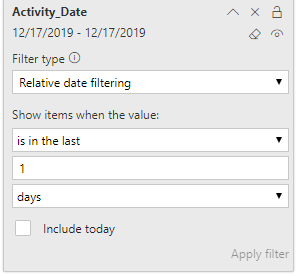
I hope someone can explain this to me. I am filtering a Matrix to show the previous day's data with a filter of in the last 1 days with the Include today box unchecked.


This morning everything was working fine. I closed my project before lunch and when I reopened it this afternoon, the relative filter is returning today's date even though Inculde today is still unchecked. It's almost like the control is living in a different time zone!


This is what I'm seeing on 12/17/2019, the Activity_Date should have a 12/16/2019-12/16/2019 range, not 12/17.


Image taken at 4:45pm PST on 12/17 it should show 12/16/2019 as the target dateImage taken at 4:45pm PST on 12/17 it should show 12/16/2019 as the target date

2 ACCEPTED SOLUTIONS
parry2k
Super User
Super User

@Anonymous most likey it is UTC time zone and tha'ts why it changed.


Subscribe to the @PowerBIHowTo YT channel for an upcoming video on List and Record functions in Power Query!!

Learn Power BI and Fabric - subscribe to our YT channel - Click here: @PowerBIHowTo

If my solution proved useful, I'd be delighted to receive Kudos. When you put effort into asking a question, it's equally thoughtful to acknowledge and give Kudos to the individual who helped you solve the problem. It's a small gesture that shows appreciation and encouragement! ❤


Did I answer your question? Mark my post as a solution. Proud to be a Super User! Appreciate your Kudos 🙂
Feel free to email me with any of your BI needs.

View solution in original post

v-diye-msft
Community Support
Community Support

Hi @Anonymous 


The following limitations and considerations currently apply to the relative date range slicer and filter.

  • Data models in Power BI don't include time zone info. The models can store times, but there's no indication of the time zone they're in.

  • The slicer and filter are always based on the time in UTC. If you set up a filter in a report and send it to a colleague in a different time zone, you'll both see the same data. Unless you are in the UTC time zone, you and your colleague must account for the time offset you’ll experience.

  • You can convert data captured in a local time zone to UTC using the Query Editor.


You might refer to this articles for more reference about the timeset in power bi and the proper solution: 

https://radacad.com/solving-dax-time-zone-issue-in-power-bi 

https://www.fourmoo.com/2017/10/03/power-bi-did-you-know-all-power-bi-services-servers-are-in-utc-now-how-to-handle-it-for-dates-times/ 


Community Support Team _ Dina Ye
If this post helps, then please consider Accept it as the solution to help the other members find it more
quickly.

View solution in original post

2 REPLIES 2
v-diye-msft
Community Support
Community Support

Hi @Anonymous 


The following limitations and considerations currently apply to the relative date range slicer and filter.

  • Data models in Power BI don't include time zone info. The models can store times, but there's no indication of the time zone they're in.

  • The slicer and filter are always based on the time in UTC. If you set up a filter in a report and send it to a colleague in a different time zone, you'll both see the same data. Unless you are in the UTC time zone, you and your colleague must account for the time offset you’ll experience.

  • You can convert data captured in a local time zone to UTC using the Query Editor.


You might refer to this articles for more reference about the timeset in power bi and the proper solution: 

https://radacad.com/solving-dax-time-zone-issue-in-power-bi 

https://www.fourmoo.com/2017/10/03/power-bi-did-you-know-all-power-bi-services-servers-are-in-utc-now-how-to-handle-it-for-dates-times/ 


Community Support Team _ Dina Ye
If this post helps, then please consider Accept it as the solution to help the other members find it more
quickly.
parry2k
Super User
Super User

@Anonymous most likey it is UTC time zone and tha'ts why it changed.


Subscribe to the @PowerBIHowTo YT channel for an upcoming video on List and Record functions in Power Query!!

Learn Power BI and Fabric - subscribe to our YT channel - Click here: @PowerBIHowTo

If my solution proved useful, I'd be delighted to receive Kudos. When you put effort into asking a question, it's equally thoughtful to acknowledge and give Kudos to the individual who helped you solve the problem. It's a small gesture that shows appreciation and encouragement! ❤


Did I answer your question? Mark my post as a solution. Proud to be a Super User! Appreciate your Kudos 🙂
Feel free to email me with any of your BI needs.

Helpful resources

Announcements
November Power BI Update Carousel

Power BI Monthly Update - November 2025

Check out the November 2025 Power BI update to learn about new features.

Fabric Data Days Carousel

Fabric Data Days

Advance your Data & AI career with 50 days of live learning, contests, hands-on challenges, study groups & certifications and more!

FabCon Atlanta 2026 carousel

FabCon Atlanta 2026

Join us at FabCon Atlanta, March 16-20, for the ultimate Fabric, Power BI, AI and SQL community-led event. Save $200 with code FABCOMM.

Top Kudoed Authors