
Join us at FabCon Atlanta from March 16 - 20, 2026, for the ultimate Fabric, Power BI, AI and SQL community-led event. Save $200 with code FABCOMM.
Register now!Get Fabric Certified for FREE during Fabric Data Days. Don't miss your chance! Request now
Hello.
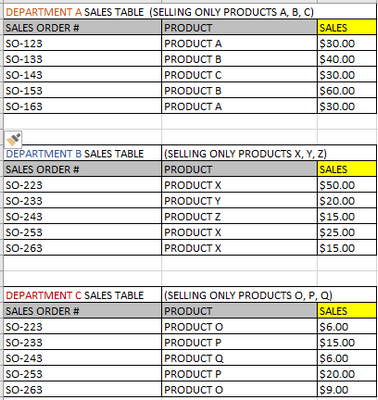
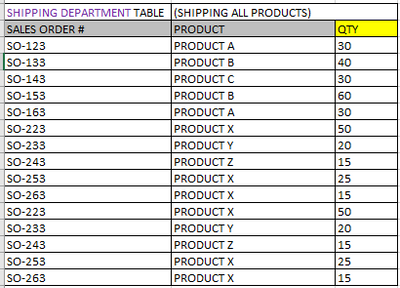
I have 4 tables that are not related to each other. How do I achieve the RESULTING TABLE (please see below). Thanks.
Solved! Go to Solution.
2 ways
1- import the 3 excel/csv files into power bi and the use the Combine botton to let Power bi do the work for you
OR
2- Import the 3 files into power query and then use
Regards
Amine Jerbi
If I answered your question, please mark this thread as accepted
and you can follow me on
My Website, LinkedIn and Facebook
Hi @Oros
Combine A, B and C into D Table. Attach D to the Shipping department table through Sales order. In power bi convas build your visual or the resulting Table.
Regards
Amine Jerbi
If I answered your question, please mark this thread as accepted
and you can follow me on
My Website, LinkedIn and Facebook
2 ways
1- import the 3 excel/csv files into power bi and the use the Combine botton to let Power bi do the work for you
OR
2- Import the 3 files into power query and then use
Regards
Amine Jerbi
If I answered your question, please mark this thread as accepted
and you can follow me on
My Website, LinkedIn and Facebook
Check out the November 2025 Power BI update to learn about new features.
Advance your Data & AI career with 50 days of live learning, contests, hands-on challenges, study groups & certifications and more!