
Join us at FabCon Atlanta from March 16 - 20, 2026, for the ultimate Fabric, Power BI, AI and SQL community-led event. Save $200 with code FABCOMM.
Register now!Get Fabric Certified for FREE during Fabric Data Days. Don't miss your chance! Request now
Hi,
i have contract end date field this field contains dates from (1-01-2018 to 31-12-2022). Need a help to fnd a dax which gives next month date range that is April (01-04-2021 to 30-04-2021) then if the month of May starts automatically it has to display (01-05-2021 to 31-05-2021) likewise it has to display next month . kindly help me to find out the dax.
Regards,
Gladis
Solved! Go to Solution.
Hi, @gladies123
As mentioned by @ryan_mayu , you can create another calendar table.
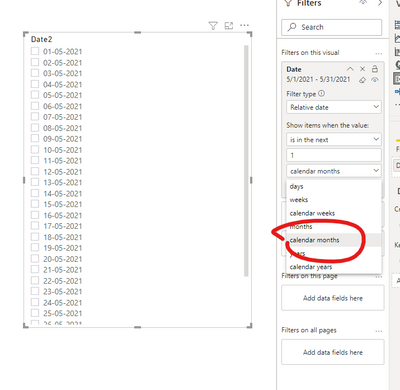
You can also drag the date field to visual filter pane to filter the date (make sure the type of the field is 'Date').
P.S. select ’calenadr month‘ rather than ’month‘ to filter the data
Best Regards,
Community Support Team _ Eason
If this post helps, then please consider Accept it as the solution to help the other members find it more quickly.
Hi, @gladies123
As mentioned by @ryan_mayu , you can create another calendar table.
You can also drag the date field to visual filter pane to filter the date (make sure the type of the field is 'Date').
P.S. select ’calenadr month‘ rather than ’month‘ to filter the data
Best Regards,
Community Support Team _ Eason
If this post helps, then please consider Accept it as the solution to help the other members find it more quickly.
Hi, @gladies123
Please try to create a measure like below, and add it into the table visualization with your date-column.
your measure =
VAR _currentmonth = max( your datetable month number column)
RETURN
calculate (your main measure, filter (all (date), month number column = _currentmonth -1))
if it is OK with you, please share your sample pbix file link here, then I can try to come up with more accurate measure.
Hi, My name is Jihwan Kim.
If this post helps, then please consider accept it as the solution to help other members find it faster.
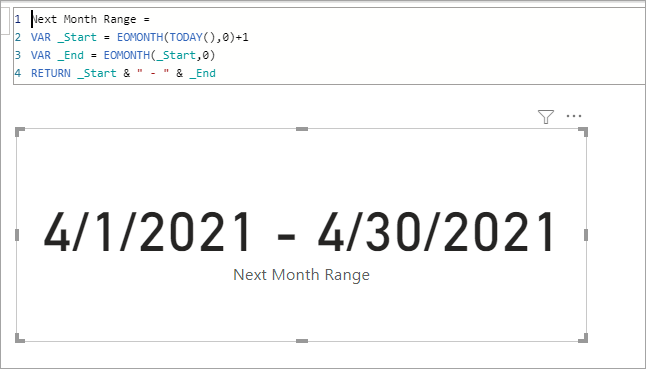
Next Month Range =
VAR _Start = EOMONTH(TODAY(),0)+1
VAR _End = EOMONTH(_Start,0)
RETURN _Start & " - " & _End
Hi @jdbuchanan71 ,
it should not display like 1-04-2021 to 30-04-2021 and i have attched an image it has to display like as in image. help me to find out the DAX.
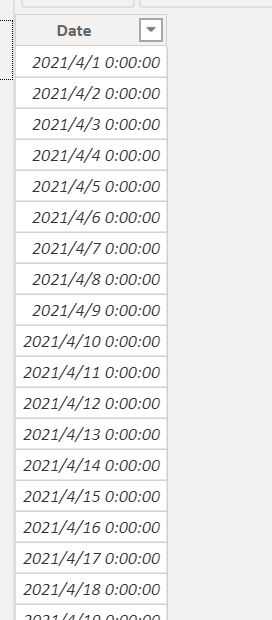
You can try to create a new table
Table = CALENDAR(EOMONTH(today(),0)+1,EOMONTH(today(),1))
Proud to be a Super User!
Check out the November 2025 Power BI update to learn about new features.
Advance your Data & AI career with 50 days of live learning, contests, hands-on challenges, study groups & certifications and more!