cancel
Showing results for 
Search instead for 
Did you mean: 

We've captured the moments from FabCon & SQLCon that everyone is talking about, and we are bringing them to the community, live and on-demand. Starts on April 14th. Register now

Reply
Annemie
Frequent Visitor

Refresh failed

Hello, I made a power bi report in power bi desktop. I can refresh it there without problems. I have the option to connect to my microsoft account.

source settings power bi.png

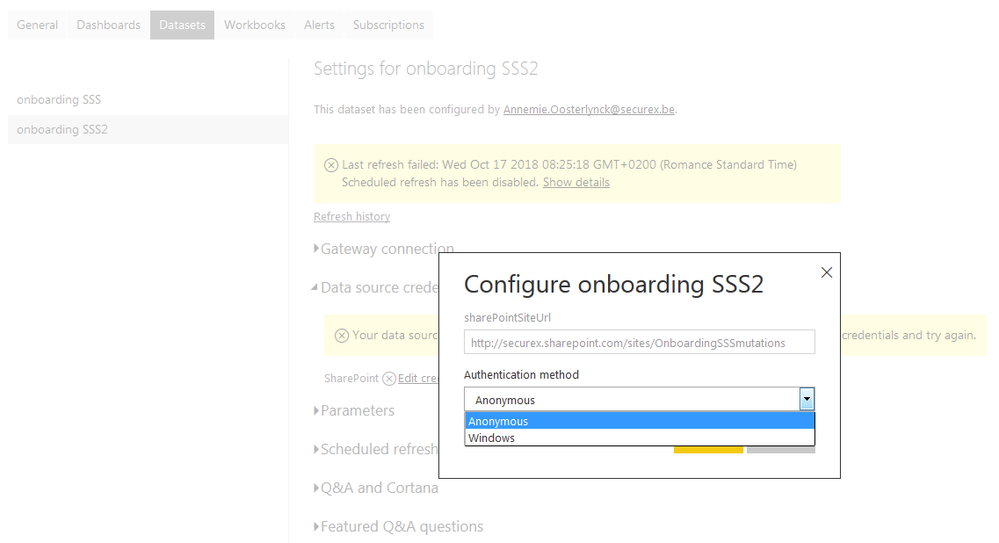
Now I published to Power Bi Online to add the sheduled Refresh (this works perfect in my other power bi reports) But now for this report I just cant do it... I get the error : Your data source can't be refreshed because the credentials are invalid. Please update your credentials and try again


I click edit credentials but there I don't get the option connect to microsoft account (only anonymous and windows) I searched everywhere for a solution but can't find it... anyone got any idea how to solve this ?


source settings power bi 2.png

1 ACCEPTED SOLUTION
v-yuta-msft
Community Support
Community Support

Hi Annemie,


This case is same with https://community.powerbi.com/t5/Service/Refresh-failed/m-p/544196#M55730. So could you please delete this thread?


Regards,

Jimmy Tao

View solution in original post

1 REPLY 1
v-yuta-msft
Community Support
Community Support

Hi Annemie,


This case is same with https://community.powerbi.com/t5/Service/Refresh-failed/m-p/544196#M55730. So could you please delete this thread?


Regards,

Jimmy Tao

Helpful resources

Announcements
New to Fabric survey Carousel

New to Fabric Survey

If you have recently started exploring Fabric, we'd love to hear how it's going. Your feedback can help with product improvements.

Power BI DataViz World Championships carousel

Power BI DataViz World Championships - June 2026

A new Power BI DataViz World Championship is coming this June! Don't miss out on submitting your entry.

Join our Fabric User Panel

Join our Fabric User Panel

Share feedback directly with Fabric product managers, participate in targeted research studies and influence the Fabric roadmap.

March Power BI Update Carousel

Power BI Community Update - March 2026

Check out the March 2026 Power BI update to learn about new features.