

cancel
Showing results for 
Search instead for 
Did you mean: 

The Power BI Data Visualization World Championships is back! Get ahead of the game and start preparing now! Learn more

Reply
learner03
Post Partisan
Post Partisan

Refresh Error

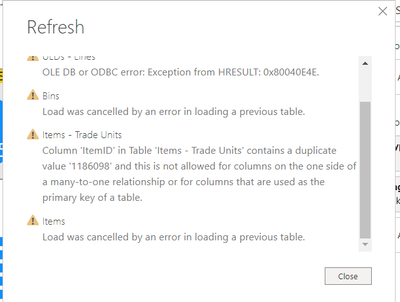
I never had this error before while refresh but today I had this error-

My data source is from a custom connector by the warehouse management system guys.

akapoor03_0-1627022575345.png


1 ACCEPTED SOLUTION

Hey @learner03 ,


did you refresh the preview and set column profiling to the whole data set?:

selimovd_0-1627027513554.png


From my experience, Power Query is sometimes a little buggy with the display, so maybe check in the data source if there is a duplicate row.

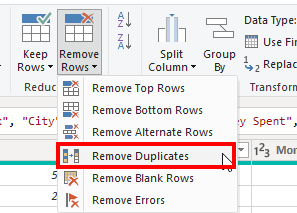
Also mark the ID column and just add as last step to remove duplicates. Like this, the error should be solved:

selimovd_1-1627027634490.png


If you need any help please let me know.
If I answered your question I would be happy if you could mark my post as a solution ✔️ and give it a thumbs up 👍
 
Best regards
Denis


View solution in original post

3 REPLIES 3
selimovd
Super User
Super User

Hey @learner03 ,


the error message says it already, you have a duplicate value in your table. And as you have a 1:m relationship this is not allowed on your 1 side.

Delete the duplicate value in your data source or in Power Query and the error will disappear.


If you need any help please let me know.
If I answered your question I would be happy if you could mark my post as a solution ✔️ and give it a thumbs up 👍
 
Best regards
Denis
 

@selimovd 

I search for this ITemID in the table and it gave me just one line-

akapoor03_0-1627024283315.png

and the relatinship is as below-

akapoor03_1-1627024486149.png


Hey @learner03 ,


did you refresh the preview and set column profiling to the whole data set?:

selimovd_0-1627027513554.png


From my experience, Power Query is sometimes a little buggy with the display, so maybe check in the data source if there is a duplicate row.

Also mark the ID column and just add as last step to remove duplicates. Like this, the error should be solved:

selimovd_1-1627027634490.png


If you need any help please let me know.
If I answered your question I would be happy if you could mark my post as a solution ✔️ and give it a thumbs up 👍
 
Best regards
Denis


Helpful resources

Announcements
Power BI DataViz World Championships

Power BI Dataviz World Championships

The Power BI Data Visualization World Championships is back! Get ahead of the game and start preparing now!

December 2025 Power BI Update Carousel

Power BI Monthly Update - December 2025

Check out the December 2025 Power BI Holiday Recap!

FabCon Atlanta 2026 carousel

FabCon Atlanta 2026

Join us at FabCon Atlanta, March 16-20, for the ultimate Fabric, Power BI, AI and SQL community-led event. Save $200 with code FABCOMM.