cancel
Showing results for 
Search instead for 
Did you mean: 

The Power BI Data Visualization World Championships is back! Get ahead of the game and start preparing now! Learn more

Reply
Anonymous
Not applicable

Records + Lists mixture

Hello PowerBI-ians,

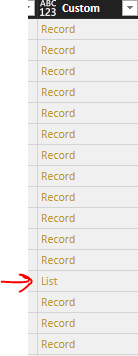
I tried getting data through custom column and using Web API string in it. Issue I am facing is that there's a mixture of both Records and Lists and I am unable to expand or remove records or anything. Kindly help.


Capture.PNG

1 ACCEPTED SOLUTION

You have to convert either the list into a record or vice versa, see this post as a start: https://www.thebiccountant.com/2017/07/25/how-to-expand-a-column-that-cannot-be-expanded-in-power-bi...


You can also add 2 column: 1st to extract the list and 2nd to extract the record (and leave the others null) then both are expanable.

Really depends how you need the data.

Imke Feldmann (The BIccountant)

If you liked my solution, please give it a thumbs up. And if I did answer your question, please mark this post as a solution. Thanks!

How to integrate M-code into your solution -- How to get your questions answered quickly -- How to provide sample data -- Check out more PBI- learning resources here -- Performance Tipps for M-queries

View solution in original post

2 REPLIES 2
Greg_Deckler
Community Champion
Community Champion

Any chance you can share the API that you are using? @ImkeF might have some Power Query magic that could address this. I am thinking perhaps a function that determines if it is a Record or a List and performs the appropriate actions, but you don't  have a lot of information to go on. 


Please see this post regarding How to Get Your Question Answered Quickly: https://community.powerbi.com/t5/Community-Blog/How-to-Get-Your-Question-Answered-Quickly/ba-p/38490


Follow on LinkedIn
@ me in replies or I'll lose your thread!!!
Instead of a Kudo, please vote for this idea
Become an expert!: Enterprise DNA
External Tools: MSHGQM
YouTube Channel!: Microsoft Hates Greg
Latest book!:
DAX For Humans

DAX is easy, CALCULATE makes DAX hard...

You have to convert either the list into a record or vice versa, see this post as a start: https://www.thebiccountant.com/2017/07/25/how-to-expand-a-column-that-cannot-be-expanded-in-power-bi...


You can also add 2 column: 1st to extract the list and 2nd to extract the record (and leave the others null) then both are expanable.

Really depends how you need the data.

Imke Feldmann (The BIccountant)

If you liked my solution, please give it a thumbs up. And if I did answer your question, please mark this post as a solution. Thanks!

How to integrate M-code into your solution -- How to get your questions answered quickly -- How to provide sample data -- Check out more PBI- learning resources here -- Performance Tipps for M-queries

Helpful resources

Announcements
Power BI DataViz World Championships

Power BI Dataviz World Championships

The Power BI Data Visualization World Championships is back! Get ahead of the game and start preparing now!

December 2025 Power BI Update Carousel

Power BI Monthly Update - December 2025

Check out the December 2025 Power BI Holiday Recap!

FabCon Atlanta 2026 carousel

FabCon Atlanta 2026

Join us at FabCon Atlanta, March 16-20, for the ultimate Fabric, Power BI, AI and SQL community-led event. Save $200 with code FABCOMM.