Join us at FabCon Atlanta from March 16 - 20, 2026, for the ultimate Fabric, Power BI, AI and SQL community-led event. Save $200 with code FABCOMM.
Register now!The Power BI Data Visualization World Championships is back! Get ahead of the game and start preparing now! Learn more
hello ,
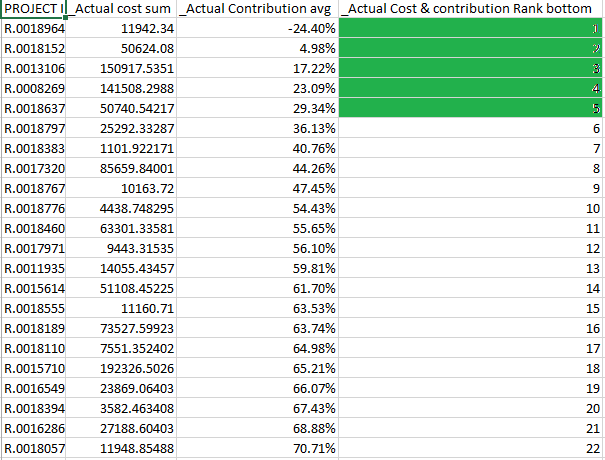
i have use some measure for _Actual Cost & contribution Rank bottom that is cantains rank i need to find only top 5 rank but
i was use option wich is in field that give me only one row,,
_Actual cost sum = SUM(YTD2[Actual Cost])
_Actual Contribution avg = AVERAGE(YTD2[Actual Contribution %])
_Actual Cost & contribution Rank bottom = RANKX(
ALLSELECTED( YTD2 ),
[_Actual Contribution avg],,ASC
) + DIVIDE (
RANKX ( ALLSELECTED(YTD2), [_Actual cost sum],,DESC),
( COUNTROWS ( ALL ( YTD2 ) ) + 1 )
)
this is some what i use
regards
pooja
Solved! Go to Solution.
Hi Poojad1,
To achieve your requirement, please use DAX formula below:
_Actual Cost & contribution Rank bottom = var temp = RANKX( ALLSELECTED( YTD2 ), [_Actual Contribution avg],,ASC ) + DIVIDE ( RANKX ( ALLSELECTED(YTD2), [_Actual cost sum],,DESC), ( COUNTROWS ( ALL ( YTD2 ) ) + 1 ) ) return IF(temp < 6, temp, BLANK())
You can refer to PBIX here:
https://www.dropbox.com/s/hzt2jwi9tt4pexl/For%20Poojad1.pbix?dl=0
Regards,
Jimmy Tao
Hi Poojad1,
To achieve your requirement, please use DAX formula below:
_Actual Cost & contribution Rank bottom = var temp = RANKX( ALLSELECTED( YTD2 ), [_Actual Contribution avg],,ASC ) + DIVIDE ( RANKX ( ALLSELECTED(YTD2), [_Actual cost sum],,DESC), ( COUNTROWS ( ALL ( YTD2 ) ) + 1 ) ) return IF(temp < 6, temp, BLANK())
You can refer to PBIX here:
https://www.dropbox.com/s/hzt2jwi9tt4pexl/For%20Poojad1.pbix?dl=0
Regards,
Jimmy Tao
The Power BI Data Visualization World Championships is back! Get ahead of the game and start preparing now!
| User | Count |
|---|---|
| 40 | |
| 37 | |
| 33 | |
| 29 | |
| 27 |
| User | Count |
|---|---|
| 133 | |
| 104 | |
| 61 | |
| 59 | |
| 55 |