Join us at FabCon Atlanta from March 16 - 20, 2026, for the ultimate Fabric, Power BI, AI and SQL community-led event. Save $200 with code FABCOMM.
Register now!The Power BI Data Visualization World Championships is back! Get ahead of the game and start preparing now! Learn more
Hi,
I have searched everywhere and I cannot seem to find a solution to my problem.
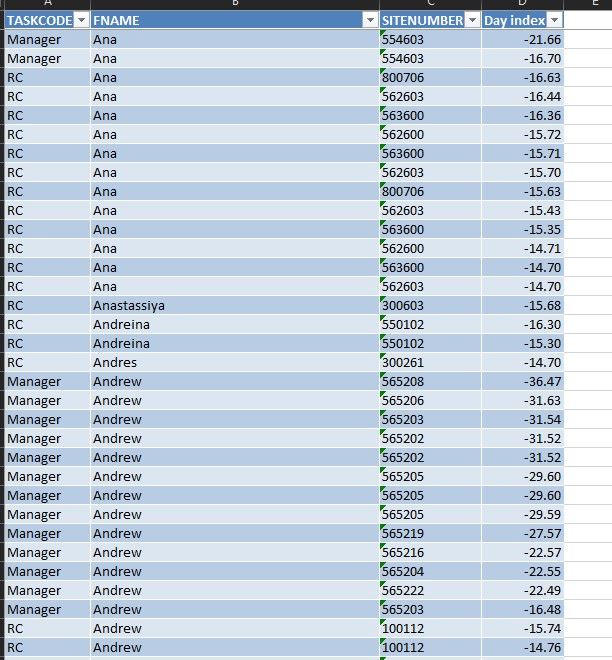
I have a simple table with this data (truncated)
I want use this DAX rankx formula to count the distinct site numbers by person.
Ranking =
RANKX (
ALL ( EpayPunches[FNAME] ),
CALCULATE ( DISTINCTCOUNT ( EpayPunches[SITENUMBER] ) ),
,
,
DENSE
)
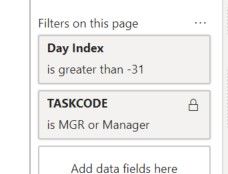
I have page level filters that filter out the day index (greater than -31) and by the task code as shown here
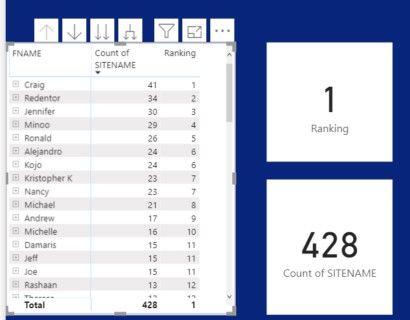
The matrix table is perfect as it shows this.
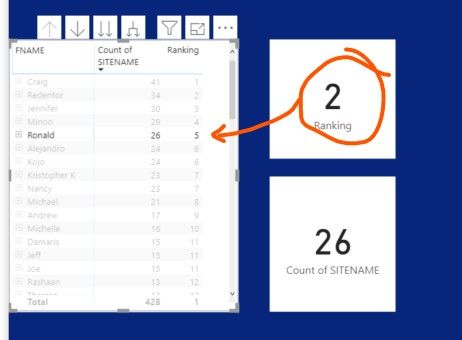
But, when I click on one person, I get a different ranking in the card vs the table.
I know it has something to do with the filters but I just can't figure out what it is.
Solved! Go to Solution.
Hi @jjku ,
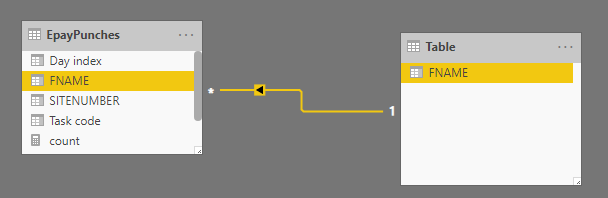
To fix that, we can create a calculated table and make it related to the fact table as below.
Table = DISTINCT(EpayPunches[FNAME])
Then we can fix the issue by updating the measure as below. Please note we should add the FANME column from the new calcualted table to the matrix.
Ranking =
CALCULATE(
RANKX (
ALL('Table'[FNAME]),
CALCULATE(DISTINCTCOUNT(EpayPunches[SITENUMBER])),
,
DESC
))
For more details, please check the pbix as attached.
Hi @jjku ,
To fix that, we can create a calculated table and make it related to the fact table as below.
Table = DISTINCT(EpayPunches[FNAME])
Then we can fix the issue by updating the measure as below. Please note we should add the FANME column from the new calcualted table to the matrix.
Ranking =
CALCULATE(
RANKX (
ALL('Table'[FNAME]),
CALCULATE(DISTINCTCOUNT(EpayPunches[SITENUMBER])),
,
DESC
))
For more details, please check the pbix as attached.
Awesome. That worked!
Thanks!
The Power BI Data Visualization World Championships is back! Get ahead of the game and start preparing now!
Check out the November 2025 Power BI update to learn about new features.
| User | Count |
|---|---|
| 59 | |
| 43 | |
| 42 | |
| 23 | |
| 17 |
| User | Count |
|---|---|
| 190 | |
| 122 | |
| 96 | |
| 66 | |
| 47 |