
cancel
Showing results for 
Search instead for 
Did you mean: 

The Power BI Data Visualization World Championships is back! Get ahead of the game and start preparing now! Learn more

Reply
alefebvre
New Member

Ranking error (sort column)

Hello,

I must put the number of typologies per group, and then do the top 5 typologies. With some research I ended up finding the RANKX function which thanks to a filter <= 5 allows me to display the 5 largest values.


I was then asked to put 2 specific typologies at the end of the table, so I created an INDEX column which allowed me to set a value to 1 by default and 1000, 1001 on the one to be at the end.


alefebvre_0-1620209507684.png


Once the INDEX value is set I configure the sort:

alefebvre_1-1620209754415.png


Then here is my measurement which allows me to have the RANK:

TYPO RANG = RANKX( ALL(TYPOLOGIES[TYPO]), MESURES[TYPO COUNT], , DESC)
 
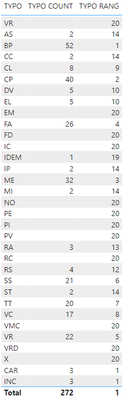
And the table that appears, the ranks are correct except for the typos (CAR and INC) which are the one to rank at the end with an index at 1000 & 1001
alefebvre_2-1620209912976.png


Do you have a solution for me so that the RANK does not put them in 1st position ?
 
Thank you in advance !
 
1 ACCEPTED SOLUTION
alefebvre
New Member

Hello,

Thank you for your help, I think it does not work for me because I go through a measure to count the number of typologies.


I found a solution on this site : https://www.sqlbi.com/articles/use-of-rankx-in-power-bi-measures/


Here is what I did in the method RANKX : TYPO RANG = RANKX( ALL(TYPOLOGIES[Index], TYPOLOGIES[TYPO]), MESURES[TYPO COUNT], , DESC)


Have a good day 🙂

View solution in original post

2 REPLIES 2
alefebvre
New Member

Hello,

Thank you for your help, I think it does not work for me because I go through a measure to count the number of typologies.


I found a solution on this site : https://www.sqlbi.com/articles/use-of-rankx-in-power-bi-measures/


Here is what I did in the method RANKX : TYPO RANG = RANKX( ALL(TYPOLOGIES[Index], TYPOLOGIES[TYPO]), MESURES[TYPO COUNT], , DESC)


Have a good day 🙂

v-yingjl
Community Support
Community Support

Hi @alefebvre ,

Could not reproduce it in my side. How did you create the index column and the [TYPO COUNT] measure?

Could you please consdier sharing more details about it or a simple sample file without any sesentive information for further discussion?


Attached my test sample file in the below, you can also change it based on the sample file.


Best Regards,
Community Support Team _ Yingjie Li

Helpful resources

Announcements
Power BI DataViz World Championships

Power BI Dataviz World Championships

The Power BI Data Visualization World Championships is back! Get ahead of the game and start preparing now!

December 2025 Power BI Update Carousel

Power BI Monthly Update - December 2025

Check out the December 2025 Power BI Holiday Recap!

FabCon Atlanta 2026 carousel

FabCon Atlanta 2026

Join us at FabCon Atlanta, March 16-20, for the ultimate Fabric, Power BI, AI and SQL community-led event. Save $200 with code FABCOMM.