cancel
Showing results for 
Search instead for 
Did you mean: 

Try your skills in the Power BI Dataviz World Championship! Round one ends June 26. Join now

Reply
Anonymous
Not applicable

Range Filters

Hi,


I want to implement range filters and I went through this article


I'm still not sure how to implement this.


I have a measure and its type is whole number.

I also have the latest version of power bi so I dont see the "Numeric range slicer" in the preview features as well

(discussed here)


Please guide

5 REPLIES 5
saurabh_kedia_
Microsoft Employee
Microsoft Employee

Hi Kapil,


Measure can't be used as a filter. Moreover, if the data type of a column is whole/decimal number, then automatically the filter will show various options such as "between", "less than or equal to", etc.

Numeric_filter.PNG


**Note:

The "numeric range filter" is an inbuit feature now, hence it's not displaying in preview features.


Regards,

Saurabh

Anonymous
Not applicable

Hi Saurabh,


What can i do to make it a non measure?

Hi,


It depends on the data source, data set & what you are trying to accomplish as the final output.

Please share a sample data describing the problem statement.


Regards,

Saurabh Kedia

Anonymous
Not applicable

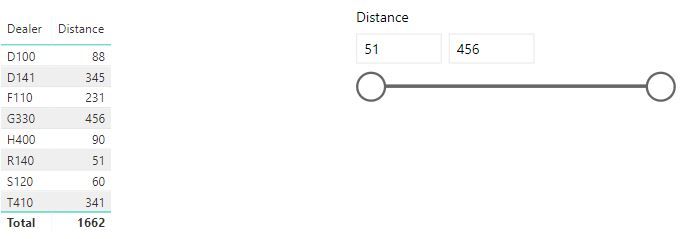
I have a dataset as simple as this : 


Dealer Distance
D10088
H40090
G330456
T410341
F110231
D141345
S12060
R14051


Here I want the distance to be used a range slicer(filter)

*Actual dataset is quite larger than this and is a redshift datasource.

hi, @Anonymous

Just drag the field Distance into a slicer, and it will be a range filters

10.JPG


and the min value of slicer will be the min value of Distance in data source automatically, the max value of slicer will be the max value of Distance in data source automatically.


By the way, range filter is a preview feature before October/2017, but now it is a normal feature, and it doesn't need to be enabled before using.


Best Regards,

Lin


Community Support Team _ Lin
If this post helps, then please consider Accept it as the solution to help the other members find it more quickly.

Helpful resources

Announcements
Fabric Data Days is here Carousel

Data Days 2026

Don't miss out on Data Days, June 15 through August 7. Learn Fabric, Power BI, SQL, AI and more.

May Power BI Update Carousel

Power BI Monthly Update - May 2026

Check out the May 2026 Power BI update to learn about new features.

Power BI DataViz World Championships carousel

Power BI DataViz World Championships - June 2026

A new Power BI DataViz World Championship is coming this June! Don't miss out on submitting your entry.