Join us at FabCon Atlanta from March 16 - 20, 2026, for the ultimate Fabric, Power BI, AI and SQL community-led event. Save $200 with code FABCOMM.
Register now!Get Fabric Certified for FREE during Fabric Data Days. Don't miss your chance! Request now
Hi,
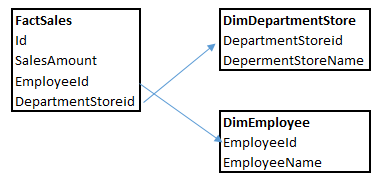
I have three tables as shown below. I have some users who only are allowed to see numbers at the department store level and not the employee level. In my graphs I have drill down from department to employee and I wonder if it's possible to define this security with the RLS functionality. If DimEmployee is filtered then blank or something like that?
Solved! Go to Solution.
Hi norway84,
You requirement is to need a column level security, not the row level security, right? Currently, power bi don't support this feature, you can vote for this idea: https://ideas.powerbi.com/forums/265200-power-bi-ideas/suggestions/15578172-column-level-security-fo....
In addtion, DAX expression in RLS is the conditional expression which can only be used to filter rows in other tables, not the result expression. For example, you can't use DAX formula function like isfilter().
As a workaround, I recommend you to use SSAS to define column level security, and then use live connection to connect to SSAS model in power bi. Reference.
Hope this can help.
Jimmy Tao
Hi norway84,
You requirement is to need a column level security, not the row level security, right? Currently, power bi don't support this feature, you can vote for this idea: https://ideas.powerbi.com/forums/265200-power-bi-ideas/suggestions/15578172-column-level-security-fo....
In addtion, DAX expression in RLS is the conditional expression which can only be used to filter rows in other tables, not the result expression. For example, you can't use DAX formula function like isfilter().
As a workaround, I recommend you to use SSAS to define column level security, and then use live connection to connect to SSAS model in power bi. Reference.
Hope this can help.
Jimmy Tao
Check out the November 2025 Power BI update to learn about new features.
Advance your Data & AI career with 50 days of live learning, contests, hands-on challenges, study groups & certifications and more!