Hello Champions,
I need to implement RLS and have data in below format
Table1 is Site Master table which has all the sites Id and Site Name (only unique entries and master table which is connected to all other fact table)

Table2 has each user name with their email ID and Site ID which they have access to
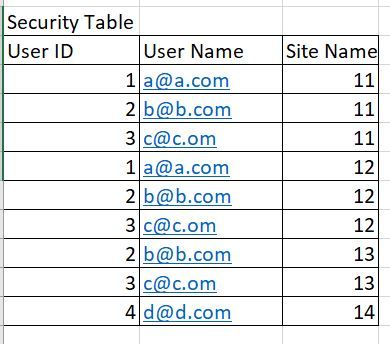
When i create the role and write below dax, i am getting error because multiple site ids are returning which is expected =Table1'[Site Id]=LOOKUPVALUE(Table2[SiteID],Table2[UserName],USERPRINCIPALNAME())
As per the requirement, Single site will be mapped to multiple user and Single user is having access to multiple sites as shown in above data.
I am unable to form the data model/DAX to achieve the above scenario, ideally it has to happen in Azure Analysis Service , we are conencting Power BI to AAS using Live connection, but even if someone can help me understand in Power BI , i will try to replicate in AAS.
Please let me know if someone has already implemented this kind of scenario.
Really Appreciate your help and support, Thank you !!


