Join us at FabCon Atlanta from March 16 - 20, 2026, for the ultimate Fabric, Power BI, AI and SQL community-led event. Save $200 with code FABCOMM.
Register now!The Power BI Data Visualization World Championships is back! Get ahead of the game and start preparing now! Learn more
Hi there,
My first post here, so I'm nervous 🙂
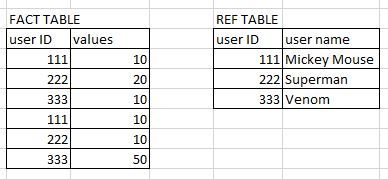
I have two tables:
User IDs have a relationship in the model.
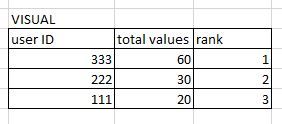
I created a simple visual using two measures:
1. Total values: SUM('FACT TABLE'[values])
2. Rank:
RANKX
(
ALLSELECTED('FACT TABLE'[user_id]),
[Total values],
,
DESC,
Dense
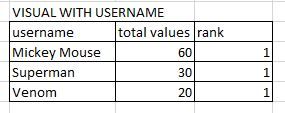
)and it works well: However, when I add username to the visual, the rank gets corrupted:
How could I get to this:
What am I doing wrong?
Many thanks!
Try putting the usrname on your fact table.
and use that username to your visual.
Did it rank correctly?
@mussaenda thanks for your prompt reply. Yes, I could do it but I'm not 100% sure if this is the right approach as user name is not the only one reference data being used in this case. For example, I would like to add "country" to the visual and I'd have to add this column to the fact table as well.
This would, in effect, turn my fact table into fact+ref table which is not super elegant. I mean I could but this would turn my fact tables into unmanagable monsters 🙂
Okay, I get you.
For sure someone else here will share ideas.
So I tested it by adding a new column in the fact table like this:
User name = RELATED('REF Table'[user name])
but to no avail, the rank gets corrupted.
The Power BI Data Visualization World Championships is back! Get ahead of the game and start preparing now!
| User | Count |
|---|---|
| 38 | |
| 38 | |
| 36 | |
| 28 | |
| 28 |
| User | Count |
|---|---|
| 124 | |
| 89 | |
| 73 | |
| 66 | |
| 65 |