cancel
Showing results for 
Search instead for 
Did you mean: 

The Power BI Data Visualization World Championships is back! Get ahead of the game and start preparing now! Learn more

Reply
AlejandroPCar
Helper IV
Helper IV

RANKX Issue!

Hi!


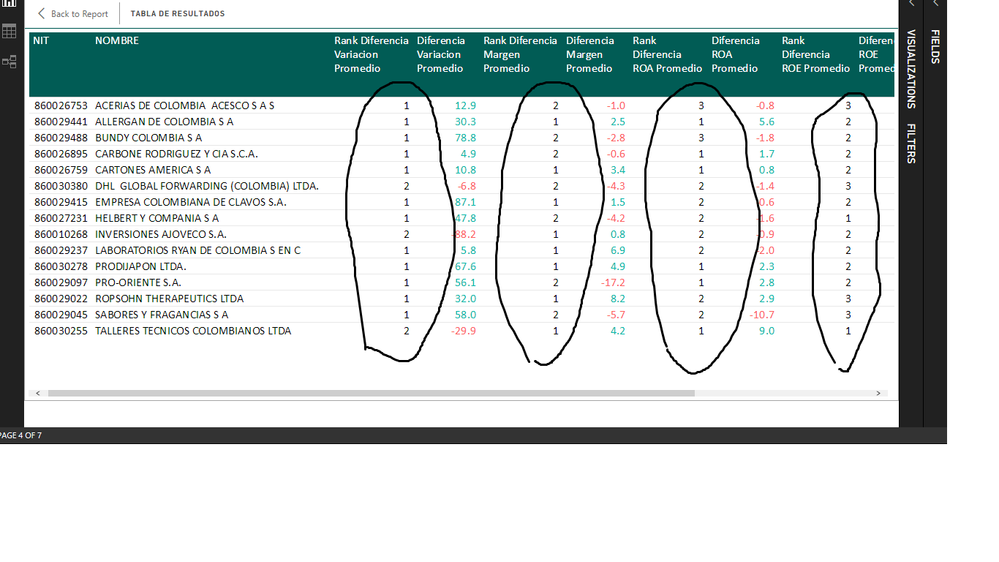
I have an strange rankx issue. I used to use RANKX measure currently in other work Im doing, but now in this file all RANK im trying to do does not have the expected result. It is very strange becasue as I said before I know this formula and in previous tables it works fine.  


Rank.pngIn the photo, the marked columns are the RANKX measures and every rank column is for the data at its right side. So, the fist rank column is the rank of the second column (data with font color). Now, I'd like to know what Im doing wrong, I apprecciate your help a lot because it is important to me solve this problem as soon as posible. 


Here is my pbix file (sorry but the file is like huge) 

https://1drv.ms/u/s!AtTnrgPUQzQCnAUc2MYHfnad2lPl


Thank you again


1 ACCEPTED SOLUTION
Zubair_Muhammad
Community Champion
Community Champion

Hi @AlejandroPCar


Try this MEASURE as a test

I just replaced ALL( 'TABLA CRUCE'[NIT]).......   with...........  ALL( 'TABLA CRUCE'[NIT],'TABLA CRUCE'[NOMBRE])


Rank Dimension Interna =
VAR RankDimension =
    RANKX (
        ALL ( 'TABLA CRUCE'[NIT], 'TABLA CRUCE'[NOMBRE] ),
        [Dimensión Interna],
        ,
        0,
        DENSE
    )
RETURN
    IF ( [Dimensión Interna] = 0, BLANK (), RankDimension )


View solution in original post

4 REPLIES 4
Zubair_Muhammad
Community Champion
Community Champion

Hi @AlejandroPCar


Try this MEASURE as a test

I just replaced ALL( 'TABLA CRUCE'[NIT]).......   with...........  ALL( 'TABLA CRUCE'[NIT],'TABLA CRUCE'[NOMBRE])


Rank Dimension Interna =
VAR RankDimension =
    RANKX (
        ALL ( 'TABLA CRUCE'[NIT], 'TABLA CRUCE'[NOMBRE] ),
        [Dimensión Interna],
        ,
        0,
        DENSE
    )
RETURN
    IF ( [Dimensión Interna] = 0, BLANK (), RankDimension )


Hi! @Zubair_Muhammad


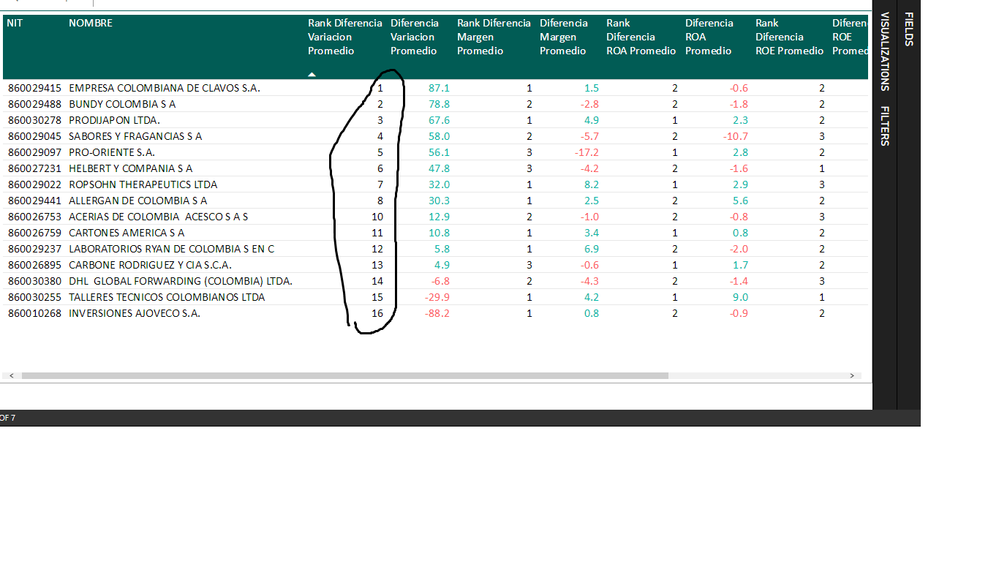
Thanks a lot for your response. It seems like could work but the rank omitted the number rank number 9. It just pass from 8 to 10, Do you know why this is happening? Even the rank assumes that there are 16 companies but the true number of those is 15. 
Rank2.pngThank you very much, really. 


Hi @AlejandroPCar


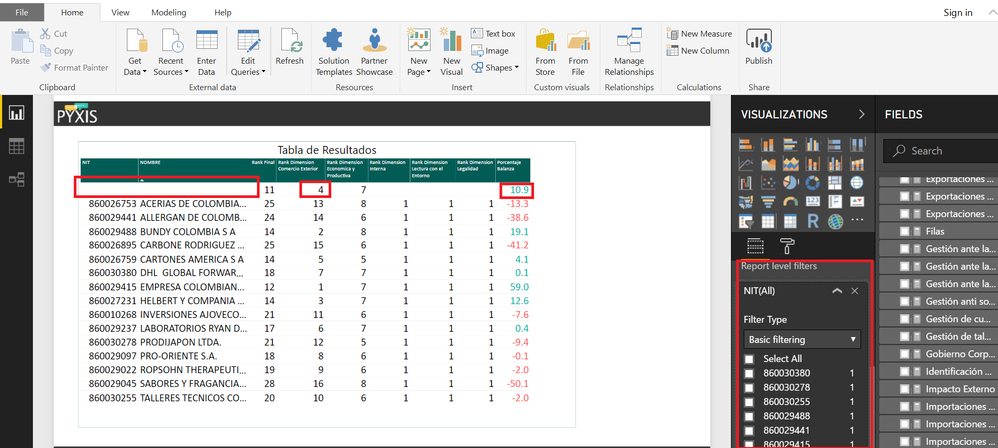
This is because you have BLANK "NIT" items which are also RANKED


These items are filtered OUT at REPORT LEVEL


See the image below


RANKXX.png

Hi! @Zubair_Muhammad

Ok, thanks for your entire help. Im will try how to solve the BLANK problem. Until this point, your solution works excellent. Thanks again. Also, if you have any idea how to overcome this problem its gonna be fine. 

Helpful resources

Announcements
Power BI DataViz World Championships

Power BI Dataviz World Championships

The Power BI Data Visualization World Championships is back! Get ahead of the game and start preparing now!

December 2025 Power BI Update Carousel

Power BI Monthly Update - December 2025

Check out the December 2025 Power BI Holiday Recap!

FabCon Atlanta 2026 carousel

FabCon Atlanta 2026

Join us at FabCon Atlanta, March 16-20, for the ultimate Fabric, Power BI, AI and SQL community-led event. Save $200 with code FABCOMM.

Top Solution Authors