Join the FabCon + SQLCon recap series. Up next: Power BI, Real-Time Intelligence, IQ and AI, and Data Factory take center stage. All sessions are available on-demand after the live show. Register now
Hello,
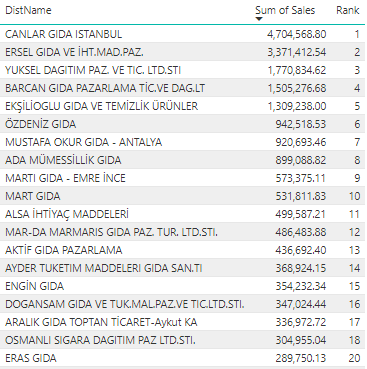
When I tried to make RANKX formula, I mostly succeed. But as you see below, some number(nr 19) does not exist in the table in rank column which includes formula. Can you help me ?
Rank Formula =
Hello Again ,
Is there anybody here who can solve my issue , I will be glad if some of you solve my issue.
Hi @Anonymous ,
Do you try to change the function? Does it work? If you have solved the issue, please accept the helpful answer. If you solved by yourself, welcome to share the solution. More people who encounter the same problem will benefit here.
Best Regards,
Xue Ding
If this post helps, then please consider Accept it as the solution to help the other members find it more quickly.
Hi @Anonymous ,
Please try to change the function of ALL to ALLNOBLANKROW or ALLSELECTED. If it still doesn't work, please share your entire table. You could mask the sensitive data. For the data that you attached, I can't use it to reproduce the result.
Best Regards,
Xue Ding
If this post helps, then please consider Accept it as the solution to help the other members find it more quickly. Kudos are nice too.
Check out the April 2026 Power BI update to learn about new features.
If you have recently started exploring Fabric, we'd love to hear how it's going. Your feedback can help with product improvements.
A new Power BI DataViz World Championship is coming this June! Don't miss out on submitting your entry.
| User | Count |
|---|---|
| 42 | |
| 37 | |
| 35 | |
| 22 | |
| 15 |
| User | Count |
|---|---|
| 67 | |
| 58 | |
| 29 | |
| 27 | |
| 25 |