Join us at FabCon Atlanta from March 16 - 20, 2026, for the ultimate Fabric, Power BI, AI and SQL community-led event. Save $200 with code FABCOMM.
Register now!The Power BI Data Visualization World Championships is back! Get ahead of the game and start preparing now! Learn more
FirstName | LastName | Country | Col4 |
| Rajesh | Tejwani | India | null |
| S | K | Sharma | Britain |
| M | K | Gandhi | NewYork |
| Krishna | Kumar | India | null |
This is the table that was given to me in a client interview. I was asked to get both SK and MK together as first name and Sharma and Gandhi as last name. Can anyone tell me how to do this and get the below mentioned output?
FirstName | LastName | Country | Col4 |
| Rajesh | Tejwani | India | null |
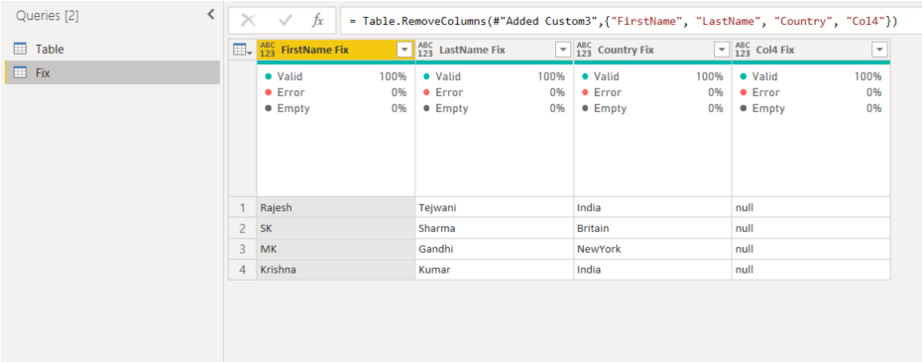
| SK | Sharma | Britain | null |
| MK | Gandhi | New York | null |
| Krishna | Kumar | India | null |
Solved! Go to Solution.
Hi, @SushainKoul
I assume that it will change when the name length is less than 2.
Create a copy table, add a condition column to get the first name.

Now transform table with M code:
let
Source = Table.FromRows(Json.Document(Binary.Decompress(Binary.FromText("i45WCkrMSi3OUNJRCknNKk/MywSyPPNSMhOBdF5pTo5SrE60UjCQ4w3EwRmJRbkgGaeizJLEzDywpC9U0j0xLyUDpN0vtTwyvygbLOldlFmckQfS4l2am1iEYXgsAA==", BinaryEncoding.Base64), Compression.Deflate)), let _t = ((type nullable text) meta [Serialized.Text = true]) in type table [FirstName = _t, LastName = _t, Country = _t, Col4 = _t]),
#"Changed Type" = Table.TransformColumnTypes(Source,{{"FirstName", type text}, {"LastName", type text}, {"Country", type text}, {"Col4", type text}}),
Custom1 = Table.ToRecords(#"Changed Type"),
Custom2 = List.Transform(Custom1, each Record.ToList (_)),
Custom3 = List.Transform(Custom2, each if Text.Length(_{1})<2 then List.Range(_,1,99) else _
),
Custom4 = List.Zip(Custom3
),
Custom5 = Table.FromColumns(Custom4
),
#"Removed Columns1" = Table.RemoveColumns(Custom5,{"Column4"}),
#"Added Index" = Table.AddIndexColumn(#"Removed Columns1", "Index", 0, 1, Int64.Type),
#"Merged Queries" = Table.NestedJoin(#"Added Index", {"Index"}, _GetFirstName, {"Index"}, "Table (2)", JoinKind.LeftOuter),
#"Expanded Table (2)" = Table.ExpandTableColumn(#"Merged Queries", "Table (2)", {"FirstName"}, {"FirstName"}),
#"Reordered Columns" = Table.ReorderColumns(#"Expanded Table (2)",{"Column1", "FirstName", "Column2", "Column3", "Index"}),
#"Removed Columns" = Table.RemoveColumns(#"Reordered Columns",{"Column1"})
in
#"Removed Columns"
Result:
Finally, merge the two tables according to the Index column to get the first name
Please refer to the attachment below for details
Is this the result you want? Hope this is useful to you
Please feel free to let me know If you have further questions
Best Regards,
Community Support Team _ Zeon Zheng
If this post helps, then please consider Accept it as the solution to help the other members find it more quickly.
Hi, @SushainKoul
I assume that it will change when the name length is less than 2.
Create a copy table, add a condition column to get the first name.
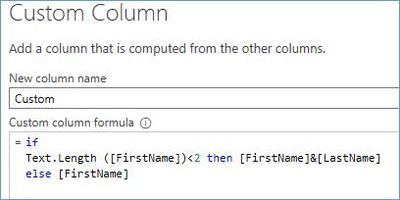
Now transform table with M code:
let
Source = Table.FromRows(Json.Document(Binary.Decompress(Binary.FromText("i45WCkrMSi3OUNJRCknNKk/MywSyPPNSMhOBdF5pTo5SrE60UjCQ4w3EwRmJRbkgGaeizJLEzDywpC9U0j0xLyUDpN0vtTwyvygbLOldlFmckQfS4l2am1iEYXgsAA==", BinaryEncoding.Base64), Compression.Deflate)), let _t = ((type nullable text) meta [Serialized.Text = true]) in type table [FirstName = _t, LastName = _t, Country = _t, Col4 = _t]),
#"Changed Type" = Table.TransformColumnTypes(Source,{{"FirstName", type text}, {"LastName", type text}, {"Country", type text}, {"Col4", type text}}),
Custom1 = Table.ToRecords(#"Changed Type"),
Custom2 = List.Transform(Custom1, each Record.ToList (_)),
Custom3 = List.Transform(Custom2, each if Text.Length(_{1})<2 then List.Range(_,1,99) else _
),
Custom4 = List.Zip(Custom3
),
Custom5 = Table.FromColumns(Custom4
),
#"Removed Columns1" = Table.RemoveColumns(Custom5,{"Column4"}),
#"Added Index" = Table.AddIndexColumn(#"Removed Columns1", "Index", 0, 1, Int64.Type),
#"Merged Queries" = Table.NestedJoin(#"Added Index", {"Index"}, _GetFirstName, {"Index"}, "Table (2)", JoinKind.LeftOuter),
#"Expanded Table (2)" = Table.ExpandTableColumn(#"Merged Queries", "Table (2)", {"FirstName"}, {"FirstName"}),
#"Reordered Columns" = Table.ReorderColumns(#"Expanded Table (2)",{"Column1", "FirstName", "Column2", "Column3", "Index"}),
#"Removed Columns" = Table.RemoveColumns(#"Reordered Columns",{"Column1"})
in
#"Removed Columns"
Result:
Finally, merge the two tables according to the Index column to get the first name
Please refer to the attachment below for details
Is this the result you want? Hope this is useful to you
Please feel free to let me know If you have further questions
Best Regards,
Community Support Team _ Zeon Zheng
If this post helps, then please consider Accept it as the solution to help the other members find it more quickly.
Hi, @SushainKoul
I am not sure if I understood your question correctly, but I suggest doing this in Power Query Editor.
All steps are in the sample pbix file.
https://www.dropbox.com/s/khhshlmjcd30pty/sushain.pbix?dl=0
Hi, My name is Jihwan Kim.
If this post helps, then please consider accept it as the solution to help other members find it faster, and give a big thumbs up.
Linkedin: linkedin.com/in/jihwankim1975/
Twitter: twitter.com/Jihwan_JHKIM
@Jihwan_Kim Thank u for your help. Yes I know it has to be done in Query Editor but I failed to answer this how to do it in Power Query Editor in the client interview.
The Power BI Data Visualization World Championships is back! Get ahead of the game and start preparing now!
| User | Count |
|---|---|
| 40 | |
| 36 | |
| 34 | |
| 31 | |
| 27 |
| User | Count |
|---|---|
| 136 | |
| 103 | |
| 67 | |
| 65 | |
| 56 |