Don't miss your chance to take the Fabric Data Engineer (DP-700) exam on us!
Learn moreWe've captured the moments from FabCon & SQLCon that everyone is talking about, and we are bringing them to the community, live and on-demand. Starts on April 14th. Register now
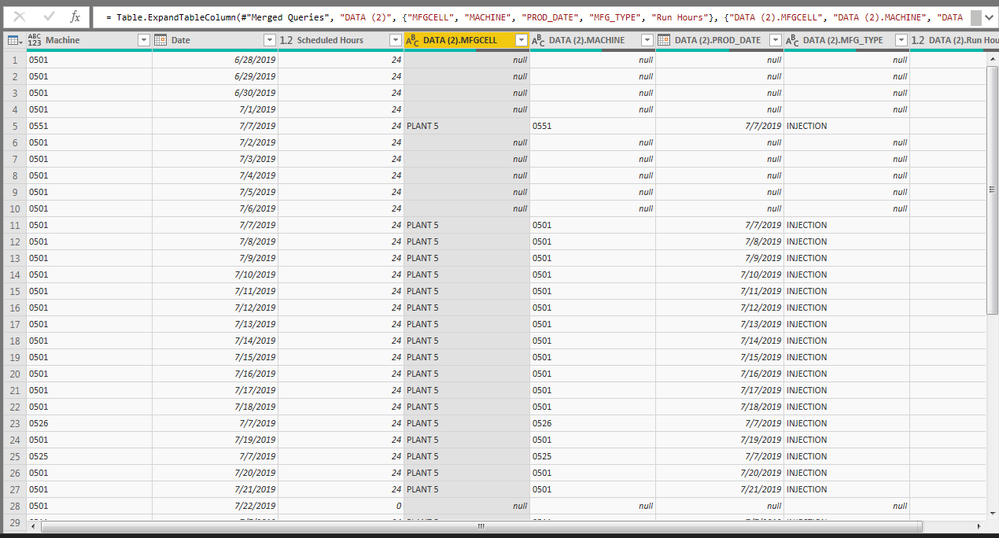
I am working with data involving manufacturing utilization from two sources, one table of just machine and scheduled hours, and another of machine, run hours, and some more classification columns such as manufacturing cell. There are some instances where a machine didn't run one day so there is no run hour data for it but it was scheduled to run for 24 hours.
When I merge the data sets by date and machine, and there is no production data for a press that was scheduled, it fills the rest of the columns with "null" (See pic). For reporting purposes I need to have sums of run and scheduled hours by MFGCELL. Through looking this up, I've seen a replace value formula can help but can one be used to replace all the nulls with "PLANT 5" if the value in the machine column is 0501-0556, PLANT 1 if machine is 0101-0110, etc?
Hi@Anonymous ,
1. When there is production data for a press then for the MFGCELL column is it always
"PLANT 5" if the value in the machine column is 0501-0556,
PLANT 1 if machine is 0101-0110 etc.
2. If this is the case , create a table with Machine and Plant like
0501, PLANT5
0502,PLANT5
0101,PLANT1
0110,PLANT1
3. Merge the first table with the second table on Machine and get the column value of Plant from second value.
If you upload sampledata, pbix to Google / One Drive and share the link may be I can help.
Cheers
CheenuSing
If you have recently started exploring Fabric, we'd love to hear how it's going. Your feedback can help with product improvements.
A new Power BI DataViz World Championship is coming this June! Don't miss out on submitting your entry.
Share feedback directly with Fabric product managers, participate in targeted research studies and influence the Fabric roadmap.
| User | Count |
|---|---|
| 53 | |
| 37 | |
| 35 | |
| 19 | |
| 17 |
| User | Count |
|---|---|
| 74 | |
| 69 | |
| 39 | |
| 35 | |
| 23 |