Join us at FabCon Atlanta from March 16 - 20, 2026, for the ultimate Fabric, Power BI, AI and SQL community-led event. Save $200 with code FABCOMM.
Register now!The Power BI Data Visualization World Championships is back! Get ahead of the game and start preparing now! Learn more
Is there a way a current table or query of a table can be used to fill the list for a PowerQuery Parameter?
Example I have multiple customer's withing the same data, When I refresh data in PBI Desktop I want to select the customer who's data I want in the report.
Solved! Go to Solution.
Power BI supports you to build a query list by a column from an existing table.
You can try my way above use Add as New Query.
Select your customer column in your existing table and use this function to build a query list.
Best Regards,
Rico Zhou
If this post helps, then please consider Accept it as the solution to help the other members find it more quickly.
I think you want to get a List with all customers from your current table to build a parameter.
Steps:
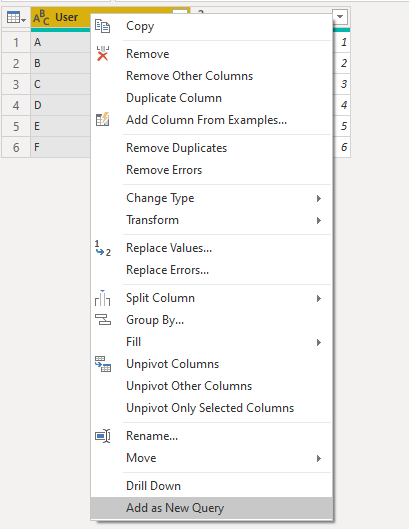
Select the customer column in Power Query Editor, right click and select Add as New Query to build a list.
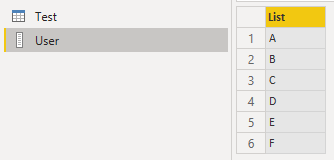
Query List:
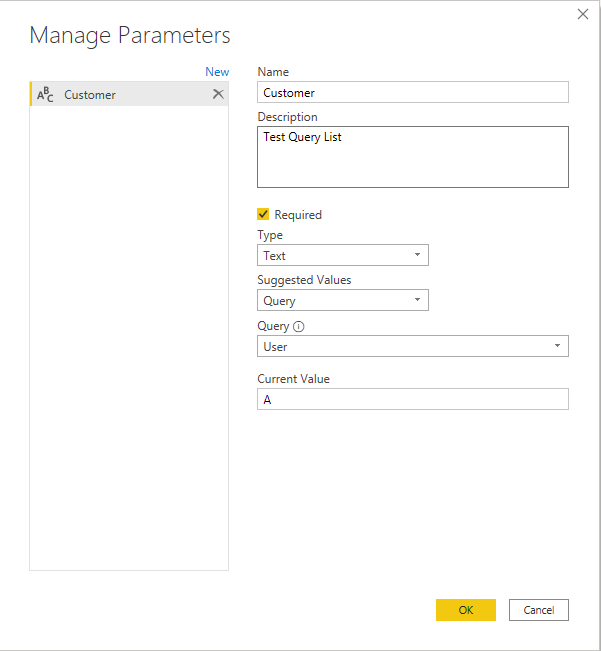
Build a parameter by this list.
For reference: Parameter List video
Best Regards,
Rico Zhou
If this post helps, then please consider Accept it as the solution to help the other members find it more quickly.
Is there a way to create the quey list from an existing table?
Power BI supports you to build a query list by a column from an existing table.
You can try my way above use Add as New Query.
Select your customer column in your existing table and use this function to build a query list.
Best Regards,
Rico Zhou
If this post helps, then please consider Accept it as the solution to help the other members find it more quickly.
The Power BI Data Visualization World Championships is back! Get ahead of the game and start preparing now!
| User | Count |
|---|---|
| 39 | |
| 35 | |
| 33 | |
| 32 | |
| 29 |
| User | Count |
|---|---|
| 134 | |
| 96 | |
| 78 | |
| 67 | |
| 65 |