FabCon is coming to Atlanta
Join us at FabCon Atlanta from March 16 - 20, 2026, for the ultimate Fabric, Power BI, AI and SQL community-led event. Save $200 with code FABCOMM.
Register now!- Power BI forums
- Get Help with Power BI
- Desktop
- Service
- Report Server
- Power Query
- Mobile Apps
- Developer
- DAX Commands and Tips
- Custom Visuals Development Discussion
- Health and Life Sciences
- Power BI Spanish forums
- Translated Spanish Desktop
- Training and Consulting
- Instructor Led Training
- Dashboard in a Day for Women, by Women
- Galleries
- Data Stories Gallery
- Themes Gallery
- Contests Gallery
- QuickViz Gallery
- Quick Measures Gallery
- Visual Calculations Gallery
- Notebook Gallery
- Translytical Task Flow Gallery
- TMDL Gallery
- R Script Showcase
- Webinars and Video Gallery
- Ideas
- Custom Visuals Ideas (read-only)
- Issues
- Issues
- Events
- Upcoming Events
The Power BI Data Visualization World Championships is back! Get ahead of the game and start preparing now! Learn more
- Power BI forums
- Forums
- Get Help with Power BI
- Desktop
- Re: Query Editor & POwer BI Date Transformation
- Subscribe to RSS Feed
- Mark Topic as New
- Mark Topic as Read
- Float this Topic for Current User
- Bookmark
- Subscribe
- Printer Friendly Page

- Mark as New
- Bookmark
- Subscribe
- Mute
- Subscribe to RSS Feed
- Permalink
- Report Inappropriate Content
Query Editor & POwer BI Date Transformation
I have 3 date columns, Order Start Date, Order End Date and Week (which is how the performance data is aggregated). Within the Query Editor, I can change Order Start Date, and Order End Date to a data type of Date. Then within Power BI, I change the format. No problems with these columns.
The "Week" column is being a little more stubborn. When I change the Data Type the column populates with Error (see below).
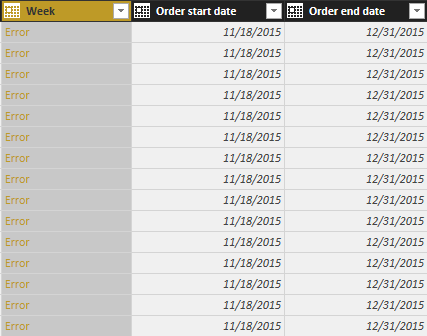
If I try to convert this in PowerBI, I receive an Error that says it can't convert the data type!
I have included a link to a sample dataset, in hopes someone can help me problem solve this.
https://www.dropbox.com/s/gbzdwo6qxxt026x/sample%20data.xlsx?dl=0
Thanks.
Solved! Go to Solution.


- Mark as New
- Bookmark
- Subscribe
- Mute
- Subscribe to RSS Feed
- Permalink
- Report Inappropriate Content
Hi @Anonymous,
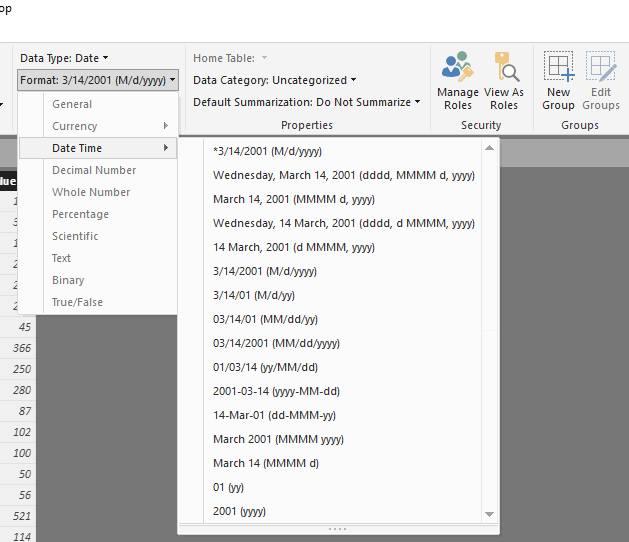
If I understand correctly, you want to set the data type of column [Week] to Date, and display date range in format '12/6/15 - 12/12/15', right? But this is not a supported date format, it will be considered as string. That is why you got the error when you attempt to convert it to date.
Below image shows all the date formats which are supported now:
Best regards,
Yuliana Gu
If this post helps, then please consider Accept it as the solution to help the other members find it more quickly.
- Mark as New
- Bookmark
- Subscribe
- Mute
- Subscribe to RSS Feed
- Permalink
- Report Inappropriate Content
Hi @Anonymous,
If I understand correctly, you want to set the data type of column [Week] to Date, and display date range in format '12/6/15 - 12/12/15', right? But this is not a supported date format, it will be considered as string. That is why you got the error when you attempt to convert it to date.
Below image shows all the date formats which are supported now:
Best regards,
Yuliana Gu
If this post helps, then please consider Accept it as the solution to help the other members find it more quickly.


- Mark as New
- Bookmark
- Subscribe
- Mute
- Subscribe to RSS Feed
- Permalink
- Report Inappropriate Content
@Anonymous
hi, do you need Week of the year ?
1, Split by delimiter Week (Use -)
2. The First Column transform to Date-Week-Week of Year.
Lima - Peru
- Mark as New
- Bookmark
- Subscribe
- Mute
- Subscribe to RSS Feed
- Permalink
- Report Inappropriate Content
Thanks for the feedback @Vvelarde.
I do not need the week of the year, only to use it as a time dimension for performance during that period of time.
If I split using the delimeter, I will lose my ability to dimensionalize the data by week range. Not sure what you mean in your second step.
Seems Power BI really struggles with "dates" and date transformaiton, no?
Please advise.
- Mark as New
- Bookmark
- Subscribe
- Mute
- Subscribe to RSS Feed
- Permalink
- Report Inappropriate Content
@Anonymous
Your Column is two dates (Start of Week and End of Week) Right?
What is the result that you want to obtain.
Lima - Peru
- Mark as New
- Bookmark
- Subscribe
- Mute
- Subscribe to RSS Feed
- Permalink
- Report Inappropriate Content
I simply wanted to show the range in the visulaization, and have the correct format.
When following your instructions, it does format it as a date.
- Mark as New
- Bookmark
- Subscribe
- Mute
- Subscribe to RSS Feed
- Permalink
- Report Inappropriate Content
@Anonymous
Your column look like this:
12/6/15 - 12/12/15
What is the format expected in the transform?
Lima - Peru
- Mark as New
- Bookmark
- Subscribe
- Mute
- Subscribe to RSS Feed
- Permalink
- Report Inappropriate Content
Same as what it looks like in the column, formatted as a date.
- Mark as New
- Bookmark
- Subscribe
- Mute
- Subscribe to RSS Feed
- Permalink
- Report Inappropriate Content
@Anonymous
Ok, to my knowledge that's not possible. 
Lima - Peru
Helpful resources

Power BI Dataviz World Championships
The Power BI Data Visualization World Championships is back! Get ahead of the game and start preparing now!

Power BI Monthly Update - December 2025
Check out the December 2025 Power BI Holiday Recap!

FabCon Atlanta 2026
Join us at FabCon Atlanta, March 16-20, for the ultimate Fabric, Power BI, AI and SQL community-led event. Save $200 with code FABCOMM.

| User | Count |
|---|---|
| 40 | |
| 38 | |
| 36 | |
| 29 | |
| 28 |


| User | Count |
|---|---|
| 126 | |
| 88 | |
| 78 | |
| 66 | |
| 65 |


