Don't miss your chance to take exam DP-600 or DP-700 on us!
Request nowLearn from the best! Meet the four finalists headed to the FINALS of the Power BI Dataviz World Championships! Register now
Hello,
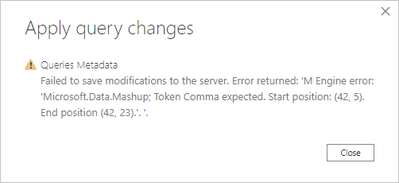
After the recent Power BI desktop update, I've been prompted to upgrade one of my reports to the enhanced metadata format. When trying to do so, I'm getting the below error. Wasn't able to find anything online about any Queries Metadata errors and I can't find anywhere to look at this in the advanced editor. Any help would be much appreciated as I can't make changes to my report because of this.
Tried the above suggestion and it didn't work. Ended up reverting my Power BI version a couple months ago to fix it but now I needed to update Power BI and I'm running into the same issue. Hoping that someone has an answer to this.
Hi @Anonymous ,
Please check if this post is helpful:
AAS Processing Error “Error returned: ‘M Engine error: ‘Microsoft.Data.Mashup; Token Comma expected”.
Best Regards,
Icey
If this post helps, then please consider Accept it as the solution to help the other members find it more quickly.
Hoping someone can help resolve this as this latest update has broken several of my reports and I am no longer able to make changes to their data models.
Share feedback directly with Fabric product managers, participate in targeted research studies and influence the Fabric roadmap.
Check out the February 2026 Power BI update to learn about new features.
| User | Count |
|---|---|
| 49 | |
| 40 | |
| 37 | |
| 14 | |
| 13 |
| User | Count |
|---|---|
| 85 | |
| 70 | |
| 37 | |
| 28 | |
| 27 |