cancel
Showing results for 
Search instead for 
Did you mean: 

Level up your Power BI skills this month - build one visual each week and tell better stories with data! Get started

Reply
baneworth
Helper III
Helper III

Qliksense Wildmatch -> Power BI DAX

Recently moved from Qlik to Power BI and very new to using DAX


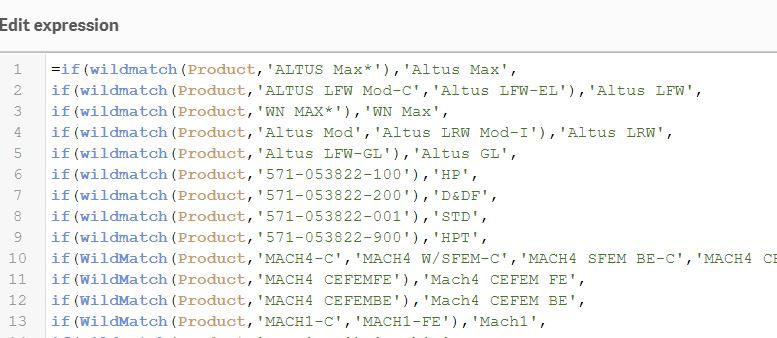
What would be the euqivalent to the Wildmatch function (please refer to image)

- basically what i have to do is combining several values(usually its just one) and then renaming them


If there would be a better solution i am happy to learn

qlik product.JPG


Best regards

2 ACCEPTED SOLUTIONS
amitchandak
Super User
Super User

Power VI has search and find in Dax

https://docs.microsoft.com/en-us/dax/search-function-dax

https://docs.microsoft.com/en-us/dax/find-function-dax

For multiple filter use switch

https://community.powerbi.com/t5/Desktop/Help-with-SWITCH-TRUE-with-multiple-items-to-evaluate/td-p/...


Appreciate your Kudos. In case, this is the solution you are looking for, mark it as the Solution.
In case it does not help, please provide additional information and mark me with @

Thanks. My Recent Blogs -Decoding Direct Query - Time Intelligence, Winner Coloring on MAP, HR Analytics, Power BI Working with Non-Standard TimeAnd Comparing Data Across Date Ranges
Connect on Linkedin

Share with Power BI Enthusiasts: Full Power BI Video (20 Hours) YouTube
Microsoft Fabric Series 60+ Videos YouTube
Microsoft Fabric Hindi End to End YouTube

View solution in original post

v-alq-msft
Community Support
Community Support

Hi, @baneworth 


Based on your description, I'd like to suggest you use FIND(), SEARCH(), CONTAINSSTRING(), CONTAINSSTRINGEXACT().


Here is the functions for text.

1. Text connection functions :  


CONCATENATE(<text1>, <text2>)
CONCATENATEX(<table>, <expression>, [delimiter])
COMBINEVALUES(<delimiter>, <expression>, <expression>[, <expression>]…)
DISTINCT(SELECTCOLUMNS(DimDate, "Month", COMBINEVALUES(",", [MonthName], [CalendarYear])))


2. Text search functions : 


FIND(<find_text>, <within_text>[, [<start_num>][, <NotFoundValue>]])  
SEARCH(<find_text>, <within_text>[, [<start_num>][, <NotFoundValue>]]) 
CONTAINSSTRING(<within_text>, <find_text>) 
CONTAINSSTRINGEXACT(<within_text>, <find_text>)


3. Formatting text functions : 


FIXED(<number>, <decimals>, <no_commas>)  
FORMAT(<value>, <format_string>)


4. Intercepting text functions : 


LEFT(<text>, <num_chars>)
RIGHT(<text>, <num_chars>)  
MID(<text>, <start_num>, <num_chars>) 


5. Replace text : 


REPLACE(<old_text>, <start_num>, <num_chars>, <new_text>)  
SUBSTITUTE(<text>, <old_text>, <new_text>, <instance_num>) 


For further information, please refer to the official document .


Best Regards

Allan


If this post helps, then please consider Accept it as the solution to help the other members find it more quickly.


View solution in original post

2 REPLIES 2
v-alq-msft
Community Support
Community Support

Hi, @baneworth 


Based on your description, I'd like to suggest you use FIND(), SEARCH(), CONTAINSSTRING(), CONTAINSSTRINGEXACT().


Here is the functions for text.

1. Text connection functions :  


CONCATENATE(<text1>, <text2>)
CONCATENATEX(<table>, <expression>, [delimiter])
COMBINEVALUES(<delimiter>, <expression>, <expression>[, <expression>]…)
DISTINCT(SELECTCOLUMNS(DimDate, "Month", COMBINEVALUES(",", [MonthName], [CalendarYear])))


2. Text search functions : 


FIND(<find_text>, <within_text>[, [<start_num>][, <NotFoundValue>]])  
SEARCH(<find_text>, <within_text>[, [<start_num>][, <NotFoundValue>]]) 
CONTAINSSTRING(<within_text>, <find_text>) 
CONTAINSSTRINGEXACT(<within_text>, <find_text>)


3. Formatting text functions : 


FIXED(<number>, <decimals>, <no_commas>)  
FORMAT(<value>, <format_string>)


4. Intercepting text functions : 


LEFT(<text>, <num_chars>)
RIGHT(<text>, <num_chars>)  
MID(<text>, <start_num>, <num_chars>) 


5. Replace text : 


REPLACE(<old_text>, <start_num>, <num_chars>, <new_text>)  
SUBSTITUTE(<text>, <old_text>, <new_text>, <instance_num>) 


For further information, please refer to the official document .


Best Regards

Allan


If this post helps, then please consider Accept it as the solution to help the other members find it more quickly.
 

amitchandak
Super User
Super User

Power VI has search and find in Dax

https://docs.microsoft.com/en-us/dax/search-function-dax

https://docs.microsoft.com/en-us/dax/find-function-dax

For multiple filter use switch

https://community.powerbi.com/t5/Desktop/Help-with-SWITCH-TRUE-with-multiple-items-to-evaluate/td-p/...


Appreciate your Kudos. In case, this is the solution you are looking for, mark it as the Solution.
In case it does not help, please provide additional information and mark me with @

Thanks. My Recent Blogs -Decoding Direct Query - Time Intelligence, Winner Coloring on MAP, HR Analytics, Power BI Working with Non-Standard TimeAnd Comparing Data Across Date Ranges
Connect on Linkedin

Share with Power BI Enthusiasts: Full Power BI Video (20 Hours) YouTube
Microsoft Fabric Series 60+ Videos YouTube
Microsoft Fabric Hindi End to End YouTube

Helpful resources

Announcements
April Power BI Update Carousel

Power BI Monthly Update - April 2026

Check out the April 2026 Power BI update to learn about new features.

Fabric SQL PBI Data Days

Data Days 2026 coming soon!

Sign up to receive a private message when registration opens and key events begin.

New to Fabric survey Carousel

New to Fabric Survey

If you have recently started exploring Fabric, we'd love to hear how it's going. Your feedback can help with product improvements.

Power BI DataViz World Championships carousel

Power BI DataViz World Championships - June 2026

A new Power BI DataViz World Championship is coming this June! Don't miss out on submitting your entry.