cancel
Showing results for 
Search instead for 
Did you mean: 

The Power BI Data Visualization World Championships is back! Get ahead of the game and start preparing now! Learn more

Reply
Srioliveira
New Member

Python Visual

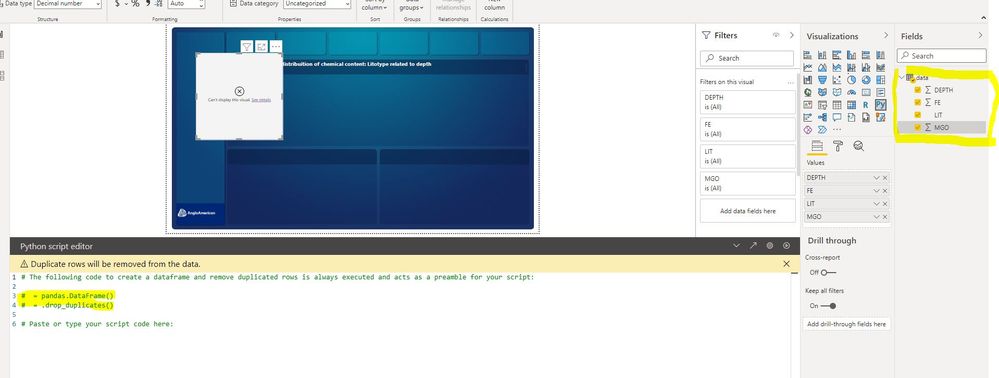
Hey guys, i'm having a issue with python visuals, when i select my data of my fields to the values, nothing happens in my python script editor, all videos that i saw, when the people did that, the row changed with the name of the dataset utilized...


I don't know what to do, my python version is 3.8, i've already installed and uninstalled python and PBI, but i'm still having the same problem.

pbibug.JPG
Help plz

2 REPLIES 2
Anonymous
Not applicable

Hi @Srioliveira 

I find some offical blogs about use python in Power BI Desktop.

For reference: 

Run Python scripts in Power BI Desktop

Create Power BI visuals by using Python

I hope they could help you solve your problem.


Best Regards,
Rico Zhou


If this post helps, then please consider Accept it as the solution to help the other members find it more quickly.

amitchandak
Super User
Super User

@Srioliveira , Please add code and use the play button on the python title and check. Recently I saw it did not update the comment but the visual worked 


refer if needed

How to create python visual: https://youtu.be/rX3-G8u5fwc

Share with Power BI Enthusiasts: Full Power BI Video (20 Hours) YouTube
Microsoft Fabric Series 60+ Videos YouTube
Microsoft Fabric Hindi End to End YouTube

Helpful resources

Announcements
Power BI DataViz World Championships

Power BI Dataviz World Championships

The Power BI Data Visualization World Championships is back! Get ahead of the game and start preparing now!

November Power BI Update Carousel

Power BI Monthly Update - November 2025

Check out the November 2025 Power BI update to learn about new features.

FabCon Atlanta 2026 carousel

FabCon Atlanta 2026

Join us at FabCon Atlanta, March 16-20, for the ultimate Fabric, Power BI, AI and SQL community-led event. Save $200 with code FABCOMM.