cancel
Showing results for 
Search instead for 
Did you mean: 

July 7 - July 17 | Round 2 of the Power BI Dataviz World Championships. Don't miss your chance! Learn more

Reply
ifenek
Frequent Visitor

Projected stock calculation help request

Hello, 


I need help, I'm trying to implement a stock projection calculation in place. 

What I'm looking to do is to say if I have enough stock to despatch a product. For that i'm looking at previous orders for the same product. If the due date of the despatch is the same the idea is to look at the earliest activationdate to determine an order. 

I have a column showing the available stock for the particular product. This value should be decreasing in regards of the previous orders and not stay the same like it is right now. 


I've attached a sample file as well as an excel spreadsheet with the calculation I'd like to achieve 


https://we.tl/t-g9aFPxZqwt


statusduedateActivationdatetraderidsorderitemnumberpartidremaingquantityavailableforassemblyCalculationResultDespatch?
ACTIVE01/10/20212021-09-30 08:11:00.000CUST1S-00017SRP1241001000/1000Ok
ACTIVE02/10/20212021-09-30 08:12:00.000CUST3S-000215SRP12420010001000-100-300600Ok
ACTIVE03/10/20212021-09-30 08:23:00.001CUST2S-00031SRP124105010001000-100-200-300400Nok
ACTIVE04/10/20212021-09-30 10:12:00.001CUST1S-00041SRP12415010001000-100-200-1050-300-650Nok
ACTIVE01/10/20212021-09-30 10:23:00.002CUST1S-00053SRP12430010001000-100900Ok


1 ACCEPTED SOLUTION
v-angzheng-msft
Community Support
Community Support

Hi, @ifenek 


Try to create a measure like this:

_Result = 
var _max=MAX ( 'Table'[availableforassembly] )
var _count=
        CALCULATE (
        DISTINCTCOUNT ( 'Table'[Activationdate] ),
        ALLEXCEPT ( 'Table', 'Table'[duedate] )
    )
var duedate=
    CALCULATE (
            SUM ( 'Table'[remaingquantity] ),
            FILTER ( ALL ( 'Table' ), 'Table'[duedate] < MAX ( 'Table'[duedate] ) )
        )
var duedate_Act=
    CALCULATE (
            SUM ( 'Table'[remaingquantity] ),
            FILTER (
                ALL ( 'Table' ),
                'Table'[duedate] = MAX ( 'Table'[duedate] )
                    && 'Table'[Activationdate] < MAX ( 'Table'[Activationdate] )
            )
        )
return 
IF(_count>1,_max-duedate-duedate_Act,_max-duedate)

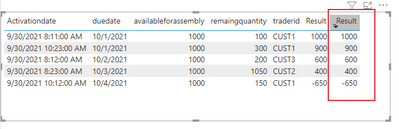
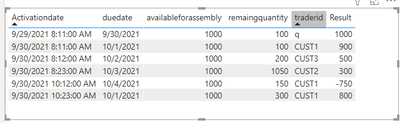
resutl:

vangzhengmsft_0-1633337818975.pngvangzhengmsft_1-1633337827134.png

Please refer to the attachment below for details. Hope this helps.


Best Regards,
Community Support Team _ Zeon Zheng
If this post helps, then please consider Accept it as the solution to help the other members find it more quickly.

View solution in original post

1 REPLY 1
v-angzheng-msft
Community Support
Community Support

Hi, @ifenek 


Try to create a measure like this:

_Result = 
var _max=MAX ( 'Table'[availableforassembly] )
var _count=
        CALCULATE (
        DISTINCTCOUNT ( 'Table'[Activationdate] ),
        ALLEXCEPT ( 'Table', 'Table'[duedate] )
    )
var duedate=
    CALCULATE (
            SUM ( 'Table'[remaingquantity] ),
            FILTER ( ALL ( 'Table' ), 'Table'[duedate] < MAX ( 'Table'[duedate] ) )
        )
var duedate_Act=
    CALCULATE (
            SUM ( 'Table'[remaingquantity] ),
            FILTER (
                ALL ( 'Table' ),
                'Table'[duedate] = MAX ( 'Table'[duedate] )
                    && 'Table'[Activationdate] < MAX ( 'Table'[Activationdate] )
            )
        )
return 
IF(_count>1,_max-duedate-duedate_Act,_max-duedate)

resutl:

vangzhengmsft_0-1633337818975.pngvangzhengmsft_1-1633337827134.png

Please refer to the attachment below for details. Hope this helps.


Best Regards,
Community Support Team _ Zeon Zheng
If this post helps, then please consider Accept it as the solution to help the other members find it more quickly.

Helpful resources

Announcements
FabCon and SQLCon Barcelona 2026

FabCon & SQLCon – Barcelona 2026

Join us in Barcelona for FabCon and SQLCon, the Fabric, Power BI, SQL, and AI community event. Save €200 with code FABCMTY200.

60 days of Data Days Carousel

Data Days 2026

Join Data Days 2026: 60 days of free live/on-demand sessions, challenges, study groups, and certification opportunities.

Power BI DataViz World Championships carousel

Power BI DataViz World Championships - June 2026

A new Power BI DataViz World Championship is coming this June! Don't miss out on submitting your entry.

Top Solution Authors