Join us at FabCon Atlanta from March 16 - 20, 2026, for the ultimate Fabric, Power BI, AI and SQL community-led event. Save $200 with code FABCOMM.
Register now!The Power BI Data Visualization World Championships is back! Get ahead of the game and start preparing now! Learn more
Hello.
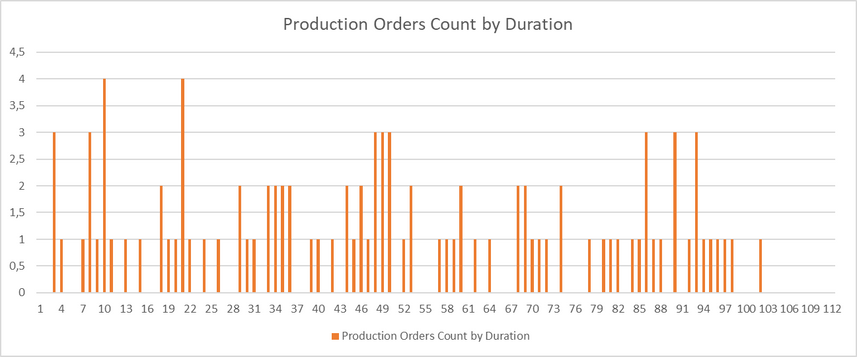
I need to count the number of production orders by duration time (in hours). The graphic needs to be similar as below. How can I do it in Power BI? Example data is below the example graphic.
| Production Order | Date | Duration (Hours) |
| 10000 | 01/01/2022 | 8,244 |
| 10001 | 03/01/2022 | 9,901 |
| 10002 | 05/01/2022 | 17,778 |
| 10003 | 07/01/2022 | 56,094 |
| 10004 | 09/01/2022 | 47,849 |
| 10005 | 11/01/2022 | 84,594 |
| 10006 | 13/01/2022 | 33,581 |
| 10007 | 15/01/2022 | 42,981 |
| 10008 | 17/01/2022 | 5,849 |
| 10009 | 19/01/2022 | 45,459 |
| 10010 | 21/01/2022 | 79,599 |
| 10011 | 23/01/2022 | 44,011 |
| 10012 | 25/01/2022 | 62,425 |
| 10013 | 27/01/2022 | 1,766 |
| 10014 | 29/01/2022 | 67,683 |
| 10015 | 31/01/2022 | 40,150 |
| 10016 | 02/02/2022 | 31,371 |
| 10017 | 04/02/2022 | 68,607 |
| 10018 | 06/02/2022 | 31,655 |
| 10019 | 08/02/2022 | 47,737 |
| 10020 | 10/02/2022 | 85,506 |
| 10021 | 12/02/2022 | 34,627 |
| 10022 | 14/02/2022 | 27,539 |
| 10023 | 16/02/2022 | 20,616 |
| 10024 | 18/02/2022 | 48,829 |
| 10025 | 20/02/2022 | 8,427 |
| 10026 | 22/02/2022 | 1,212 |
| 10027 | 24/02/2022 | 48,016 |
| 10028 | 26/02/2022 | 78,892 |
| 10029 | 28/02/2022 | 58,862 |
| 10030 | 02/03/2022 | 70,599 |
| 10031 | 04/03/2022 | 83,967 |
| 10032 | 06/03/2022 | 86,381 |
| 10033 | 08/03/2022 | 84,822 |
| 10034 | 10/03/2022 | 72,214 |
| 10035 | 12/03/2022 | 24,500 |
| 10036 | 14/03/2022 | 28,981 |
| 10037 | 16/03/2022 | 55,956 |
| 10038 | 18/03/2022 | 6,308 |
| 10039 | 20/03/2022 | 43,098 |
| 10040 | 22/03/2022 | 51,160 |
| 10041 | 24/03/2022 | 19,509 |
| 10042 | 26/03/2022 | 91,068 |
| 10043 | 28/03/2022 | 34,688 |
| 10044 | 30/03/2022 | 57,907 |
| 10045 | 01/04/2022 | 69,639 |
| 10046 | 03/04/2022 | 60,995 |
| 10047 | 05/04/2022 | 37,373 |
| 10048 | 07/04/2022 | 46,522 |
| 10049 | 09/04/2022 | 16,480 |
| 10050 | 11/04/2022 | 84,431 |
| 10051 | 13/04/2022 | 88,376 |
| 10052 | 15/04/2022 | 93,479 |
| 10053 | 17/04/2022 | 2,019 |
| 10054 | 19/04/2022 | 46,137 |
| 10055 | 21/04/2022 | 27,036 |
| 10056 | 23/04/2022 | 11,545 |
| 10057 | 25/04/2022 | 19,773 |
| 10058 | 27/04/2022 | 7,998 |
| 10059 | 29/04/2022 | 95,997 |
| 10060 | 01/05/2022 | 16,988 |
| 10061 | 03/05/2022 | 1,961 |
| 10062 | 05/05/2022 | 66,708 |
| 10063 | 07/05/2022 | 76,575 |
| 10064 | 09/05/2022 | 91,072 |
| 10065 | 11/05/2022 | 44,643 |
| 10066 | 13/05/2022 | 88,635 |
| 10067 | 15/05/2022 | 96,639 |
| 10068 | 17/05/2022 | 33,918 |
| 10069 | 19/05/2022 | 94,219 |
| 10070 | 21/05/2022 | 92,803 |
| 10071 | 23/05/2022 | 50,969 |
| 10072 | 25/05/2022 | 91,084 |
| 10073 | 27/05/2022 | 58,467 |
| 10074 | 29/05/2022 | 8,548 |
| 10075 | 31/05/2022 | 22,628 |
| 10076 | 02/06/2022 | 72,423 |
| 10077 | 04/06/2022 | 38,729 |
| 10078 | 06/06/2022 | 90,074 |
| 10079 | 08/06/2022 | 51,935 |
| 10080 | 10/06/2022 | 42,905 |
| 10081 | 12/06/2022 | 29,085 |
| 10082 | 14/06/2022 | 66,163 |
| 10083 | 16/06/2022 | 6,650 |
| 10084 | 18/06/2022 | 13,723 |
| 10085 | 20/06/2022 | 88,937 |
| 10086 | 22/06/2022 | 80,055 |
| 10087 | 24/06/2022 | 32,041 |
| 10088 | 26/06/2022 | 48,228 |
| 10089 | 28/06/2022 | 18,170 |
| 10090 | 30/06/2022 | 6,320 |
| 10091 | 02/07/2022 | 46,485 |
| 10092 | 04/07/2022 | 19,102 |
| 10093 | 06/07/2022 | 32,448 |
| 10094 | 08/07/2022 | 82,883 |
| 10095 | 10/07/2022 | 47,356 |
| 10096 | 12/07/2022 | 67,273 |
| 10097 | 14/07/2022 | 19,582 |
| 10098 | 16/07/2022 | 8,766 |
| 10099 | 18/07/2022 | 100,890 |
Solved! Go to Solution.
Hi @GustavoKamchen ,
Please try:
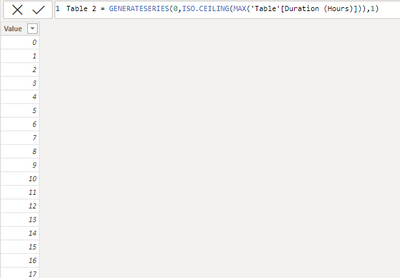
First create a new table:
Then create a measure:
Measure = CALCULATE(COUNT('Table'[Duration (Hours)]),FILTER('Table',[Duration (Hours)]>=MAX('Table 2'[Value])&&[Duration (Hours)]<MAX('Table 2'[Value])+1))
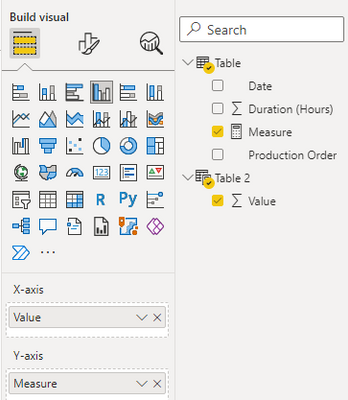
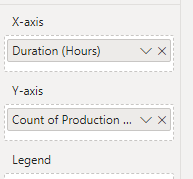
Apply it to the visual:
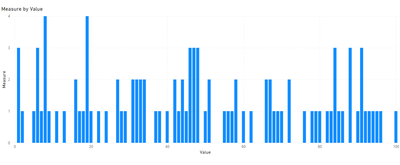
Final output:
Best Regards,
Jianbo Li
If this post helps, then please consider Accept it as the solution to help the other members find it more quickly.
Hi @GustavoKamchen ,
Please try:
First create a new table:
Then create a measure:
Measure = CALCULATE(COUNT('Table'[Duration (Hours)]),FILTER('Table',[Duration (Hours)]>=MAX('Table 2'[Value])&&[Duration (Hours)]<MAX('Table 2'[Value])+1))
Apply it to the visual:
Final output:
Best Regards,
Jianbo Li
If this post helps, then please consider Accept it as the solution to help the other members find it more quickly.
Hi @GustavoKamchen ,
Please try:
Final output:
Best Regards,
Jianbo Li
If this post helps, then please consider Accept it as the solution to help the other members find it more quickly.
Hello.
However I need the X axis to be divided in intervals of 1 hour, and count the number of orders in that interval, for example, count the number of orders where the duration time in hours is between 1 and 2, 2 and 3, 3 and 4, and so on.
Ps: The comma is the decimal point.
The Power BI Data Visualization World Championships is back! Get ahead of the game and start preparing now!
| User | Count |
|---|---|
| 39 | |
| 37 | |
| 33 | |
| 32 | |
| 29 |
| User | Count |
|---|---|
| 132 | |
| 88 | |
| 82 | |
| 68 | |
| 64 |