cancel
Showing results for 
Search instead for 
Did you mean: 

The Power BI Data Visualization World Championships is back! Get ahead of the game and start preparing now! Learn more

Reply
luxpbi
Helper V
Helper V

Problems with RLS

Hi all, 


I'm having troubles setting RLS to one of my reports. 


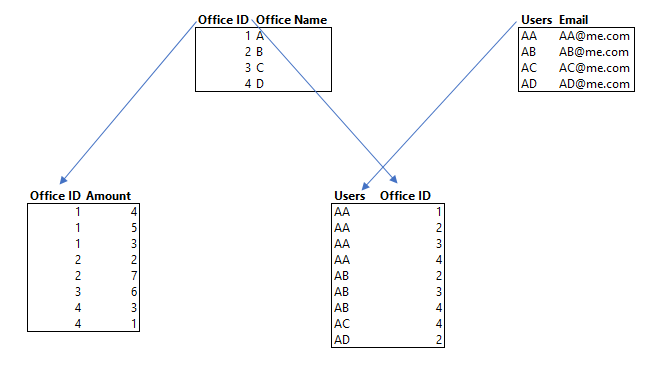
I have a fact sales table such as: 


Office …(other columns, not relevant)
1
1
1
2
2
3
4
4


Dimension tables: 
Office: 

(One row per office code)

Office Code Office Name
1A
2B
3C
4D

Users: 

(Determines the offices that the users should see, can have multiple offices codes for one user)

UsersUsers emailOffice Name
AA...@...1
AA...@...2
AA...@...3
AA...@...4
AB...@...2
AB...@...3
AB...@...4
AC...@...4
AD...@...2


I have a bidirectional filter set between Users and Office and a Single direction filter between Office and my facts table. 


Then I have the next Role in the table Users:

[Users email] = USERNAME() 


Any ideas why this doesn't work? Or how should I do it?

Thank you a lot ofr your help.


Regards,

3 REPLIES 3
LivioLanzo
Solution Sage
Solution Sage

 Hello @luxpbi

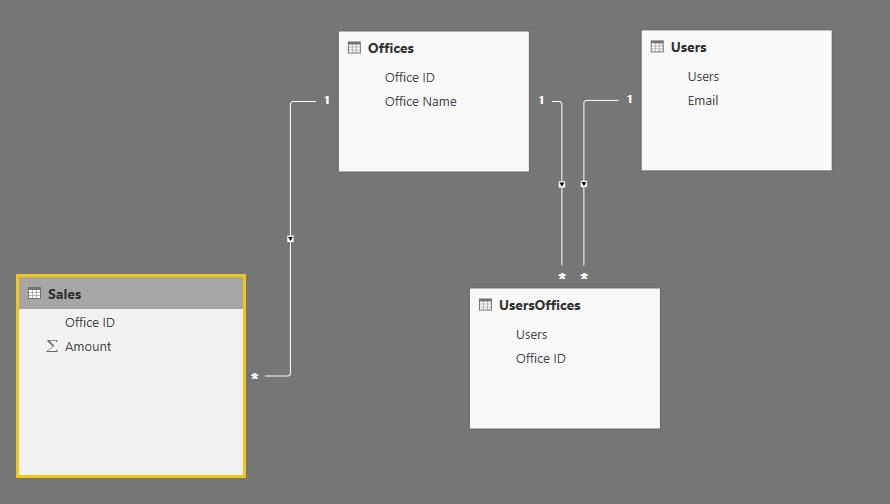
You have many to many relationship between offices and users. 


You can build the below model:


Model.PNG


 Model2.PNG


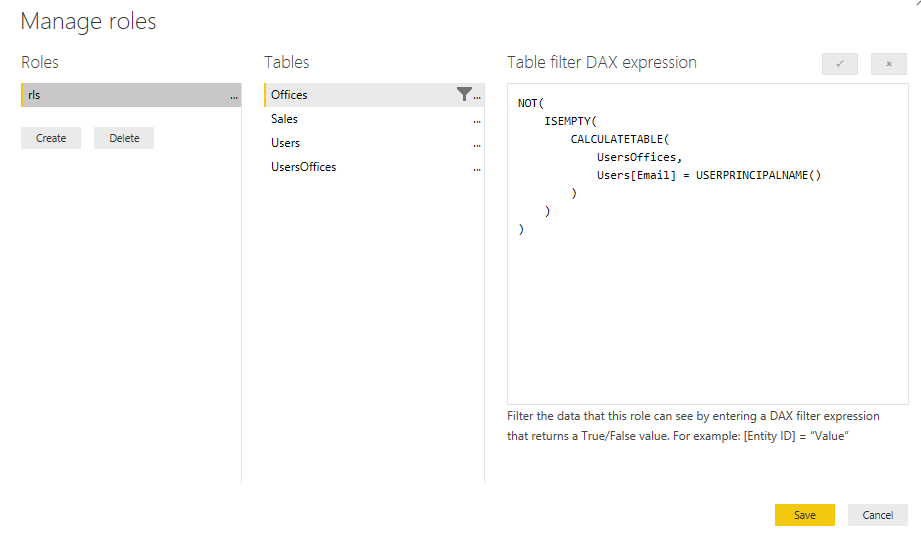
and then use this RLS rule:


Capture.PNG


Did I answer your question correctly? Mark my answer as a solution!


Proud to be a Datanaut!  

Hi @LivioLanzo


It's a very good idea the Users email table. But it is not working. 


I'm testing it in my workspace, can this be a issue? 


It's going to be hard for me to test it with others users... 


Regards,

@luxpbi


I'd first test it within Power BI Desktop to see how it works and you can test it for different email addresses 


Did I answer your question correctly? Mark my answer as a solution!


Proud to be a Datanaut!  

Helpful resources

Announcements
Power BI DataViz World Championships

Power BI Dataviz World Championships

The Power BI Data Visualization World Championships is back! Get ahead of the game and start preparing now!

December 2025 Power BI Update Carousel

Power BI Monthly Update - December 2025

Check out the December 2025 Power BI Holiday Recap!

FabCon Atlanta 2026 carousel

FabCon Atlanta 2026

Join us at FabCon Atlanta, March 16-20, for the ultimate Fabric, Power BI, AI and SQL community-led event. Save $200 with code FABCOMM.