This is best Fabric, Power BI, SQL and AI community event. How do we know? The last event sold out! Save €200 with code FABCMTY200.
Register nowA new Data Days event is coming soon! This time we’re going bigger than ever. Fabric, Power BI, SQL, AI and more. Don't miss out.
Im trying to divide the parcels of my products in line and tried to do something like this
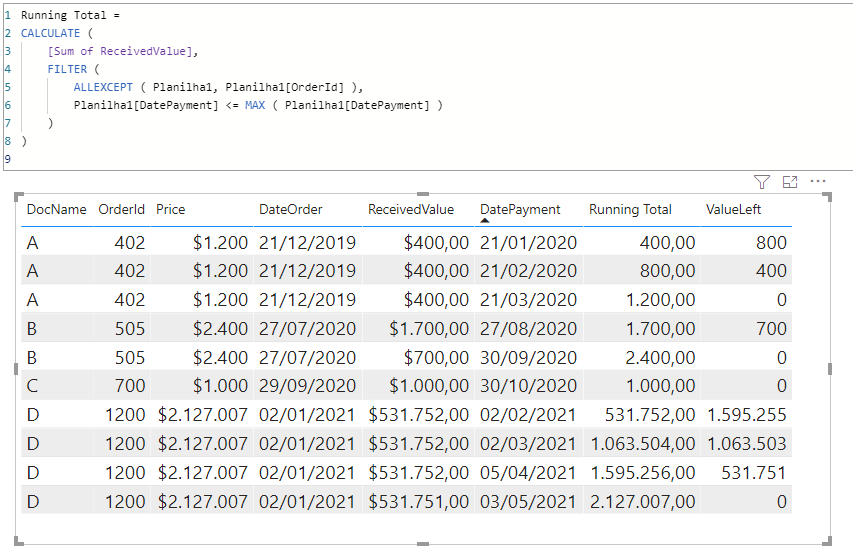
the measure ReceivedValue running total... works fine with DocName that the parcels have the same value(A,C) but when there is a value different in the parcel(B,D) things don't work very well. Can someone help me with this?
This is what i expect
Thanks
Power Bi File
Solved! Go to Solution.
Hi @Anonymous ,
you can do it like this (take a look at the attached PBIX file):
Running Total =
CALCULATE (
[Sum of ReceivedValue],
FILTER (
ALLEXCEPT ( Planilha1, Planilha1[OrderId] ),
Planilha1[DatePayment] <= MAX ( Planilha1[DatePayment] )
)
)
Sum of ReceivedValue = SUM(Planilha1[ReceivedValue])
With kind regards from the town where the legend of the 'Pied Piper of Hamelin' is at home
FrankAT (Proud to be a Datanaut)
Hi @Anonymous ,
you can do it like this (take a look at the attached PBIX file):
Running Total =
CALCULATE (
[Sum of ReceivedValue],
FILTER (
ALLEXCEPT ( Planilha1, Planilha1[OrderId] ),
Planilha1[DatePayment] <= MAX ( Planilha1[DatePayment] )
)
)
Sum of ReceivedValue = SUM(Planilha1[ReceivedValue])
With kind regards from the town where the legend of the 'Pied Piper of Hamelin' is at home
FrankAT (Proud to be a Datanaut)
Check out the May 2026 Power BI update to learn about new features.
Sign up to receive a private message when registration opens and key events begin.
If you have recently started exploring Fabric, we'd love to hear how it's going. Your feedback can help with product improvements.
| User | Count |
|---|---|
| 30 | |
| 26 | |
| 25 | |
| 22 | |
| 13 |
| User | Count |
|---|---|
| 58 | |
| 50 | |
| 26 | |
| 20 | |
| 19 |