I have tried to produce a custom report theme.
I am following the steps and documentation from here: MS documentation
I have also looked through the attempt to document json-tags here: Curbal Theme template by Ruth
Here is my code as of now:
{
    "name": "XXX Report Theme",
    "dataColors": ["#A66999", "#DBC3D6", "#8AD4EB", "#FD625E", "#F9F9F9", "#FFFFFF", "#FFFFFF", "#FFFFFF"],
    "background": "#F9F9F9",
    "foreground": "#DBC3D6",
    "tableAccent": "#FD625E",
	"visualStyles":{
		"slicer":{
			"*":{
				"selection":[{
                                        "singleSelect": false,
                                        "selectAllCheckboxEnabled": false
				}],
				"header":[{
					"show": false,
					"fontColor": { "solid": { "color": "#FFFFFF" } },
					"background": { "solid": { "color": "#A66999" } }
				}],
				"cardTitle":[{
					"show": true,
					"color": { "solid": { "color": "#FD625E" } },
					"background": { "solid": { "color": "#8AD4EB" } }
				}]
			}
		}
	}
}
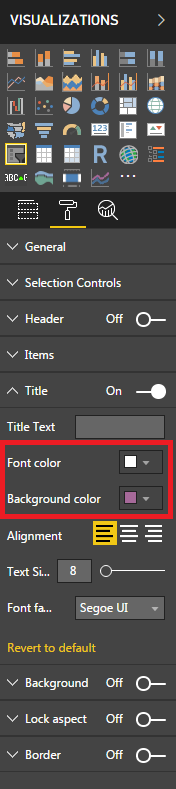 My theme works for the "selection" and "header" card properties, but not for "cardTitle". I fyou can see in the screenshot to the right, what I want to control is the "Font color" and "Background color" for the "Title" section.
The problem is that I cannot find any corresponding json-name to use to control this. I have looked at the documentation and also tried to identify the card property group from the properties that should be there, given the appearance of the "Title" section but sadly I haven't been able to find any solution.
I also tried to reverse engineer the json-tag by looking at HTML from within Power BI Service. This is the div-tag containing the title for my slicer:
<div class="visualTitle preTextWithEllipsis" ng-if="viewModel.visualTitleVisible()" title="Test" apply-style="::viewModel.readOnlyState.titleStyle" ng-bind="viewModel.visualTitle.text" style="visibility: visible; background-color: rgb(166, 105, 153); color: rgb(255, 255, 255); font-size: 12px; height: 16px;">Test</div>
Compare this to the corresponding div-tag for a header element (with the overlay menu removed):
<div class="slicer-header-title" style="border-style: solid;
border-color: rgb(128, 128, 128); border-width: 0px; display: flex;
background-color: rgb(166, 105, 153);">
<span class="slicer-header-clear" title="Clear selections" style="display: none;"></span>
<h2 class="slicer-header-text" title="Type" style="font-size: 12px; font-family: "Segoe UI", wf_segoe-ui_normal, helvetica, arial, sans-serif; color: rgb(255, 255, 255);">Type</h2>
</div>
It seems like a "visualTitle" is amore general property than "slicer-header".
Right now it doesn't seem possible to control the title properties using a report them. If anyone has a better understanding, please let me know.


