Join us at FabCon Atlanta from March 16 - 20, 2026, for the ultimate Fabric, Power BI, AI and SQL community-led event. Save $200 with code FABCOMM.
Register now!The Power BI Data Visualization World Championships is back! Get ahead of the game and start preparing now! Learn more
Hello,
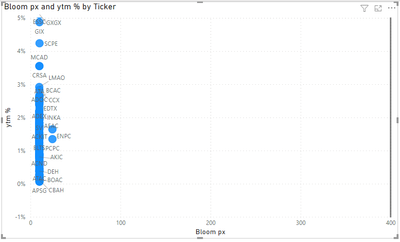
The scatter chart below is not depicting my expected results. Questions:
1. What does the vertical grey bar on the right side of the chart indicate?
2. The data range in the Bloom px column is 9.67 - 28.9 (this serves as the x-axis). Why does the x-axis in the chart run from 0 to 400?
Here is a link to the .pbix: https://techservicesllc-my.sharepoint.com/:u:/p/bstorie/Ed8AaAC0eABJvPgL10lBVRcBph1ZU63m8mbtxc1rUwfs...
I thank you for your time.
Bob
Solved! Go to Solution.
Hi @bob57 ,
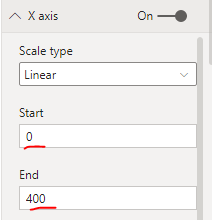
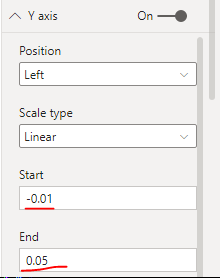
After testing, the range of the x-axis and y-axis automatically presented in the visual is different on different computers. You can make adjustments in the x-axis and y-axis panes of the format list.
As for the vertical gray bar on the right, I think it is a constant line with x = 400 added on the x axis.
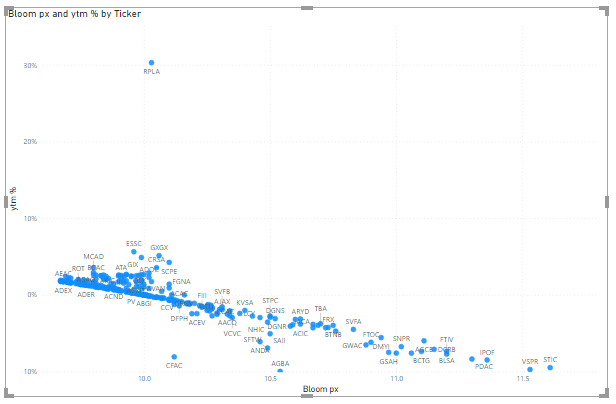
This is the result of my test.
If the problem is still not resolved, please provide detailed error information or the expected result you expect. Let me know immediately, looking forward to your reply.
Best Regards,
Winniz
If this post helps, then please consider Accept it as the solution to help the other members find it more quickly.
Hi @bob57 ,
After testing, the range of the x-axis and y-axis automatically presented in the visual is different on different computers. You can make adjustments in the x-axis and y-axis panes of the format list.
As for the vertical gray bar on the right, I think it is a constant line with x = 400 added on the x axis.
This is the result of my test.
If the problem is still not resolved, please provide detailed error information or the expected result you expect. Let me know immediately, looking forward to your reply.
Best Regards,
Winniz
If this post helps, then please consider Accept it as the solution to help the other members find it more quickly.
Hi @bob57
My answer to both questions is I don't know - a programming glitch in the visual?
I deleted the chart and recreated it and it works fine now
Regards
Phil
Proud to be a Super User!
The Power BI Data Visualization World Championships is back! Get ahead of the game and start preparing now!
| User | Count |
|---|---|
| 39 | |
| 37 | |
| 33 | |
| 32 | |
| 29 |
| User | Count |
|---|---|
| 133 | |
| 88 | |
| 85 | |
| 68 | |
| 64 |