Don't miss your chance to take the Fabric Data Engineer (DP-700) exam on us!
Learn moreThe FabCon + SQLCon recap series starts April 14th at 8am Pacific. If you’re tracking where AI is going inside Fabric, this first session is a can't miss. Register now
Hi all,
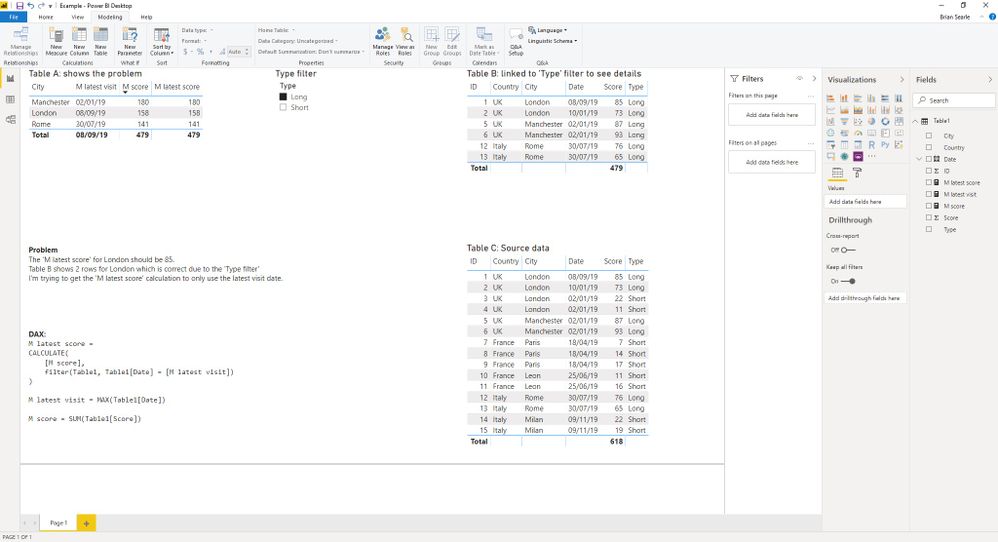
I'm trying to create a dynamic filter that works with a measure but can't get it working. I've put together a test jig to show the problem
Any help will be gratefully received
Thanks, Brian
Solved! Go to Solution.
Try
Measure 3 =
VAR __date = MAX ( Table1[DATE] )
VAR __city = CALCULATE ( MAX( Table1[CITY]), ALLSELECTED ( Table1 ), Table1[DATE] = __date )
RETURN CALCULATE ( [M Score] ), VALUES ( Table1[CITY] ), Table1[CITY] = __city, Table1[DATE] = __date )
Appreciate your Kudos. In case, this is the solution you are looking for, mark it as the Solution. In case it does not help, please provide additional information and mark me with @
Thanks. My Recent Blog -
Winner-Topper-on-Map-How-to-Color-States-on-a-Map-with-Winners , HR-Analytics-Active-Employee-Hire-and-Termination-trend
Power-BI-Working-with-Non-Standard-Time-Periods And Comparing-Data-Across-Date-Ranges
Connect on Linkedin
Hi @amitchandak
Well done and thank you.
Playing around with the code I found I didn't need the reference to City and the cause of the problem was that I needed to have the 'latest visit date' not as a separate measure but as a variable in the main measure. Not sure I fully understand this yet, need to do some more experimenting!
Thanks
Brian
Try:
M latest score =
CALCULATE ([M score],
FILTER(ALL(table1),
table1[date] = [M latest visit]))
Proud to be a Super User!
Paul on Linkedin.
Hi @PaulDBrown
Thank you for your reply.
This didn't work. It seems to be something to do with the latest visit date being a separate measure, if it's a variable in the main measure it works.
Thanks, Brian
Try
Measure 3 =
VAR __date = MAX ( Table1[DATE] )
VAR __city = CALCULATE ( MAX( Table1[CITY]), ALLSELECTED ( Table1 ), Table1[DATE] = __date )
RETURN CALCULATE ( [M Score] ), VALUES ( Table1[CITY] ), Table1[CITY] = __city, Table1[DATE] = __date )
Appreciate your Kudos. In case, this is the solution you are looking for, mark it as the Solution. In case it does not help, please provide additional information and mark me with @
Thanks. My Recent Blog -
Winner-Topper-on-Map-How-to-Color-States-on-a-Map-with-Winners , HR-Analytics-Active-Employee-Hire-and-Termination-trend
Power-BI-Working-with-Non-Standard-Time-Periods And Comparing-Data-Across-Date-Ranges
Connect on Linkedin
Hi @amitchandak
Well done and thank you.
Playing around with the code I found I didn't need the reference to City and the cause of the problem was that I needed to have the 'latest visit date' not as a separate measure but as a variable in the main measure. Not sure I fully understand this yet, need to do some more experimenting!
Thanks
Brian
If you have recently started exploring Fabric, we'd love to hear how it's going. Your feedback can help with product improvements.
A new Power BI DataViz World Championship is coming this June! Don't miss out on submitting your entry.
Share feedback directly with Fabric product managers, participate in targeted research studies and influence the Fabric roadmap.
| User | Count |
|---|---|
| 53 | |
| 40 | |
| 38 | |
| 19 | |
| 18 |
| User | Count |
|---|---|
| 70 | |
| 69 | |
| 34 | |
| 33 | |
| 30 |