cancel
Showing results for 
Search instead for 
Did you mean: 

The Power BI Data Visualization World Championships is back! Get ahead of the game and start preparing now! Learn more

Reply
MorganeLachuer
New Member

Problem with a calculation

Hi,


I have a problem in one of my calculation.


I have 2 tables connected to Power BI. One table contains my clients with their billing mode (table 1) and the other table (table 2) contains the transaction of each client.


Depending of the billing mode, I need to add several columns in table 2. For exemple, if the billing mode is Bundle, I have to add Interchange amount and volume amount. If the billing mode is IC, i have to add interchange and CSF amount.


For the moment, I created this calculation:

SWITCH(TRUE();accountBillingData[mode]="Bundle";SUM(transactionFees[InterchangeAmount]+SUM(transactionsFees[VolumeAmount]))


But the amount is not correct. I think Power BI recovers the total sum of interchange and volume and multiplies the result by the number of customers.


Do you have any idea what's wrong?


Best Regards;


Morgane


1 ACCEPTED SOLUTION
v-xuding-msft
Community Support
Community Support

Hi @MorganeLachuer ,

By my test, you need to add a ALL function in the measure. the following is my sample you can have a try.


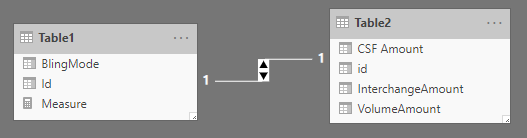
I have two tables. And there is a one-to-one relationship based on the column of id between them.

Capture.PNG

Measure =

SWITCH (

    TRUE (),

    MAX ( Table1[BlingMode] ) = "Bundle", SUMX ( Table2, Table2[InterchangeAmount] + Table2[VolumeAmount] ),

    MAX ( Table1[BlingMode] ) = "IC", SUMX ( Table2, Table2[CSF Amount] + Table2[InterchangeAmount] )

)

0.jpg

If the result is not what you want, please post your sample data and the expected output.


Best Regards,

Xue Ding


If this post helps, then please consider Accept it as the solution to help the other members find it more quickly.


Best Regards,
Xue Ding
If this post helps, then please consider Accept it as the solution to help the other members find it more quickly.

View solution in original post

1 REPLY 1
v-xuding-msft
Community Support
Community Support

Hi @MorganeLachuer ,

By my test, you need to add a ALL function in the measure. the following is my sample you can have a try.


I have two tables. And there is a one-to-one relationship based on the column of id between them.

Capture.PNG

Measure =

SWITCH (

    TRUE (),

    MAX ( Table1[BlingMode] ) = "Bundle", SUMX ( Table2, Table2[InterchangeAmount] + Table2[VolumeAmount] ),

    MAX ( Table1[BlingMode] ) = "IC", SUMX ( Table2, Table2[CSF Amount] + Table2[InterchangeAmount] )

)

0.jpg

If the result is not what you want, please post your sample data and the expected output.


Best Regards,

Xue Ding


If this post helps, then please consider Accept it as the solution to help the other members find it more quickly.


Best Regards,
Xue Ding
If this post helps, then please consider Accept it as the solution to help the other members find it more quickly.

Helpful resources

Announcements
Power BI DataViz World Championships

Power BI Dataviz World Championships

The Power BI Data Visualization World Championships is back! Get ahead of the game and start preparing now!

December 2025 Power BI Update Carousel

Power BI Monthly Update - December 2025

Check out the December 2025 Power BI Holiday Recap!

FabCon Atlanta 2026 carousel

FabCon Atlanta 2026

Join us at FabCon Atlanta, March 16-20, for the ultimate Fabric, Power BI, AI and SQL community-led event. Save $200 with code FABCOMM.