Join us at FabCon Atlanta from March 16 - 20, 2026, for the ultimate Fabric, Power BI, AI and SQL community-led event. Save $200 with code FABCOMM.
Register now!The Power BI Data Visualization World Championships is back! It's time to submit your entry. Live now!
I'm strugling with DAX, I have been trying to create a New Column that
I have been using unsucessfully trying
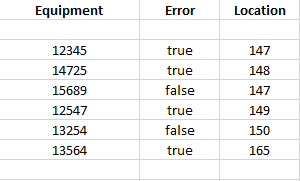
for more info, here ist the subset of the tabel equipments:
Any help is greatly appreciated.
First, from your data, I believe that you have 4 "true" values, not 3.
You should be able to simply create a table where you put "Error" and the Equipment and then change Equipment to be "Count of Equipment" from the drop-down for the field in the Visualizations pane.
Similarly, you could create a table and put Error into it and then put Location as well and then swithc Location to be "Count of Location" and then change the "Show value as" to "Percent of grand total".
The Power BI Data Visualization World Championships is back! It's time to submit your entry.
Check out the January 2026 Power BI update to learn about new features.
| User | Count |
|---|---|
| 60 | |
| 41 | |
| 27 | |
| 25 | |
| 23 |
| User | Count |
|---|---|
| 127 | |
| 109 | |
| 55 | |
| 39 | |
| 33 |