cancel
Showing results for 
Search instead for 
Did you mean: 

The Power BI Data Visualization World Championships is back! Get ahead of the game and start preparing now! Learn more

Reply
didi42
Frequent Visitor

Problem to allign 'Time intelligence' measures with text fields

Hello,


I am struggling with a problem, which seems very basic but for which I cannot find any solution and would really appreciate your help.


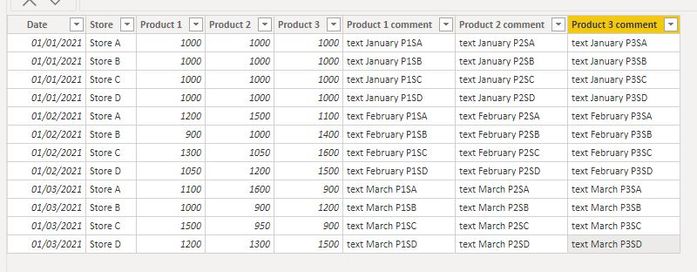
  • I have a simple data set of sales of product per store and per dates, as well as text comment for each product sale
Capture1.JPG

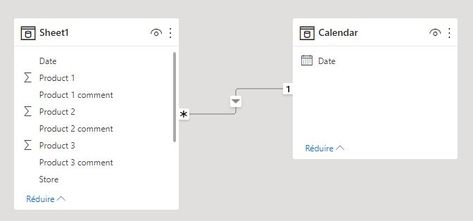
  •  This set is linked to a calendar table created with CALENDAR() function
CALENDAR(Date(2021,01,01),Date(2021,12,31))
Capture2.JPG

  • I added one measure to return the previous mont sales and one to return the variation between 2 months
Previousmonth Product1 = CALCULATE(SUM(Sheet1[Product 1]),PREVIOUSMONTH('Calendar'[Date].[Date]))
Previousmonth variation product1 = SUM(Sheet1[Product 1])-[Previousmonth Product1]


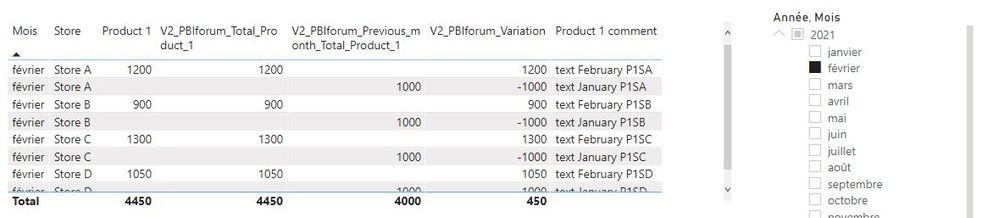
The measures are working properly but I am facing problems when I want to display them in a table alligned with the text comment column of the data set. I can display correctly a table with the current sales and variation for each store and another table with the current sales and comments for each store but I am not able to have everything shown properly in a single table (Current and previous month do not allign anymore, variation is not calculated in one row, and comments of previous month are also shown, irrespective of the date filter applied...)
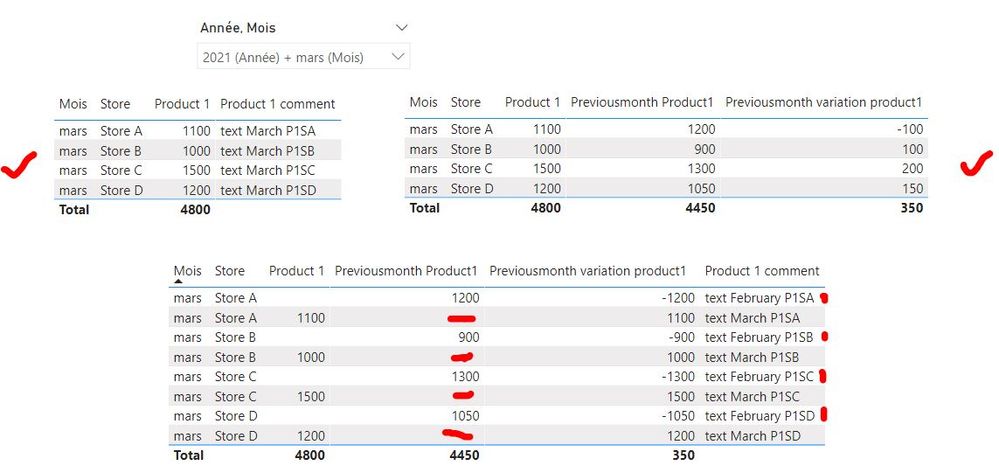
Capture3.JPG


Would you have an idea of what I am doing wrong ?


Thanks in advance for your help.

1 ACCEPTED SOLUTION

Hello,


Thanks for taking the time to answer me. I tried to modify the measures with the one you provided me, however, I'm still facing the same issue.Capture4.JPG


My basic understanding would be that, since with my measures "call" values from past month, then the text fields of previous month are also displayed.

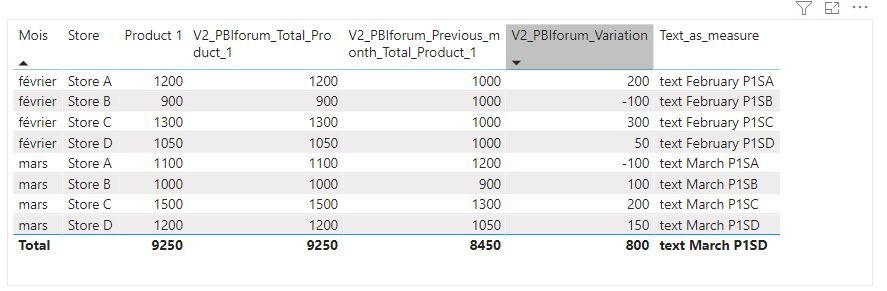
EDIT :I found a small trick which seems to work : Make a measure from my text.


Text_as_measure = Calculate(MAX(Sheet1[Product 1 comment]))


Capture7.JPG


This way ,measures are shown correctly in one row and then everything is alligned


Is it a correct way to do it, or could I improve it ?

View solution in original post

2 REPLIES 2
Anonymous
Not applicable

Hi, 

You can try this 

1. Create a measure for the total of Product 1,   Total_Product_1 = SUM(your_table[Product 1])
2. Create 2nd measure for the previous month Product 1, Previous_month_Total_Product_1= 

    Calculate([Total_Product_1],DATEADD('CALENDAR'[Date],-1,MONTH))
3. Create Variation Measure  Variation = [Previous_month_Total_Product_1]-[Total_Product_1]
 
4. Use calander slicer for changing month

Hello,


Thanks for taking the time to answer me. I tried to modify the measures with the one you provided me, however, I'm still facing the same issue.Capture4.JPG


My basic understanding would be that, since with my measures "call" values from past month, then the text fields of previous month are also displayed.

EDIT :I found a small trick which seems to work : Make a measure from my text.


Text_as_measure = Calculate(MAX(Sheet1[Product 1 comment]))


Capture7.JPG


This way ,measures are shown correctly in one row and then everything is alligned


Is it a correct way to do it, or could I improve it ?

Helpful resources

Announcements
Power BI DataViz World Championships

Power BI Dataviz World Championships

The Power BI Data Visualization World Championships is back! Get ahead of the game and start preparing now!

December 2025 Power BI Update Carousel

Power BI Monthly Update - December 2025

Check out the December 2025 Power BI Holiday Recap!

FabCon Atlanta 2026 carousel

FabCon Atlanta 2026

Join us at FabCon Atlanta, March 16-20, for the ultimate Fabric, Power BI, AI and SQL community-led event. Save $200 with code FABCOMM.