Don't miss your chance to take the Fabric Data Engineer (DP-600) exam for FREE! Find out how by watching the DP-600 session on-demand now through April 28th.
Learn moreJoin the FabCon + SQLCon recap series. Up next: Power BI, Real-Time Intelligence, IQ and AI, and Data Factory take center stage. All sessions are available on-demand after the live show. Register now
My dashboard users should be able to export or print the reports from the platform. We’re using a combination of graphs, tables and slicers in the report in question. The standard browser print only prints the information present on the slicer tab that is selected. The information for the unselected slicer tabs is lost. The same happens when trying to export the information in PDF. The ask is to be able to export or print the data from all tables, graphs and slicer tabs (selected and unselected) at one go.
Solved! Go to Solution.
hi @Anonymous ,
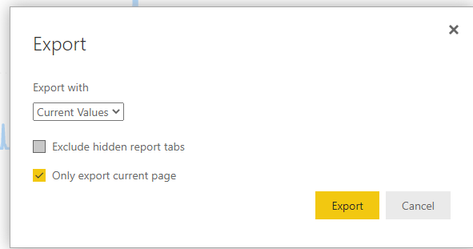
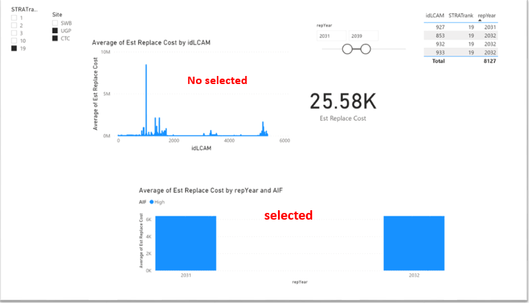
According to my understanding, export to powerpoint is a good way. After selecting "only export current page" to export successfully, the selected and no select results will be retained. I did a test, the reference is as follows:
related document link:
Export entire reports to PowerPoint - Power BI | Microsoft Docs
Best Regards,
Henry
If this post helps, then please consider Accept it as the solution to help the other members find it more quickly.
hi @Anonymous ,
According to my understanding, export to powerpoint is a good way. After selecting "only export current page" to export successfully, the selected and no select results will be retained. I did a test, the reference is as follows:
related document link:
Export entire reports to PowerPoint - Power BI | Microsoft Docs
Best Regards,
Henry
If this post helps, then please consider Accept it as the solution to help the other members find it more quickly.
@Anonymous , You can create a bookmark to clear the selection from all slicers and then print. If the ask is to print by removing all the filters
Thanks @amitchandak.
What I realised is, we are using EMBEDDED capacity of PBI. Full export including all tables, graphs and slicer tabs is not possible in Power BI I beleive and for that matter with any BI tool as per my knowledge, there are some restrictions when exporting the data from visuals.
Microsoft has a different tool (Power BI Report Builder), which allows a lot more export capabilities. However cannot use this currently on the Embedded. Still keep on searching for the solution, I am..
Check out the April 2026 Power BI update to learn about new features.
If you have recently started exploring Fabric, we'd love to hear how it's going. Your feedback can help with product improvements.
A new Power BI DataViz World Championship is coming this June! Don't miss out on submitting your entry.
| User | Count |
|---|---|
| 48 | |
| 40 | |
| 38 | |
| 20 | |
| 17 |
| User | Count |
|---|---|
| 68 | |
| 65 | |
| 30 | |
| 26 | |
| 25 |