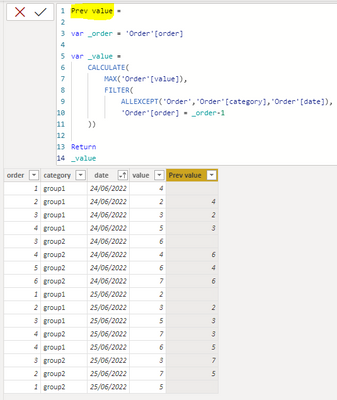
Hello,
I want to have a dax column based on a specific criteria. I have this sample table with output column name of DAX_column_previous_value.
let
Source = Table.FromRows(Json.Document(Binary.Decompress(Binary.FromText("fdBLCsAgDATQu7hW0JjoYcR1ly2F3r9aVPylUKHCY0wmBGGEFMd9Plf+AVTaKdAA6YLp5C/KIIBVTWZmWWYL/RiyjAod02BmrhsNWYVVZka/YW0DxzLfp42t0dTHvjXi6rAsG+oYF6VptJUtaa4kbsqdZ/PLCttHW5phGdU+4gs=", BinaryEncoding.Base64), Compression.Deflate)), let _t = ((type nullable text) meta [Serialized.Text = true]) in type table [order = _t, category = _t, date = _t, value = _t, DAX_column_previous_value = _t, #".." = _t]),
#"Changed Type with Locale" = Table.TransformColumnTypes(Source, {{"date", type date}}, "en-GB"),
#"Changed Type" = Table.TransformColumnTypes(#"Changed Type with Locale",{{"order", Int64.Type}, {"category", type text}, {"date", type date}, {"value", Int64.Type}, {"DAX_column_previous_value", Int64.Type}, {"..", type text}})
in
#"Changed Type"
It's a dataset with a sequency (called "order") with a value. This should be "grouped by" the columns category and date. The DAX calculated column should output the value of the previous order in the combination of group and date.
So if the order is 5 it should take the value for the row with order 4. If 4 doesn't exist, it should take the value for the row with order 3. That all should happen within a specific group which are based on category and date. The lowest value in a group has no previous order, so that one is always empty.
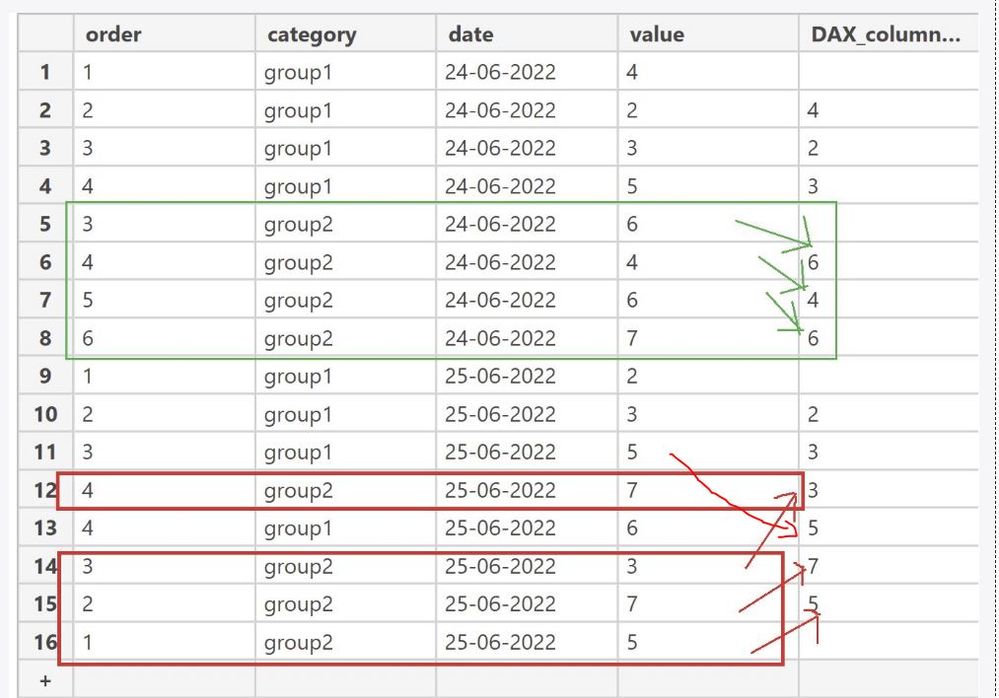
I have attached the requirement above and what criteria it should follow. Kindly help me ge the DAX code for the column.
It would be appreciated.
Thank you