Don't miss your chance to take the Fabric Data Engineer (DP-700) exam on us!
Learn moreNext up in the FabCon + SQLCon recap series: The roadmap for Microsoft SQL and Maximizing Developer experiences in Fabric. All sessions are available on-demand after the live show. Register now
Hello,
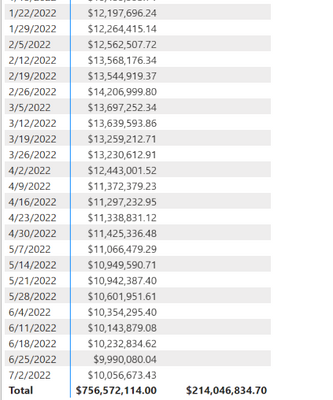
I am trying to create a measure to show last year's sales which i will use to calculate YoY growth. When i put this in a table format i can tell there is an issue because the LY values do not show next to the CY values. Looked around at other code and can't seem to get it to show . What's weird is their is a LY total amount appearing. Any guidance is appreciated, thank you.
DAX code:
Solved! Go to Solution.
Hi @jlandsm4785 ,
I created some data:
Here are the steps you can follow:
1. Create measure.
LY =
CALCULATE(
SUM('Table'[Amount]),FILTER(ALL('Table'),
'Table'[Date]>=DATE(YEAR(MAX('Table'[Date]))-1,1,1)&&'Table'[Date]<=DATE(YEAR(MAX('Table'[Date]))-1,MONTH(MAX('Table'[Date])),DAY(MAX('Table'[Date])))
))CY =
CALCULATE(
SUM('Table'[Amount]),FILTER(ALL('Table'),
'Table'[Date]>=DATE(YEAR(MAX('Table'[Date])),1,1)&&'Table'[Date]<=MAX('Table'[Date])))
2. Result:
If you need pbix, please click here.
Best Regards,
Liu Yang
If this post helps, then please consider Accept it as the solution to help the other members find it more quickly
Hi @jlandsm4785 ,
I created some data:
Here are the steps you can follow:
1. Create measure.
LY =
CALCULATE(
SUM('Table'[Amount]),FILTER(ALL('Table'),
'Table'[Date]>=DATE(YEAR(MAX('Table'[Date]))-1,1,1)&&'Table'[Date]<=DATE(YEAR(MAX('Table'[Date]))-1,MONTH(MAX('Table'[Date])),DAY(MAX('Table'[Date])))
))CY =
CALCULATE(
SUM('Table'[Amount]),FILTER(ALL('Table'),
'Table'[Date]>=DATE(YEAR(MAX('Table'[Date])),1,1)&&'Table'[Date]<=MAX('Table'[Date])))
2. Result:
If you need pbix, please click here.
Best Regards,
Liu Yang
If this post helps, then please consider Accept it as the solution to help the other members find it more quickly
@jlandsm4785 the basic rule of using TIMEINTELLIGANCE functions is, it requires continous dates.
So what you can do is, Use Calenderauto() or calender function and create the date table.
Create a relationship to this table on WeekEnding.
And then
use below dax.
LY_Spread = CALCULATE([Core Spread] , SAMEPERIODLASTYEAR(DateTable[Date]))
Use that Datetable date column in visual along with this measure.
Let me know if that helps.
Update:
After thinking about this more i believe that the error is caused from the column being based off of Week Ending dates, so looking a year back will not generate a sales value to appear because the date it is looking to match with is not exact. I tried using the DATEADD function to shift the previous year value forward + 1 day. Still having issues, but this feels closer to a solution.
DAX:
Any guidance forward is appreciated.
If you have recently started exploring Fabric, we'd love to hear how it's going. Your feedback can help with product improvements.
A new Power BI DataViz World Championship is coming this June! Don't miss out on submitting your entry.
Share feedback directly with Fabric product managers, participate in targeted research studies and influence the Fabric roadmap.
| User | Count |
|---|---|
| 50 | |
| 44 | |
| 41 | |
| 18 | |
| 18 |
| User | Count |
|---|---|
| 69 | |
| 68 | |
| 32 | |
| 32 | |
| 32 |