FabCon is coming to Atlanta
Join us at FabCon Atlanta from March 16 - 20, 2026, for the ultimate Fabric, Power BI, AI and SQL community-led event. Save $200 with code FABCOMM.
Register now!- Power BI forums
- Get Help with Power BI
- Desktop
- Service
- Report Server
- Power Query
- Mobile Apps
- Developer
- DAX Commands and Tips
- Custom Visuals Development Discussion
- Health and Life Sciences
- Power BI Spanish forums
- Translated Spanish Desktop
- Training and Consulting
- Instructor Led Training
- Dashboard in a Day for Women, by Women
- Galleries
- Data Stories Gallery
- Themes Gallery
- Contests Gallery
- QuickViz Gallery
- Quick Measures Gallery
- Visual Calculations Gallery
- Notebook Gallery
- Translytical Task Flow Gallery
- TMDL Gallery
- R Script Showcase
- Webinars and Video Gallery
- Ideas
- Custom Visuals Ideas (read-only)
- Issues
- Issues
- Events
- Upcoming Events
The Power BI Data Visualization World Championships is back! It's time to submit your entry. Live now!
- Power BI forums
- Forums
- Get Help with Power BI
- Desktop
- Previous Week Sum Measure
- Subscribe to RSS Feed
- Mark Topic as New
- Mark Topic as Read
- Float this Topic for Current User
- Bookmark
- Subscribe
- Printer Friendly Page


- Mark as New
- Bookmark
- Subscribe
- Mute
- Subscribe to RSS Feed
- Permalink
- Report Inappropriate Content
Previous Week Sum Measure
Hi, I'm a fairly new Power BI user and am having a problem calculating a measure for a Matrix visual.
My aim is to calculate the previous weeks miles for each business division in a Matrix. My current function calculates the total previous week miles. However, I need it to calculate the previous weeks miles for each business division.

Solved! Go to Solution.
- Mark as New
- Bookmark
- Subscribe
- Mute
- Subscribe to RSS Feed
- Permalink
- Report Inappropriate Content
HI @clarkey1988,
I think you also need to consider about the year conversion issue, so I added if statement your formula to dispatch to two conditions based on current week number that extract from your table date fields. (I add one additional condition to your formula to filter records based on the year and week number, it will be filtered more accurately if your table contains many year records)
You can try it if below formula meets to your requirement:
Previous Week =
VAR currDate =
    MAX ( 'Trip Detail'[date] )
RETURN
    CALCULATE (
        SUM ( 'Trip Detail'[Miles] ),
        FILTER (
            ALLSELECTED ( 'Trip Detail' ),
            IF (
                weekNumber > 1,
                YEAR ( 'Trip Detail'[Date] ) = YEAR ( currDate )
                    && WEEKNUM ( 'Trip Detail'[Date] )
                        = WEEKNUM ( currDate ) - 1,
                YEAR ( 'Trip Detail'[Date] )
                    = YEAR ( currDate ) - 1
                    && WEEKNUM ( 'Trip Detail'[Date] )
                        = WEEKNUM ( DATE ( YEAR ( currDate ) - 1, 12, 31 ) )
            )
        ),
        VALUES ( 'Trip Detail'[Business Division] )
    )
Regards,
Xiaoxin Sheng
- Mark as New
- Bookmark
- Subscribe
- Mute
- Subscribe to RSS Feed
- Permalink
- Report Inappropriate Content
Thank you all for your responses!


- Mark as New
- Bookmark
- Subscribe
- Mute
- Subscribe to RSS Feed
- Permalink
- Report Inappropriate Content

- Mark as New
- Bookmark
- Subscribe
- Mute
- Subscribe to RSS Feed
- Permalink
- Report Inappropriate Content
You don't need ALLSELECTED. What is your current week measure?
You probably only need something along the lines of:
Previous week = CALCULATE(SUM('Trip Detail'[Miles]),
FILTER(ALL('Trip Detail'),
'Trip Detail'[Week Number]=MAX('Trip Detail'[Week Number])-1))
If there are other row contexts (nested for example) you might need ALLEXCEPT
Something along the lines of:
Previous week = CALCULATE(SUM('Trip Detail'[Miles]),
(FILTER(ALLEXCEPT('Table, Table[Business Division]'),'Trip Detail'[Week Number]=MAX('Trip Detail'[Week Number])-1)))
Did I answer your question? Mark my post as a solution!
In doing so, you are also helping me. Thank you!
Proud to be a Super User!
Paul on Linkedin.
- Mark as New
- Bookmark
- Subscribe
- Mute
- Subscribe to RSS Feed
- Permalink
- Report Inappropriate Content
Hi @PaulDBrown
Thanks for responding. My current measure is simply the sum of the current weeks miles/sum of week 10 miles (pre COVID)
However, I need it to be week over week and not specific to week 10. I have two filters within the Matrix, but it seems the measure you listed without ALLSELECTED still sums the TOTAL miles, and does not break it out by business division. The business division is a column I added and made into an if statement.
- Mark as New
- Bookmark
- Subscribe
- Mute
- Subscribe to RSS Feed
- Permalink
- Report Inappropriate Content
@clarkey1988
Hi again,
You probably need to include the fweek number in the ALL clause:
Previous week = CALCULATE(SUM('Trip Detail'[Miles]),
FILTER(ALL('Trip Detail'[Week Number]),
'Trip Detail'[Week Number]=MAX('Trip Detail'[Week Number])-1))
Otherwise try with the second option I posted using ALLEXCEPT, see if that works.
Did I answer your question? Mark my post as a solution!
In doing so, you are also helping me. Thank you!
Proud to be a Super User!
Paul on Linkedin.
- Mark as New
- Bookmark
- Subscribe
- Mute
- Subscribe to RSS Feed
- Permalink
- Report Inappropriate Content
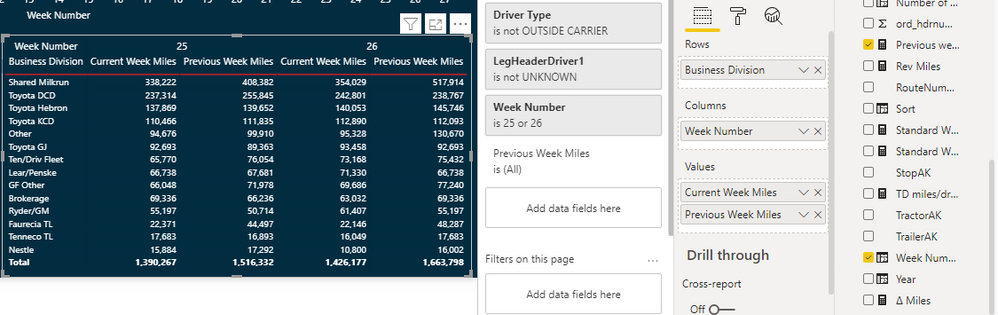
@PaulDBrown so I think I'm close. The first optuion did not work
The ALLEXCEPT version below calculatues the previous weeks miles by business division accurately. However, it does not take into considertation the two filters I have in the matrix.
- Mark as New
- Bookmark
- Subscribe
- Mute
- Subscribe to RSS Feed
- Permalink
- Report Inappropriate Content
HI @clarkey1988,
I think you also need to consider about the year conversion issue, so I added if statement your formula to dispatch to two conditions based on current week number that extract from your table date fields. (I add one additional condition to your formula to filter records based on the year and week number, it will be filtered more accurately if your table contains many year records)
You can try it if below formula meets to your requirement:
Previous Week =
VAR currDate =
    MAX ( 'Trip Detail'[date] )
RETURN
    CALCULATE (
        SUM ( 'Trip Detail'[Miles] ),
        FILTER (
            ALLSELECTED ( 'Trip Detail' ),
            IF (
                weekNumber > 1,
                YEAR ( 'Trip Detail'[Date] ) = YEAR ( currDate )
                    && WEEKNUM ( 'Trip Detail'[Date] )
                        = WEEKNUM ( currDate ) - 1,
                YEAR ( 'Trip Detail'[Date] )
                    = YEAR ( currDate ) - 1
                    && WEEKNUM ( 'Trip Detail'[Date] )
                        = WEEKNUM ( DATE ( YEAR ( currDate ) - 1, 12, 31 ) )
            )
        ),
        VALUES ( 'Trip Detail'[Business Division] )
    )
Regards,
Xiaoxin Sheng
- Mark as New
- Bookmark
- Subscribe
- Mute
- Subscribe to RSS Feed
- Permalink
- Report Inappropriate Content
Hi @Anonymous , your answer helped with my Last Calendar week Orders calculation.I am struggling to calculate orders for Last 4 Calendar weeks. Any help with that will be greatly appreciated.
- Mark as New
- Bookmark
- Subscribe
- Mute
- Subscribe to RSS Feed
- Permalink
- Report Inappropriate Content
Ok, so we are getting close...
Something which I din't ask, and is actually very important (for many reasons, including these kind of calculations): do you have a calendar or Date table?
If not, please create one and link it to your tables in one-to-many relationship.
(As regards the measure not taking into account the filters, it's hard to see what's going on without knowing what/if tables & relationships you are enacting in the filters...).
Ps, it would be very helpful if you could provide a sample PBIX file/sample data (with fake data of need be) to work on!
Did I answer your question? Mark my post as a solution!
In doing so, you are also helping me. Thank you!
Proud to be a Super User!
Paul on Linkedin.

Helpful resources

Power BI Dataviz World Championships
The Power BI Data Visualization World Championships is back! It's time to submit your entry.

Power BI Monthly Update - January 2026
Check out the January 2026 Power BI update to learn about new features.

FabCon Atlanta 2026
Join us at FabCon Atlanta, March 16-20, for the ultimate Fabric, Power BI, AI and SQL community-led event. Save $200 with code FABCOMM.

| User | Count |
|---|---|
| 69 | |
| 45 | |
| 36 | |
| 28 | |
| 23 |


| User | Count |
|---|---|
| 142 | |
| 124 | |
| 59 | |
| 40 | |
| 32 |


