cancel
Showing results for 
Search instead for 
Did you mean: 

The Power BI Data Visualization World Championships is back! It's time to submit your entry. Live now!

Reply
Anonymous
Not applicable

Preview Features

Hello,


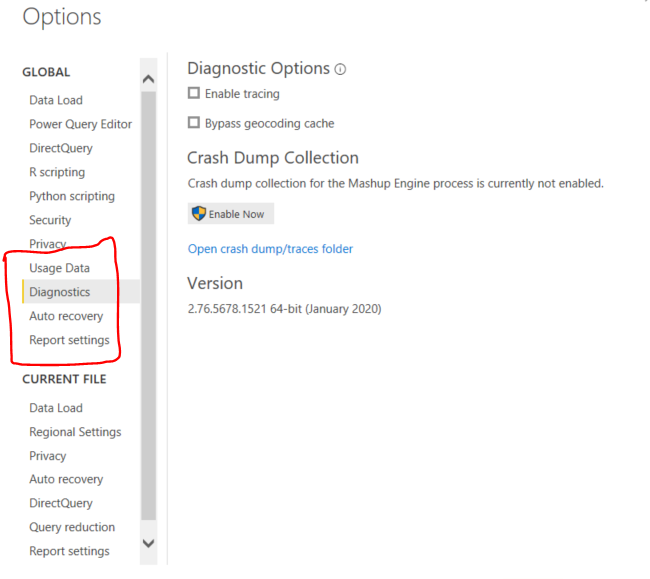
I am using Power BI desktop version 2.76.5678.1521 64-bit (January 2020). I am trying to create shape maps however the first step to enable shape map visualisations is not possible as I don't seem to have the Preview Features options. Could someone help me out on what must be done so I could create a shape map?

Thanks a lot !

Capture.PNG


3 REPLIES 3
Anonymous
Not applicable

@Anonymous 

Please download and install the latest desktop version here.


Regards
Paul

amitchandak
Super User
Super User

@Anonymous , Are you still on Jan release. In case you are not the new release. Then you will not see the preview feature which is not in preview now.

Share with Power BI Enthusiasts: Full Power BI Video (20 Hours) YouTube
Microsoft Fabric Series 60+ Videos YouTube
Microsoft Fabric Hindi End to End YouTube
Greg_Deckler
Community Champion
Community Champion

@Anonymous - That's really odd. I don't have that version of the desktop to test with. I would recommend updating to the latest version of the Desktop.


Follow on LinkedIn
@ me in replies or I'll lose your thread!!!
Instead of a Kudo, please vote for this idea
Become an expert!: Enterprise DNA
External Tools: MSHGQM
YouTube Channel!: Microsoft Hates Greg
Latest book!:
DAX For Humans

DAX is easy, CALCULATE makes DAX hard...

Helpful resources

Announcements
Power BI DataViz World Championships

Power BI Dataviz World Championships

The Power BI Data Visualization World Championships is back! It's time to submit your entry.

January Power BI Update Carousel

Power BI Monthly Update - January 2026

Check out the January 2026 Power BI update to learn about new features.

FabCon Atlanta 2026 carousel

FabCon Atlanta 2026

Join us at FabCon Atlanta, March 16-20, for the ultimate Fabric, Power BI, AI and SQL community-led event. Save $200 with code FABCOMM.