
Join us at FabCon Atlanta from March 16 - 20, 2026, for the ultimate Fabric, Power BI, AI and SQL community-led event. Save $200 with code FABCOMM.
Register now!The Power BI Data Visualization World Championships is back! It's time to submit your entry. Live now!
Hello,
I noticed that when using DirectQuery or Live Connection the 'Modelling' tab is not available in Power BI.
Somehow however Power BI changed the data format it receives, for example changes DATE format to DATETIME format (what can mess up visual legend or axis) as well as it does not allow to display WebURLs as Icon (because the format of a hyperlink is not WebUrl) and it does not allow accessing Modelling tab to get those things fixed.
The output format in the datasource is definitely set up as the expected format in PowerBI (however it sill happens)
Any ideas why is this happening or what is the workaround?
Best regards,
Artur
Hi @Anonymous
when you click on the column in question you should get extra ribbons that will allow you to adjust thew formats
Hello Mariusz,
I do not get that Ribbon, how do I enable it?
That's what I see:
@Anonymous , please find the link : https://docs.microsoft.com/en-us/power-bi/desktop-ribbon
How to enable it
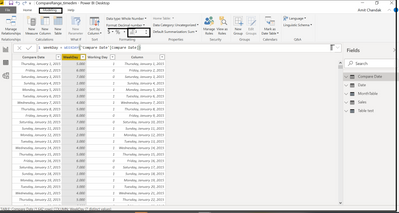
The functionalities of Data Category/Format change are still disabled:
In this blog, I show how to change the data type in direct query. You should also able to change data format at the same place
Appreciate your Kudos.
The Power BI Data Visualization World Championships is back! It's time to submit your entry.
Check out the January 2026 Power BI update to learn about new features.
| User | Count |
|---|---|
| 61 | |
| 48 | |
| 35 | |
| 25 | |
| 23 |
| User | Count |
|---|---|
| 132 | |
| 105 | |
| 59 | |
| 39 | |
| 31 |