cancel
Showing results for 
Search instead for 
Did you mean: 

Try your skills in the Power BI Dataviz World Championship! Round one ends June 26. Join now

Reply
Anonymous
Not applicable

PowerBI Filtering

I am new to PowerBI so this might be a quick fix - I just can't see it. 


I have one set of data for products manufactured in a bar graph. Each product has a set of features (about 5 or 6 per product). With all the data there will be about 6 products but 30+ features making the bar graph look crowded. 


What I want to do is filter to product 1 then only see the 5/6 features associated with it. Currently it's only shading in the columns but leaving the ones with no data. 

1 ACCEPTED SOLUTION
Anonymous
Not applicable

Hi @Anonymous,


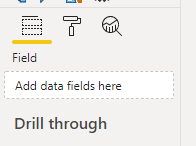
You can choose which visual you want your slicer to control. To to this click on your slicer, go to the Format tab, and on the left you can see the Edit interactions button. Click on that and then two icons will appear above all the visuals:

laurinyeczm_0-1595930782986.png If the left one is selected on a visual it means that your selected slicer controls that visual if the right one is selected it doesn't. Select the right one for all visuals except for the one you want your slicer to control.

View solution in original post

6 REPLIES 6
Anonymous
Not applicable

Hi @Anonymous ,


Check the document about slicer in power bi.

https://docs.microsoft.com/en-us/power-bi/visuals/power-bi-visualization-slicers

And the document about interactions between visuals.

https://docs.microsoft.com/en-us/power-bi/create-reports/service-reports-visual-interactions


Best Regards,

Jay

Tahreem24
Super User
Super User

@Anonymous ,

If you want Slicer only interact with your one bar graph so Take the Product and Feature in separate  Slicer and use the Edit Interaction feature which enable these Slicer to work only with your bar graph and inactive for rest of the page.

https://radacad.com/control-the-interaction-in-power-bi-report


Don't forget to give thumbs up and accept this as a solution if it helped you!!!

Please take a quick glance at newly created dashboards : Restaurant Management Dashboard , HR Analytics Report , Hotel Management Report, Sales Analysis Report , Fortune 500 Companies Analysis , Revenue Tracking Dashboard
amitchandak
Super User
Super User

@Anonymous ,The information you have provided is not making the problem clear to me. Can you please explain with an example.
Can you share sample data and sample output in table format?
Appreciate your Kudos.

Share with Power BI Enthusiasts: Full Power BI Video (20 Hours) YouTube
Microsoft Fabric Series 60+ Videos YouTube
Microsoft Fabric Hindi End to End YouTube
Anonymous
Not applicable

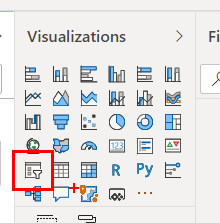
Click the following icon. 

Karlos_0-1595925108304.png


This will give you the slicer visual, Then add/drag "Products" to the values field. 

Karlos_0-1595925272046.png

This should allow you to quickly filter by product. 


Anonymous
Not applicable

This will filter all the graphs on the page not just the features graph that I want. I still can't see an option to do this?

Anonymous
Not applicable

Hi @Anonymous,


You can choose which visual you want your slicer to control. To to this click on your slicer, go to the Format tab, and on the left you can see the Edit interactions button. Click on that and then two icons will appear above all the visuals:

laurinyeczm_0-1595930782986.png If the left one is selected on a visual it means that your selected slicer controls that visual if the right one is selected it doesn't. Select the right one for all visuals except for the one you want your slicer to control.

Helpful resources

Announcements
Fabric Data Days is here Carousel

Fabric Data Days 2026

Don't miss out on Data Days, June 15 through August 7. Learn Fabric, Power BI, SQL, AI and more.

Power BI DataViz World Championships carousel

Power BI DataViz World Championships - June 2026

A new Power BI DataViz World Championship is coming this June! Don't miss out on submitting your entry.