cancel
Showing results for 
Search instead for 
Did you mean: 

The Power BI Data Visualization World Championships is back! Get ahead of the game and start preparing now! Learn more

Reply
mak
Helper I
Helper I

PowerBI Embedded problem with Direct Query on Azure SQL


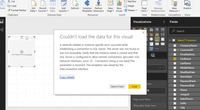
I am getting DB erros while trying to display the data on PowerBI Desktop. Attached is the Picture which shows the Issue


Below is my setup

1. Azure SQL DB  with open firewall (0.0.0.0 to 254.254.254.254)

2. Connecting to my PowerBI Desktop in Direct Query Mode

3. Using the Sales LT Database


It connects to the database well, also shows a preview of data but when I try to render I get a connection error. Not sure what the issue is ? Have tried lots of combinations but still no success.


Screen Shot 2017-02-14 at 12.44.29 PM.png

1 ACCEPTED SOLUTION
ElliotP
Post Prodigy
Post Prodigy

I've found this sometimes happens for the first one or two times when you try to access an azure database that hasn't been pulled from in a little bit (few hours to 10hrs+). Try refreshing the query in the query editor and the report view a few times and that should solve the issue.


If that doesn't fix it, I would check that you can form a new query to the server as to check your details and credentials are correct.


If you find you can create a new query that works, yet the old ones do not, then it might be worth taking a look to see why that query is having specific trouble pulling from the database with its setup.

View solution in original post

3 REPLIES 3
ElliotP
Post Prodigy
Post Prodigy

I've found this sometimes happens for the first one or two times when you try to access an azure database that hasn't been pulled from in a little bit (few hours to 10hrs+). Try refreshing the query in the query editor and the report view a few times and that should solve the issue.


If that doesn't fix it, I would check that you can form a new query to the server as to check your details and credentials are correct.


If you find you can create a new query that works, yet the old ones do not, then it might be worth taking a look to see why that query is having specific trouble pulling from the database with its setup.

Elliot


Thank you, I think that was the problem, It was giving me errors for a long time, until I tried from a different windows machine, and went to Advanced Section, and the checkboxes (not sure if this had any effect)

It still gave me the errors but it got connected once and I have been using the same connection since.. its working good


thank you..

Hi


The trick to try from a different windows machine with a new installation worked last time, but due to change in schema i had to create a new project and whatever I do , I am not able to connect to the Azure SQL with Direct query.


The same DB connects perfectly with my application on my machine, also the DB connection works for Imports but for Direct Query its the same issue, now My MS SQL is also more than 1day old, not sure how long will have to wait or is there an alternative


Helpful resources

Announcements
Power BI DataViz World Championships

Power BI Dataviz World Championships

The Power BI Data Visualization World Championships is back! Get ahead of the game and start preparing now!

December 2025 Power BI Update Carousel

Power BI Monthly Update - December 2025

Check out the December 2025 Power BI Holiday Recap!

FabCon Atlanta 2026 carousel

FabCon Atlanta 2026

Join us at FabCon Atlanta, March 16-20, for the ultimate Fabric, Power BI, AI and SQL community-led event. Save $200 with code FABCOMM.