cancel
Showing results for 
Search instead for 
Did you mean: 

The Power BI Data Visualization World Championships is back! Get ahead of the game and start preparing now! Learn more

Reply
Anonymous
Not applicable

Power bi visual Gantt 2.2.3 edit color on timeline

Hi 

I am using Gantt 2.2.3 visual in Power bi. It works fine but for some reason, the visual has by default a blue background at the timeline which I can't remove. I have seen colleagues using the same visual but they don't have a blue background. Has anyone else experienced the same problem? I haven't been able to change the color which is a bit frustrating. Does anyone have a solution for me to try? 


Kind regards

Victoriagantt 2.2.3.png

5 REPLIES 5
kieren_atwork
Regular Visitor

Sorry to resurrect a dead thread but how did you get the bubble colour to change depending on "Byggdel"? 

Anonymous
Not applicable

have you found the solution? I have the same problem too and looking for the solution

Anonymous
Not applicable

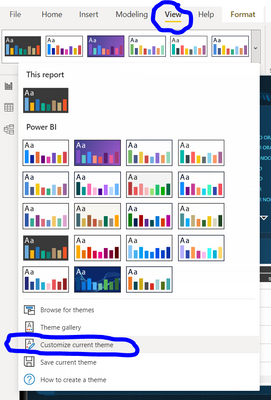
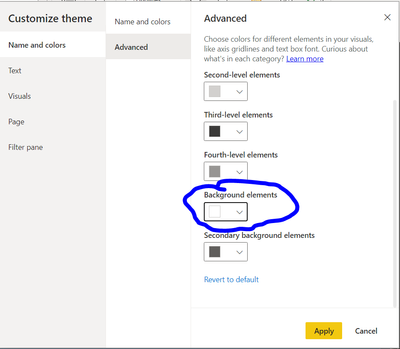
I think I solved the problem by changing the theme 

rosiindahag_0-1630378275432.pngrosiindahag_1-1630378499692.png


Thanks for the help on changing color on the timeline, works perfectly! Is there also a way to change the background color of the category labels (Y-axis)? I tried changing the rest of the theme elements but nothing had an impact on the category labels. There's an option on changing the font color but not the background from what I've found.

v-yingjl
Community Support
Community Support

Hi @Anonymous ,

Please try these solutions to check:

  1. Recerate a Gantt visual to try
  2. Update the Gantt visual to try
  3. Recreate a new .pbix file to try

Best Regards,

Yingjie Li


If this post helps then please consider Accept it as the solution to help the other members find it more quickly.

Helpful resources

Announcements
Power BI DataViz World Championships

Power BI Dataviz World Championships

The Power BI Data Visualization World Championships is back! Get ahead of the game and start preparing now!

November Power BI Update Carousel

Power BI Monthly Update - November 2025

Check out the November 2025 Power BI update to learn about new features.

FabCon Atlanta 2026 carousel

FabCon Atlanta 2026

Join us at FabCon Atlanta, March 16-20, for the ultimate Fabric, Power BI, AI and SQL community-led event. Save $200 with code FABCOMM.