cancel
Showing results for 
Search instead for 
Did you mean: 

The Power BI Data Visualization World Championships is back! Get ahead of the game and start preparing now! Learn more

Reply
Negi1984
Regular Visitor

Power Query Lookup range changed based on Cell value

Hi All,

I have a Master sheet having wk number mentioned in first column. I want to apply vlookup on name based on value mentioned in Wk number column.

For example :- if wk number is less than 26 than vlookup apply from Group 1 sheet and pick the "Current Hrs" value based on Resource Name otherwise from Group 2 sheet.

can anybody suggest me , how dynamically we can change the lookup table and pick the value.

Below is the sample data.

https://1drv.ms/x/s!Ap80Ku6M2Tw5gTyVsOwG-9-qNL-2

Regards,
Rajender

1 ACCEPTED SOLUTION
v-yulgu-msft
Microsoft Employee
Microsoft Employee

Hi @Negi1984,


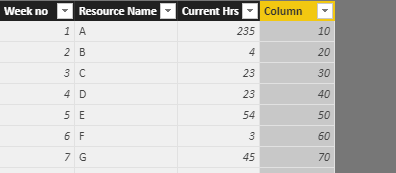
It would be much easier to achieve that via DAX. Please new a calculated column in Master sheet:

Column =
IF (
    'Master Sheet'[Week no] < 26,
    LOOKUPVALUE (
        Group1[Current Hrs],
        Group1[Resource Name], 'Master Sheet'[Resource Name]
    ),
    LOOKUPVALUE (
        Group2[Current Hrs],
        Group2[Resource Name], 'Master Sheet'[Resource Name]
    )
)

1.PNG


However, if you want to do that via Power Query, you may need to create a custom VLOOKUP function.


Best regards,

Yuliana Gu

Community Support Team _ Yuliana Gu
If this post helps, then please consider Accept it as the solution to help the other members find it more quickly.

View solution in original post

2 REPLIES 2
v-yulgu-msft
Microsoft Employee
Microsoft Employee

Hi @Negi1984,


It would be much easier to achieve that via DAX. Please new a calculated column in Master sheet:

Column =
IF (
    'Master Sheet'[Week no] < 26,
    LOOKUPVALUE (
        Group1[Current Hrs],
        Group1[Resource Name], 'Master Sheet'[Resource Name]
    ),
    LOOKUPVALUE (
        Group2[Current Hrs],
        Group2[Resource Name], 'Master Sheet'[Resource Name]
    )
)

1.PNG


However, if you want to do that via Power Query, you may need to create a custom VLOOKUP function.


Best regards,

Yuliana Gu

Community Support Team _ Yuliana Gu
If this post helps, then please consider Accept it as the solution to help the other members find it more quickly.

Thanks a lot Yuliana for your valuable support.

Helpful resources

Announcements
Power BI DataViz World Championships

Power BI Dataviz World Championships

The Power BI Data Visualization World Championships is back! Get ahead of the game and start preparing now!

December 2025 Power BI Update Carousel

Power BI Monthly Update - December 2025

Check out the December 2025 Power BI Holiday Recap!

FabCon Atlanta 2026 carousel

FabCon Atlanta 2026

Join us at FabCon Atlanta, March 16-20, for the ultimate Fabric, Power BI, AI and SQL community-led event. Save $200 with code FABCOMM.

Top Solution Authors