Join us at FabCon Atlanta from March 16 - 20, 2026, for the ultimate Fabric, Power BI, AI and SQL community-led event. Save $200 with code FABCOMM.
Register now!The Power BI Data Visualization World Championships is back! Get ahead of the game and start preparing now! Learn more
Hi,
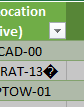
How do I remove this character as I already tried Transform > Clean but it didn't help:
In Power Query, it shows like this:
If loaded into Excel, it looks like this:
Solved! Go to Solution.
@ovetteabejuela,
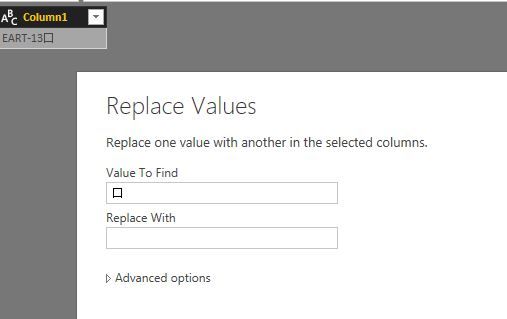
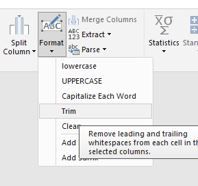
Right click on your column and select "Replace Values" to replace this character with space, then trim your column.
Regards,
Lydia
Hi,
I have a similar problem, but the non-printable character is just behaving as a space ' ' when using find and replace. Trying to replace it just replaces spaces, leaving it unchanged. Is there any other way to find and replace these non-printable characters?
@ovetteabejuela,
Right click on your column and select "Replace Values" to replace this character with space, then trim your column.
Regards,
Lydia
Yes, actually that worked, I just never thought PQ is capable of recognizing non-print characters in the Replace... method.
The Power BI Data Visualization World Championships is back! Get ahead of the game and start preparing now!
| User | Count |
|---|---|
| 39 | |
| 38 | |
| 38 | |
| 28 | |
| 27 |
| User | Count |
|---|---|
| 124 | |
| 88 | |
| 73 | |
| 66 | |
| 65 |