Join us at FabCon Atlanta from March 16 - 20, 2026, for the ultimate Fabric, Power BI, AI and SQL community-led event. Save $200 with code FABCOMM.
Register now!The Power BI Data Visualization World Championships is back! It's time to submit your entry. Live now!
Good Morning, Community:
I have this table, which contains demand for specific items, on a given location and a given date:
| Date | Product ID | Location ID | Demand (Qty) |
| 01-01-2018 | a | 3 | 4 |
| 01-02-2018 | b | 1 | 30 |
| 01-03-2018 | c | 4 | 7 |
| 01-04-2018 | e | 3 | 10 |
| 01-05-2018 | d | 3 | 17 |
| 01-06-2018 | a | 3 | 19 |
| 01-07-2018 | b | 1 | 44 |
| 01-08-2018 | c | 3 | 23 |
Assuming the demand is already grouped (Sum) by Date, Product ID and Location ID, is there a way of generating several queries based distinct Product IDs and Location IDs, containing their respective demand?
This how it would look like for product "a" on location "3":
| Date | Product ID | Location ID | Demand (Qty) |
| 01-01-2018 | a | 3 | 4 |
| 01-06-2018 | a | 3 | 19 |
Thanks in advance.
Solved! Go to Solution.
Hi @Anonymous,
This is easy to do with DAX. But if you'd like the Power Query solution, please refer to the following steps.
1. Create a function.
(ProductID as text, LocationID as number) as table=>
let
result = Table.SelectRows(Table1, each [Product ID] = ProductID and [Location ID] = LocationID)
in
result
2. Invoke the function with parameters.
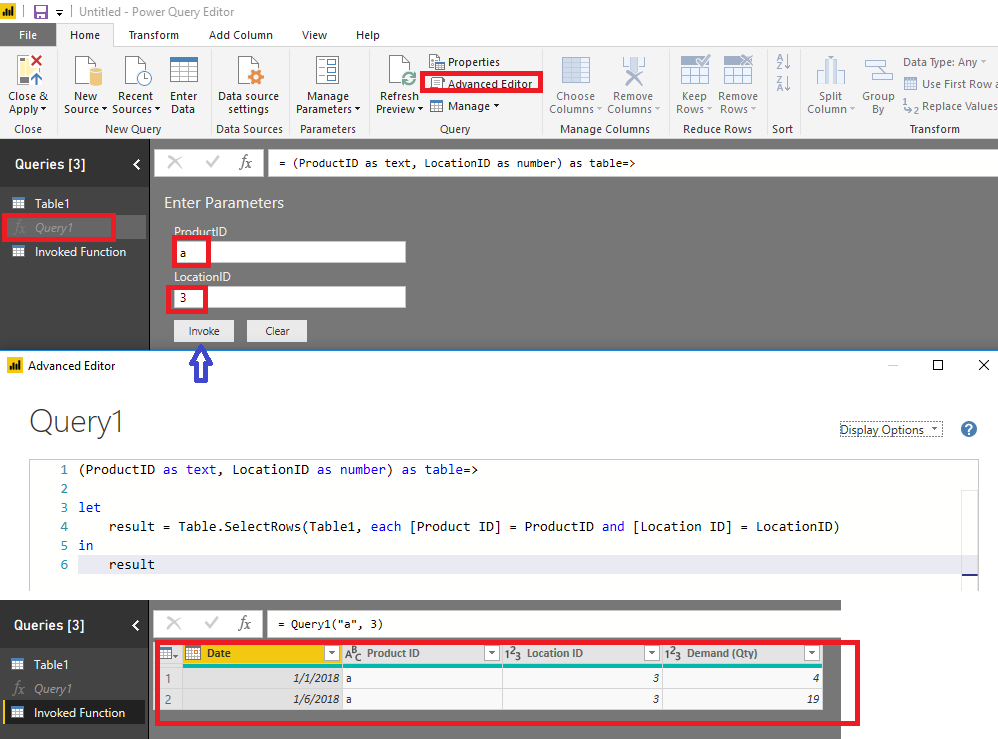
Please download the demo in the attachment.
Best Regards,
Dale
Hi @Anonymous,
This is easy to do with DAX. But if you'd like the Power Query solution, please refer to the following steps.
1. Create a function.
(ProductID as text, LocationID as number) as table=>
let
result = Table.SelectRows(Table1, each [Product ID] = ProductID and [Location ID] = LocationID)
in
result
2. Invoke the function with parameters.
Please download the demo in the attachment.
Best Regards,
Dale
| User | Count |
|---|---|
| 51 | |
| 38 | |
| 33 | |
| 22 | |
| 19 |
| User | Count |
|---|---|
| 136 | |
| 101 | |
| 58 | |
| 36 | |
| 35 |